An EZVIZ PoE camera (models like the H4 PoE, H5 PoE, and H8c PoE) gets both power and network connection through a single Ethernet cable, so there is no separate power brick to run outdoors. Follow each step in order to get it recording, and check the troubleshooting steps near the bottom if a camera will not come online.
| Power Standard | 802.3af PoE (single Ethernet cable) |
| Common Models | H4 PoE, H5 PoE, H8c PoE |
| Max Cable Run | 100 meters from PoE source |
| Local Storage | microSD up to 512GB, or NVR hard drive |
| Weather Rating | IP67 on most outdoor models |
| App / Platform | EZVIZ app or compatible PoE NVR |
| Third-Party NVR Support | Limited, via ONVIF |
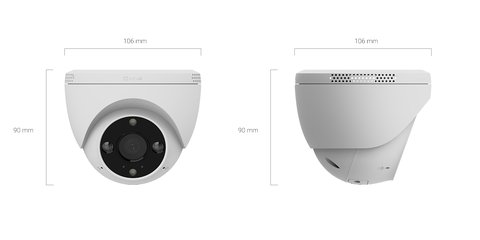
Confirm Your PoE Switch or Injector Supports the Camera’s Power Draw (most common install blocker)
EZVIZ PoE cameras generally need an 802.3af-compliant PoE switch or injector. Cheap unmanaged switches sometimes advertise PoE but cannot sustain the wattage a camera with IR lights and a heater needs in cold weather, causing random reboots.
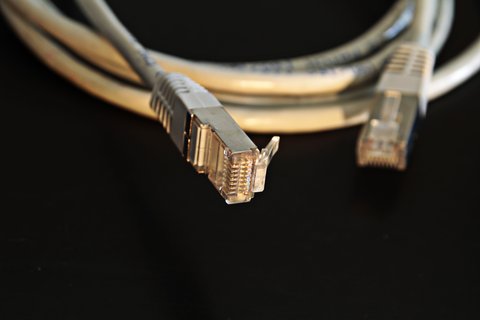
Run and Terminate the Ethernet Cable
Use Cat5e or Cat6 cable rated for outdoor/direct burial if the run goes outside, since standard indoor cable degrades quickly with UV and moisture exposure. Keep total cable length under 100 meters from the PoE switch, which is the standard Ethernet distance limit before signal quality drops.
Mount the Camera and Connect Power
Once plugged into the PoE switch port, the camera should power on within a few seconds — look for the status LED to confirm. Mount at a height and angle that avoids direct sunlight hitting the lens, which can wash out footage during the day.
- Point the camera slightly downward to reduce sky glare in the frame
- Keep the lens away from spiderweb-prone corners, since webs trigger constant false motion alerts
- Route the cable so water cannot pool at the entry gland
Add the Camera to the EZVIZ App or Your NVR
PoE cameras can be added directly to the EZVIZ app for standalone use, or to a compatible EZVIZ PoE NVR for a multi-camera system. In the app, tap Add Device and scan the QR code printed on the camera body or its packaging.

Set Up Storage
Most EZVIZ PoE cameras record to a microSD card (up to 512GB) inserted directly into the camera, to a connected NVR’s hard drive, or to EZVIZ CloudPlay. Format any new microSD card through the app before recording starts.
I wired up an H4 PoE for a small warehouse last year using an 8-port PoE switch that turned out to be underpowered once three cameras were drawing full IR power at night. Swapping to a proper 802.3af/at switch with enough total wattage budget fixed the intermittent reboots immediately.
Per Tomas B., who is a Security Systems Installer at a commercial contractor, “PoE cameras save so much time on install day compared to running separate power — the main thing clients get wrong is buying an underpowered switch to save a few dollars.”
Common PoE Camera Problems
- Camera reboots randomly, especially at night: your PoE switch or injector likely cannot sustain full IR/heater load — check its per-port wattage rating
- Camera does not power on at all: test the Ethernet cable and port with a different device to rule out a bad cable or dead switch port
- App shows camera offline despite a solid physical connection: check whether the switch or NVR itself has internet access, since remote viewing needs it even though local PoE power does not
- Video is choppy or drops frames: cable runs near AC power lines or over 100 meters can introduce interference — use shielded cable for long or noisy runs
For exact PoE wattage requirements per model, check EZVIZ’s official support site and search your specific camera model’s datasheet. EZVIZ’s H4 PoE product page is a good reference point since it lists the full spec sheet including IP67 rating and night vision range.
Frequently Asked Questions
Do EZVIZ PoE cameras need a separate power supply?
No, that is the point of PoE — a single Ethernet cable carries both data and power from a compatible switch or injector.
Can I use a regular network switch instead of a PoE switch?
No, a non-PoE switch will not power the camera at all. You need either a PoE-capable switch or a separate PoE injector between the camera and a regular switch.
How far can the Ethernet cable run?
Standard Ethernet distance limits apply, so keep runs under 100 meters from the PoE source for reliable power and signal.
Do EZVIZ PoE cameras work with third-party NVRs?
Some models support ONVIF for limited third-party NVR compatibility, but full feature support (AI detection, two-way audio) usually requires EZVIZ’s own app or NVR.
Are EZVIZ PoE cameras weatherproof?
Most outdoor PoE models carry an IP67 rating, meaning they handle rain and dust well, but always check the specific model’s rating before an outdoor install.
Keeping Firmware and Motion Alerts Under Control
Once a PoE camera is online, most of the ongoing maintenance is really just firmware and notification tuning rather than anything physical. EZVIZ pushes firmware updates through the app periodically, and it is worth checking for one right after a fresh install since cameras often ship with an older build than what is currently available. Updating early can resolve bugs with night vision switching or app connectivity before they become a recurring annoyance.
- Open the camera’s device page in the EZVIZ app and check the firmware version under device settings
- Apply updates over a stable network connection, and avoid power-cycling the camera mid-update since PoE cameras have no battery backup to ride out a brief interruption
- After updating, re-check motion detection zones, since some firmware updates reset custom detection areas back to the default full-frame setting
Notification fatigue is the other common complaint with outdoor PoE cameras. Passing cars, tree branches, and shifting shadows can trigger dozens of alerts a day if motion sensitivity is left at its default level. Narrowing the detection zone to just the driveway, entry, or walkway you actually care about, and lowering sensitivity a notch or two, usually cuts false alerts dramatically without missing real activity. Human detection modes, where supported on the model, also help filter out non-person motion like blowing leaves or passing headlights.
Conclusion
EZVIZ PoE cameras simplify installation a lot compared to running separate power, but the PoE switch or injector quality matters more than people expect — an underpowered one causes reboots that look like a faulty camera. Plan your cable run and power budget before mounting anything, and most setups go smoothly from there. Once running, PoE cameras tend to be more stable long-term than WiFi models since they are not affected by wireless interference.
Ryan
Computer Science grad · long-time hands-on troubleshooter