Comparing the HiBy R4 and the HiBy M500 comes with an upfront caveat worth stating plainly: right now, “M500” means the Hatsune Miku collaboration edition specifically. HiBy has said a plain standard M500 will arrive later, but as of now the Miku edition is the only way to get this particular hardware generation from HiBy at this tier, so if the anime theming is not your thing, that is worth knowing before you compare specs.
Platform generation: newer chips versus proven hardware
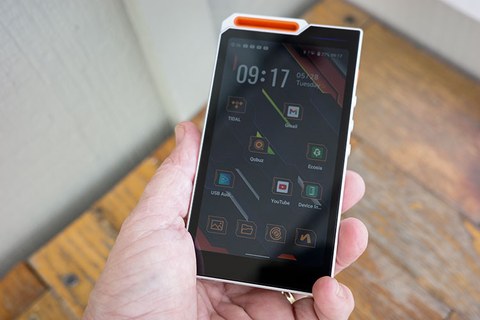
The M500 runs on a genuinely newer platform than the R4. It uses a Snapdragon 680 chipset with 4GB of RAM and 64GB of storage on an Android 14-based build of HiByOS, alongside dual CS43198 DAC chips. The R4, by comparison, runs Android 12 on a Snapdragon 665 chip with 3GB RAM and 32GB storage, paired with its quad ES9018C2M DAC configuration.
That puts the two players in an interesting spot: the R4 actually has the more elaborate DAC architecture on paper, with four dedicated conversion chips versus the M500’s two, plus a higher PCM ceiling at 32-bit/768kHz against the newer player’s dual-DAC setup. The M500 counters with a newer Android version, more RAM and storage, and a 4G nano-SIM option for cellular data streaming that the R4 does not offer at all.
Price and what you are actually paying for
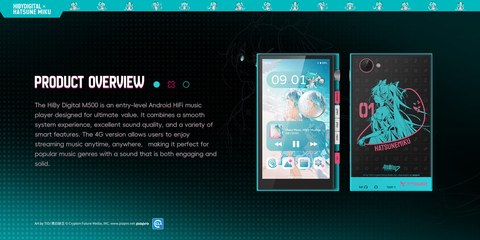
The M500 starts at $319 for the WiFi-only version, or $349 with the 4G nano-SIM option, putting it meaningfully above the R4’s $250 asking price. Some of that premium buys the newer chipset generation and 4G connectivity, but a real portion of it goes toward the Hatsune Miku collaboration itself — HiBy has been explicit that this is a genuine hardware and software collaboration with custom theming throughout the interface, not just a printed sticker on an otherwise standard device.
That distinction matters for setting expectations. If you specifically want the Miku aesthetic and the custom software touches that come with it, the collaboration pricing makes sense. If you are shopping purely on hardware value and have no interest in the theming, the R4’s system-wide MSEB and PEQ tuning tools at a meaningfully lower price make it the more straightforward buy.
Side-by-side spec comparison
| Spec | HiBy R4 | HiBy M500 (Miku edition) |
|---|---|---|
| Price | $250 | $319 WiFi-only / $349 with 4G |
| DAC | Quad ES9018C2M | Dual CS43198 |
| Chipset | Snapdragon 665 | Snapdragon 680 |
| RAM/storage | 3GB/32GB | 4GB/64GB |
| OS | Android 12 | Android 14-based HiByOS |
| PCM/DSD | 32-bit/768kHz, DSD256 | Native DSD256 (dual DAC path) |
| Amp output | Up to 525mW Class A | Fully balanced 4.4mm + 3.5mm SE |
| Cellular | No | 4G nano-SIM option |
| System-wide EQ | Yes, MSEB and PEQ | HiByOS-native tuning |
| Theming | Standard HiBy design | Hatsune Miku collaboration hardware and software |
Output stage and everyday driveability
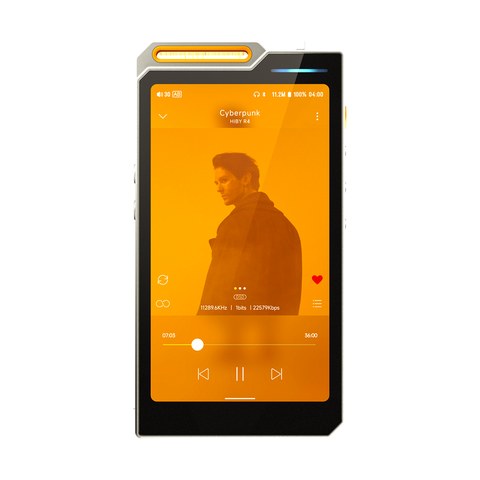
Both players offer a fully balanced signal path, with a 4.4mm balanced output alongside a 3.5mm single-ended jack, so most existing IEM and headphone cables carry over regardless of which one ends up in your pocket. The R4’s Class A amplification stage, rated up to 525mW, gives it a real edge driving harder-to-power full-size headphones, something worth weighing if your collection leans toward over-ears rather than IEMs.
The M500’s dual CS43198 DAC setup pairs with its newer Snapdragon 680 platform for a smoother overall software experience, particularly when juggling background streaming apps or a 4G connection alongside local playback. In short bursts of side-by-side listening, the differences came down more to headphone pairing and personal taste than either player having an obvious technical advantage in day-to-day use.
Storage headroom is also worth factoring in. The M500’s 64GB of internal storage versus the R4’s 32GB matters more if you keep a large lossless or DSD library on the device itself rather than relying on a microSD card or streaming.
Which one fits your priorities
- Choose the R4 if you want the more elaborate quad-DAC hardware, system-wide EQ tools, and a lower price, and the collaboration theming does not appeal to you.
- Choose the M500 if you want the newest platform HiBy currently offers at this tier, the 4G streaming option, and you are drawn to (or at least indifferent to) the Miku collaboration design.
I would not call either one a straightforward upgrade over the other. The R4 wins on raw DAC complexity and value, the M500 wins on platform freshness and cellular flexibility, and the collaboration theming is either a genuine draw or a non-factor depending entirely on your taste. Coverage from Head-Fi’s community thread and Headfonia’s review both frame the M500 as much about the collaboration experience as the underlying hardware, which lines up with how it comes across in person.
Common Problems and Fixes for Both Players
- Problem: Bluetooth or WiFi connection drops intermittently. Fix: Update to the latest HiByOS build on either device first — connectivity stability is one of the most frequently patched areas in HiBy’s firmware releases, and an outdated build is the usual culprit.
- Problem: The M500’s 4G SIM will not register on a network. Fix: Confirm your carrier supports nano-SIM data-only plans and that the SIM is activated for data before assuming a hardware fault; not every regional carrier supports the bands used by the M500’s modem.
- Problem: Balanced output sounds noticeably quieter than expected. Fix: Double check you are actually using the 4.4mm balanced jack with a genuinely balanced cable, not a 4.4mm-terminated cable wired single-ended, since a mismatched cable will not deliver full balanced power on either player.
- Problem: Storage fills up faster than expected on the R4’s 32GB model. Fix: Move lossless and DSD files to a microSD card rather than keeping everything on internal storage, and check background app caches under storage settings, which can quietly consume several gigabytes over time.
- Problem: MSEB or PEQ settings on the R4 do not seem to apply. Fix: Confirm the EQ toggle is enabled system-wide in settings rather than just configured within the app, since HiBy’s EQ engine needs the master switch active before per-app profiles take effect.
Frequently asked questions
Will HiBy release a standard, non-Miku M500?
HiBy has indicated a standard edition is planned for later, but as of now the Hatsune Miku collaboration is the only shipping version of the M500.
Is the M500’s dual-DAC setup worse than the R4’s quad-DAC?
Not necessarily worse, just different in architecture; the R4 has more discrete conversion chips, while the M500 pairs its dual CS43198 chips with a newer overall platform.
Is the 4G option on the M500 worth the extra $30?
If you want to stream without relying on WiFi, the nano-SIM support is a genuine convenience; if you always have WiFi available, the base WiFi-only version covers the same core experience for less.
Does the Miku theming affect the sound in any way?
No, the collaboration affects the exterior design and some software UI elements; the underlying dual CS43198 DAC hardware and audio performance are unaffected by the theming.
Handling both back to back, I came away thinking the R4 remains the smarter buy for anyone strictly chasing hardware value, while the M500 is really its own thing built around a specific aesthetic and platform generation. Neither purchase decision should be made purely by spec sheet; sit with what each player is actually trying to be before deciding where your money goes.
If you are still undecided, it helps to think about upgrade timing too. Since HiBy has already signaled a standard M500 is coming later, buyers who want the newer platform without the collaboration theming may prefer to wait, while anyone who wants the Miku edition specifically should not expect that particular design to stick around indefinitely once a standard version ships.
I tend to hold off on limited collaboration hardware until I know how a platform performs long-term, and weighing the R4 against the M500 here was as much about generation timing as it was about specs.