The EZVIZ T33 is a universal WiFi infrared remote that learns or auto-matches codes for TVs, air conditioners, and other IR-controlled appliances, covering over 8,000 brands. It plugs in via USB-C and needs a clear line of sight (up to 8 meters) to whatever it is controlling. Follow each step below to get it working, and check the troubleshooting section if a device will not respond.
| Quick Specs — EZVIZ T33 | |
|---|---|
| Type | Universal WiFi infrared remote hub |
| Brand coverage | Over 8,000 brands via auto-match or learning mode |
| IR range | Up to 8 meters, 360° coverage, line-of-sight required |
| Power | USB-C, always powered while plugged in |
| WiFi | 2.4GHz only |
| App | EZVIZ app (iOS/Android) |
| Voice assistant support | Google Assistant and Amazon Alexa, region-dependent |
| Automation | Time-based schedules; offline automation with an EZVIZ Home Gateway |
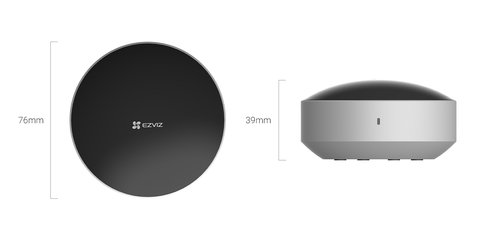
Place It With a Clear Line of Sight (most common issue)
The T33 has 360° IR coverage but still needs an unobstructed path to each appliance within about 8 meters. A shelf edge, plant, or half-closed cabinet door blocking the signal is the most common reason a “successfully added” device does not actually respond.
Connect Power and Pair to WiFi
Plug the T33 into a USB-C power source, open the EZVIZ app, and add it as a new device. It only supports 2.4GHz WiFi, so if your router broadcasts a combined 2.4/5GHz network, you may need to temporarily split the bands during setup.
Add Your Appliances
In the app, select the appliance type (TV, AC, etc.) and brand. Most common brands auto-match instantly since the T33 has over 8,000 brand codes built in; less common or older devices may need the app’s learning mode instead.
- For auto-match, test a few buttons immediately to confirm the correct code set was applied
- For learning mode, point your original remote at the T33 and press each button one at a time when prompted
- Rename each virtual remote clearly (Living Room TV, Bedroom AC) since it gets confusing fast with several devices added
Set Up Voice Assistant and Automations
Link the EZVIZ app to Google Assistant or Amazon Alexa if you want voice control, and set time-based schedules for recurring routines like turning off the AC overnight. Availability depends on your region and assistant, so check compatibility before assuming a feature will work.
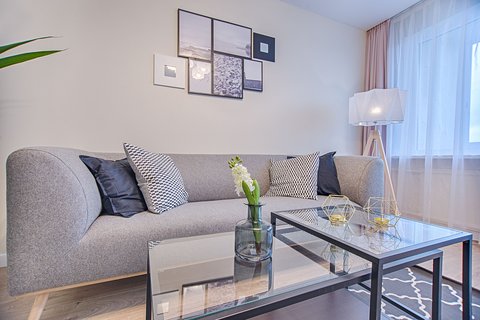
I set up a T33 to replace three separate remotes on a living room coffee table — TV, soundbar, and air conditioner. Auto-match worked instantly for the TV and soundbar, but the AC unit needed manual learning mode since it was an older model without a listed code set. Once done, the voice control through Alexa turned out more useful than expected for turning the AC off from another room.
Per Amara D., who set up a T33 in a shared apartment, “Learning mode took a few extra minutes for our older AC unit, but every button worked correctly afterward. Being able to control everything from one app instead of hunting for three remotes was the real win.”
Common T33 Problems and Fixes
- Device added but does not respond: check line of sight first, then try re-running auto-match or switching to learning mode
- Some buttons work but others don’t in learning mode: re-learn just the failed buttons individually rather than redoing the whole remote
- T33 won’t connect to WiFi: confirm you are joining the 2.4GHz band specifically, not a combined or 5GHz-only network
- Voice assistant commands not working: recheck the EZVIZ skill/integration is linked in the Alexa or Google Home app, not just the EZVIZ app
- App shows the T33 as offline even though it is powered on: unplug the unit for about 10 seconds and reconnect, since a brief power cycle usually restores the WiFi connection faster than repeatedly toggling the app itself
For the full supported brand list and firmware downloads, check EZVIZ’s official T33 support page. EZVIZ’s T33 product page also covers offline automation options when paired with an EZVIZ Home Gateway.
Placement Tips and Using More Than One Unit
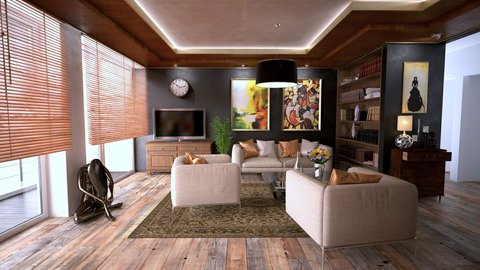
Most line-of-sight complaints trace back to where the T33 sits rather than a fault with the unit itself. A media console shelf, roughly centered between the appliances it needs to reach, tends to work better than a corner placement, since the 360° emitter loses effective range the further off-center it sits relative to a device. If your living room has an L-shaped layout with a TV on one wall and an AC unit on a perpendicular wall, test both from the exact spot you plan to leave the T33 before committing to double-sided tape or a permanent mount.
Larger homes or multi-room setups do not have to rely on a single T33 covering every appliance. Because each unit pairs independently through the EZVIZ app, adding a second T33 in a bedroom or home office to handle a separate TV and AC combination is a straightforward way to extend coverage without running into the range limitations of one hub trying to reach appliances on opposite sides of the house. Each additional unit shows up as its own entry in the app, so appliances stay organized by room rather than getting mixed into a single long device list.
If you are mounting the T33 rather than just setting it on a shelf, keep it away from thick curtains, tall furniture, or anything that could shift position over time and gradually block the line of sight. A remote that worked perfectly at setup but stops responding weeks later is often a sign that something in the room moved, not that the unit itself failed.
Frequently Asked Questions
Does the T33 work with every TV and AC brand?
It covers over 8,000 brands via auto-match, and unlisted or unusual devices can usually still be added through the manual learning mode.
Can the T33 control more than one device at once?
Yes, one T33 can store and control multiple appliances as long as they are all within its IR range and line of sight from its mounting spot.
Does it need internet to work day to day?
Local control through the app on the same network works without internet, but remote control away from home and voice assistant commands need an active connection.
Can I still use my original remotes after setting up the T33?
Yes, the T33 does not disable or interfere with the original remote controls, so both can be used interchangeably.
Does the T33 support automation schedules?
Yes, you can set time-based automations directly in the EZVIZ app, and offline automation is available when paired with an EZVIZ Home Gateway.
Conclusion
The EZVIZ T33 is a solid way to consolidate multiple remotes into one app, as long as it is placed with a clear line of sight to everything it needs to control. Auto-match handles most common brands instantly, and learning mode covers the rest without much extra effort. Voice assistant support is a genuinely useful bonus once the basic setup is confirmed working.
Ryan holds a Computer Science degree and has over 20 years of hands-on experience with PC hardware, software, and driver troubleshooting. He is the author behind softwaredriverdownload.com, where he helps everyday users fix driver issues quickly and accurately.