The DDPAI N1 Dual and 70mai A200 are both entry-level dual-channel dash cams aimed at drivers who want basic front and rear coverage without paying for 4K or advanced parking radar. Here’s how they compare on the specs that actually matter at this price tier.
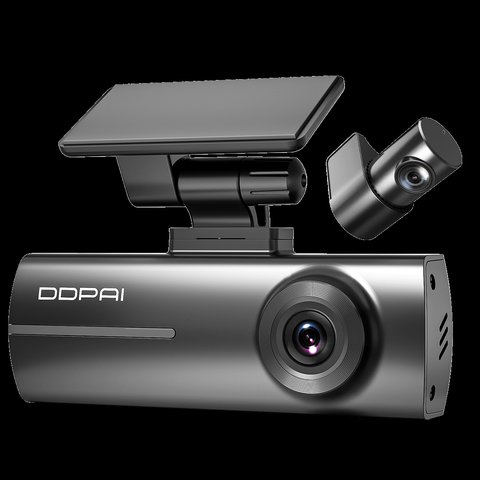
Spec Comparison
| Spec | DDPAI N1 Dual | 70mai A200 |
|---|---|---|
| Front resolution | 1296P | 1080P@60fps |
| Rear resolution | 1080P | 1080P |
| Field of view | 135° front, 125° rear | Not disclosed |
| WiFi | 2.4GHz | 2.4GHz |
| Parking mode | 24H with G-sensor | 24H smart surveillance |
| Storage | Up to 256GB | Check current listing |
Resolution: A Modest but Real Difference
The N1 Dual’s 1296P front resolution edges out the A200’s standard 1080P in raw detail, though the A200 counters with 60fps recording that captures motion more smoothly than the N1 Dual’s likely 30fps front channel. For most everyday incident documentation, both resolutions are perfectly usable; the practical difference shows up mainly when zooming into a distant license plate after the fact, where the N1 Dual’s extra resolution gives slightly more legible detail.
Neither camera is going to compete with flagship 4K models at this price point, and that’s the right expectation to have — these are budget-tier cameras meant to provide basic coverage rather than pixel-perfect footage.
Build and Brand Ecosystem Considerations
Beyond the spec sheet, it’s worth considering which brand ecosystem you’re buying into. DDPAI’s app and firmware update cadence has generally been more consistent in recent years, while 70mai offers a broader accessory catalog across its dash cam lineup for rear cameras and mounts. If you think you might upgrade to a higher-tier model from the same brand later, this ecosystem continuity is worth factoring in beyond just the specs of these two entry-level units.
At this budget tier, don’t overthink the resolution gap between the two — the more meaningful differentiator is usually app reliability and how easy each brand makes it to actually pull footage when you need it, since a camera that captured perfect video but is a hassle to retrieve clips from defeats the purpose.
Installation Basics
- Mount the front unit behind the rearview mirror using the included adhesive bracket
- Route the rear camera cable along the headliner to the back window
- Connect power via the 12V adapter, or a hardwire kit for full 24H parking mode
- Pair the respective companion app over WiFi to configure settings
For full specs, see DDPAI’s official N1 Dual product page and 70mai’s official A200 product page.
Troubleshooting Common Issues
Budget dual-channel dash cams like these two are generally reliable, but a handful of setup and daily-use snags come up often enough to cover here.
- Camera won’t connect to WiFi during setup: Both units need 2.4GHz WiFi specifically; if your router broadcasts a combined or 5GHz-only network, create a separate 2.4GHz SSID temporarily for pairing.
- Rear camera footage is choppy or drops frames: Check the cable routing for tight bends or pinch points near the doors, and reseat the connector at both ends — a loose rear-camera connection is the most common cause on both models.
- MicroSD card errors or “format required” messages: Use a card rated for continuous/endurance recording rather than a standard consumer card, and reformat it in-app every few months rather than waiting for corruption to force the issue.
- Parking mode drains the car battery faster than expected: Lower the motion-detection sensitivity or shorten the recording buffer window in the app, and consider a hardwire kit with a low-voltage cutoff instead of running off the 12V socket for extended parking mode.
- App shows the camera as offline even though it’s recording fine: This is usually a background app permission issue on newer phone OS versions; make sure the app has background WiFi and location permissions enabled, since both are required for live view even though it seems unrelated.
Setting Realistic Expectations at This Price Point
Both of these cameras are positioned as budget entry points rather than feature-rich flagships, which means neither includes extras like ADAS collision warnings, radar-based parking monitoring, or 4K resolution. That’s fine for their intended buyer — someone who mainly wants documented evidence in the event of an accident rather than an all-in-one smart driving assistant. If you find yourself wanting those extra features after using either camera for a while, both brands offer clear upgrade paths within their own product lines rather than requiring you to switch ecosystems entirely.
Long-Term Durability at This Price Point
Budget-tier dash cams generally have a shorter realistic service life than flagship models, since cost-cutting often shows up in component quality over years of heat cycling rather than in initial performance. Neither the N1 Dual nor the A200 is marketed with the same durability emphasis as higher-tier models, so it’s reasonable to expect a few years of reliable service from either rather than treating them as long-term investments the way you might a flagship camera.
Frequently Asked Questions
Which is better for a first-time dash cam buyer?
Both are reasonable entry points; the N1 Dual’s slightly higher resolution gives it a small edge for buyers who want the sharpest footage possible at this price tier.
Does either include GPS?
Check the current listing for each, as GPS inclusion can vary by regional bundle at this budget tier.
Is 60fps recording actually noticeable on the A200?
Yes, smoother motion is noticeable during fast driving or when reviewing footage frame by frame, even at standard 1080P resolution.
Can I add a larger card to either camera later?
Yes, both support swapping in a larger microSD card up to their stated maximum without needing to replace the camera.
Which one has better customer support?
Support quality can vary by region and retailer for both brands; check recent reviews specific to your country before deciding based on this alone.
Is a hardwire kit included with either?
This varies by bundle; check your specific listing to confirm whether a hardwire kit is included or needs to be purchased separately.
Do both models come with a suction or adhesive mount?
Most entry-level dual-channel dash cams in this price range use adhesive mounts rather than suction; check your specific listing to confirm.
Is footage from either camera admissible as insurance evidence?
Timestamped dash cam footage from either camera is generally accepted by insurers, though acceptance policies vary by provider and region.
Does either support night vision enhancement?
Both include basic night recording capability suited to their price tier, though neither matches the low-light performance of higher-end models.
Is either one compatible with a dash cam power hub?
Both use a standard USB-C or mini-USB power connection compatible with most aftermarket power hub accessories.
Where Budget Cameras Cut Corners
It’s worth understanding where entry-level dash cams typically save cost, since it helps set realistic expectations. Common areas include simpler ADAS algorithms with more false positives, smaller included storage cards requiring an early upgrade, and less refined low-light processing compared to mid-tier models. Neither the N1 Dual nor the A200 hides these tradeoffs — they’re simply the nature of the budget tier, and both are honest about delivering solid basics rather than premium extras.
Conclusion
Both the N1 Dual and A200 deliver reasonable basic dual-channel coverage for their price point, without major weaknesses on either side. Pick based on resolution priority (N1 Dual) versus frame rate smoothness (A200), or simply whichever brand’s app experience you find easier to use during a quick test at the store.
Ryan
CS graduate · tests every camera and driver he writes about firsthand