The Cayin RU7 is not a typical dongle DAC underneath its curved aluminum shell, and that shows up in how you should actually set it up and use it. I put together this manual-style walkthrough after living with one for a while, covering what is in the box, how the outputs work, and the details that the printed manual glosses over.
| Quick Specs — Cayin RU7 | |
|---|---|
| Type | USB-C dongle DAC/amp |
| DAC architecture | 1-Bit Discrete Resistor Network, derived from Cayin’s flagship N7 player |
| Size/weight | 66 x 24 x 12mm, 25g |
| Outputs | 3.5mm single-ended up to 160mW at 32ohm; 4.4mm balanced up to 400mW at 32ohm; fixed line-out mode |
| Format support | PCM up to 384kHz, native DSD64 through DSD256, All-to-DSD upsampling |
| Volume control | 100-step discrete resistor-relay attenuator |
| Price tier | $290 MSRP |
| Compatibility | Android, iOS, Windows, and Mac via USB-C, generally no dedicated driver needed for playback |
What’s in the Box
A new RU7 ships with:
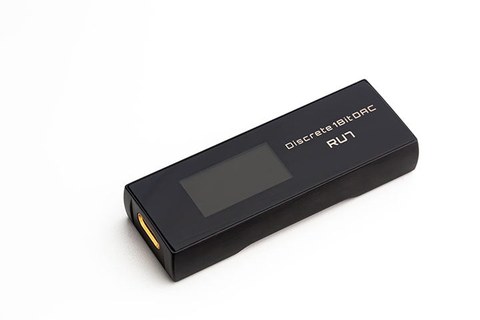
- The RU7 unit itself (66 x 24 x 12mm, 25g)
- A printed manual
- A USB-C to USB-C cable
- A USB-A to USB-C adapter for older laptops and desktops
The whole package is small enough to fit in a jacket pocket alongside a phone, which is the point — this is meant to travel.
The DAC Architecture, in Plain Language
Instead of a conventional delta-sigma DAC chip, the RU7 uses a 1-Bit Discrete Resistor Network DAC, a design that trickled down from Cayin’s flagship N7 digital audio player. Rather than relying on an off-the-shelf chip to do the digital-to-analog conversion, Cayin builds the conversion stage out of discrete resistors. Headfonia’s review and Headfonics’ review both go deep on why this matters for sound character, but the practical takeaway is that it is a genuinely different approach from most dongles in this price range, not just a marketing label.
Setting Up the Outputs
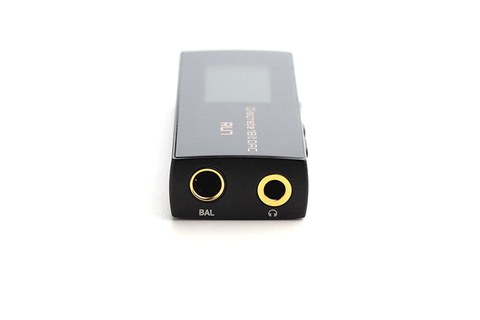
The RU7 has two headphone outputs and a fixed line-out mode, all accessible from the same physical jacks:
- 3.5mm single-ended: up to 160mW at 32ohm — suitable for easier-to-drive IEMs and portable headphones.
- 4.4mm balanced: up to 400mW at 32ohm — noticeably more headroom for harder-to-drive gear.
- Fixed-voltage line-out: switch into this mode when feeding an external amp or powered speakers, so you are not accidentally sending amplified signal into equipment that already has its own gain stage.
Format support tops out at PCM 384kHz and native DSD64 through DSD256, and there’s an “All-to-DSD” mode that upsamples incoming PCM to DSD on the fly if you prefer that presentation.
Understanding the Volume Control
This is the part of the manual most people skip, and it is worth reading. The RU7’s volume is not a simple digital potentiometer. It is a discrete resistor-network design offering 100 volume steps spread across 3 resistor segments, controlled through switching relays rather than a basic digital pot. The reason this matters in practice: at low volumes, cheaper digital volume controls often introduce channel imbalance, where one ear sounds slightly louder than the other. A discrete resistor-relay approach is built specifically to avoid that at low listening levels, which is exactly where sensitive in-ear monitors tend to live. If you use efficient IEMs at low volume settings, this is the feature actually protecting your channel balance.
Reading the OLED Display
The RU7’s 128 x 64 OLED screen cycles through sample rate, format, volume level, and gain mode. There is no touchscreen here — navigation happens through the tactile buttons on the body, which give a clear, deliberate click rather than the mushy feel some dongles have. Combined with the gold-plated connectors, the build quality is clearly aimed at people who will be plugging and unplugging this daily for years.
Connecting to Different Devices
- Phone (Android/iOS): connect via the included USB-C to USB-C cable. Most modern phones will recognize the RU7 as an external audio device automatically.
- Windows or Mac laptop: use the USB-C to USB-C cable directly, or the included USB-A adapter for older ports. No dedicated driver install should be necessary for basic playback on either platform.
- Older USB-A devices: use the bundled adapter rather than a generic third-party one, since cable quality can affect how reliably the connection is recognized.
Everyday Care Tips
A few small habits go a long way with a device this compact:
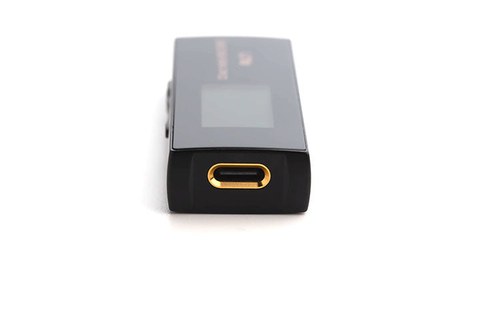
- Handle the USB-C connector gently. It is the single point of physical stress every time you plug in, so avoid twisting or bending it at an angle.
- Keep the OLED screen away from prolonged direct sunlight when not in use, mostly to avoid unnecessary wear on the display over time.
- Store it in a case or pouch rather than loose in a bag pocket with keys or coins, since the gold-plated jacks can pick up scratches from contact with harder objects.
- Check for firmware updates periodically through Cayin’s official channels, since dongle DACs at this level do occasionally receive driver and firmware refinements after launch.
Troubleshooting Setup and Connection Issues
The RU7 is largely plug-and-play, but a few recognition and output issues come up often enough to cover directly.
- Device not recognized on Windows: try a different USB-C port and cable first, since the bundled cable and adapter are matched to the RU7’s power draw and a lower-quality third-party cable can cause intermittent recognition.
- Phone shows a “not enough power” or similar warning: some phones limit output current for accessories; using the RU7’s included cable directly rather than through another adapter or hub usually resolves this.
- No sound from the balanced 4.4mm output: confirm the connector is fully seated, and check that you have not left the unit in fixed line-out mode, which outputs a constant signal level rather than routing through the volume-controlled headphone stage.
- OLED screen shows the wrong sample rate: this is usually the source app defaulting to a lower rate rather than a fault with the RU7; check your music app or OS sound settings for an exclusive or bit-perfect output mode.
- Alternate connection if the USB-C to USB-C cable is unavailable: the bundled USB-A to USB-C adapter lets you connect to older laptops and desktops without a USB-C port, so you are not limited to only USB-C hosts.
- Recognition issues on an older Windows PC: checking for updated drivers on Cayin’s own site, as noted in the FAQ below, resolves most edge cases that plug-and-play detection does not cover automatically.
Frequently Asked Questions
Does the Cayin RU7 need a driver on Windows?
For standard playback, no dedicated driver installation is typically required, though checking for the latest drivers on Cayin’s own site is worth doing if you run into recognition issues.
What is the difference between the two headphone outputs?
The 3.5mm single-ended jack outputs up to 160mW at 32ohm, while the 4.4mm balanced jack pushes up to 400mW at 32ohm, giving noticeably more power and typically better channel separation for demanding headphones.
Can I use the RU7 as a line-out source for a separate amp?
Yes. Switch it into the fixed-voltage line-out mode so it hands off a clean, unamplified signal rather than double-amplifying through both the RU7 and your external amp.
Why does the volume control matter so much on this device?
Because the RU7 uses a discrete resistor-network volume design with 100 steps and switching relays rather than a basic digital pot, which is specifically meant to reduce channel imbalance at low listening volumes — a common weak point for sensitive IEMs on cheaper dongles.
Final Thoughts
The RU7 rewards actually reading through what it can do rather than treating it like a plug-and-play dongle. The 1-Bit DAC architecture, the relay-based volume control, and the dual output jacks are all genuinely purposeful design choices rather than spec-sheet padding. For deeper technical breakdowns and measurements, Twister6’s review is a solid next stop.
This guide was put together by Ryan, a CS degree holder and long-time PC and audio hardware hobbyist, based on hands-on use of the device.
Quick Reference
- DAC: 1-Bit Discrete Resistor Network
- Size: 66 x 24 x 12mm, 25g
- 3.5mm SE: up to 160mW @ 32ohm
- 4.4mm balanced: up to 400mW @ 32ohm
- PCM up to 384kHz
- Native DSD64–DSD256
- All-to-DSD upsampling mode
- 100-step relay volume control
- Price: $290 MSRP