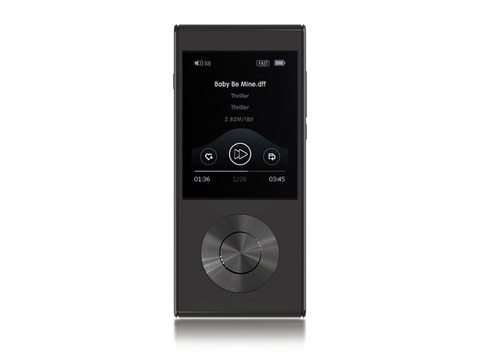
Dedicated music players have become a bit of a niche product these days, since most people just stream from a phone, but there is still a strong case for a device whose only job is playing local files well. The Aune M1P is the third generation of Aune’s M1 line of portable players, and it leans hard into that single-purpose philosophy rather than trying to be a phone replacement with a music app bolted on.
| Model | Aune M1P |
| DAC | ES9038Q2M |
| Decoding | Up to 32-bit/768kHz PCM, native DSD512 |
| Outputs | 3.5mm single-ended, 2.5mm and 4.4mm balanced |
| THD+N / SNR | -112dB / 102dB |
| Battery life | About six hours continuous playback |
| Connectivity | Bluetooth 5.0, aptX / aptX HD |
| Price tier | Roughly $400 |
Specs that matter
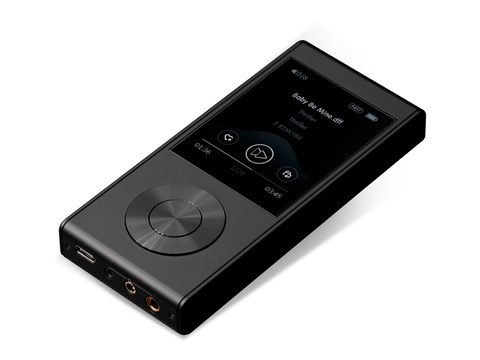
The M1P supports playback up to 32-bit/768kHz PCM and native DSD512, with four independent amplifier circuits feeding its three output options: a single-ended 3.5mm jack alongside balanced 2.5mm and 4.4mm outputs. After several rounds of internal optimization, Aune quotes THD+N at -112dB and a signal-to-noise ratio of 102dB, both of which are strong figures for a device in this price bracket, sitting around $400.
- Model / applies to: Aune M1P (third generation of Aune’s M1 DAP line)
- DAC: ES9038Q2M, hardware decoding up to 32-bit/768kHz PCM and native DSD512
- Outputs: single-ended 3.5mm plus balanced 2.5mm and 4.4mm, four independent amp circuits
- THD+N / SNR: -112dB and 102dB respectively
- Battery life: around six hours of continuous playback in moderate use
- Connectivity: Bluetooth 5.0 with aptX and aptX HD codec support
- Price tier: roughly $400, mid-range for a dedicated DAP
- Compatibility: works as a standalone local-file player; no gain switch, so output level is fixed for any connected headphone or IEM
One notable omission is that there are no adjustable gain settings, so what you get out of the box is what you get regardless of whether you are running sensitive IEMs or harder-to-drive full-size headphones. In practice this was not a major issue with most of the gear I paired it with, but it is worth knowing in advance if you plan to use it with something unusually hard to drive.
Using it day to day
The direction buttons respond quickly and the on-device search through a large local library is fast enough that it never felt like a chore to find a specific track. The interface itself is simple, more utilitarian than flashy, but everything is where you expect it to be after a few minutes of familiarization. A full walkthrough of the menu system and firmware options is available from Audio Glorye.
Battery life sits around six hours in moderate use, which is on the lower end for this category. If you are used to DAPs that stretch to ten or more hours, the M1P will require more frequent charging, so plan around that if you are taking it on longer trips without easy access to a charger.
Sound quality
This is where the M1P really earns its price. It has a sound signature close to neutral, which means it does not impose much of its own character on whatever headphones or IEMs you connect. That transparency is exactly what you want in a source component, since it lets your headphones do the tonal shaping rather than fighting against a colored source. Detail retrieval and resolution are genuinely impressive for the price, with enough drive to push moderately demanding gear closer to its potential than most similarly priced competitors manage.
Compared with using a phone and a dongle, the difference is noticeable, particularly in how composed the sound stays at higher volumes and with more complex, densely layered tracks. It is not going to compete with flagship DAPs costing several times as much, but for the money it punches well above its price class.
Who this is for
The M1P makes the most sense for someone who already has a curated local music library and wants a dedicated device to enjoy it away from a phone’s distractions and battery drain. If your listening is entirely streaming-based, a DAP like this makes less sense, since you would need to manage downloaded files rather than just opening an app. But for the growing group of people rediscovering the value of owning their music library outright, it is a strong option.
Getting a music library ready for it
If you are coming to a dedicated DAP for the first time after years of streaming, the biggest adjustment is not the hardware but the workflow. You will need to actually manage files rather than relying on an app to fetch them for you, which means ripping CDs, buying lossless downloads, or exporting playlists from a streaming service in a format the M1P can read. It sounds like a step backward at first, but the payoff is a listening experience free of compression artifacts and streaming-service loudness normalization, which can genuinely change how familiar tracks sound.
- Organize your library with consistent folder and tag structures before loading it onto the device
- Use lossless formats like FLAC where possible to take advantage of the M1P’s resolution
- Keep a backup of your library on a computer, since a DAP is not the ideal single point of storage
Firmware and long-term support
One underrated aspect of buying a dedicated player from an established brand like Aune is ongoing firmware support. Updates over the life of a product can add file format compatibility, fix UI quirks, or improve battery management, and checking a manufacturer’s download page periodically is worth building into your routine rather than assuming the device will stay static from the day you buy it. Aune has a track record of iterating on its DAP firmware based on user feedback from its own forums and from Head-Fi threads, which is reassuring if you plan to keep the M1P for several years.
Troubleshooting and practical tips
Most M1P issues that come up in owner forums are workflow problems rather than hardware faults. Here is how to work through the common ones:
- Files won’t play or show up as unsupported: confirm the file is a format the M1P actually decodes (FLAC, WAV, DSD, and common lossy formats), and try re-copying the file, since an interrupted transfer can leave a corrupted file that looks fine in a folder listing.
- Device not recognized when connected to a computer: try a different USB-C cable, since some cables are charge-only and carry no data line, and confirm the M1P is set to the correct USB mode (mass storage vs. DAC mode) if it has a toggle for that.
- Bluetooth pairing fails or drops: forget the device on both ends and re-pair from scratch, and keep the M1P within a few meters of the headphones during the initial pairing handshake.
- Output feels too quiet or too loud for your headphones: since there is no gain switch, the only real adjustment path is picking a different output jack (single-ended vs. balanced) or, for very hard-to-drive headphones, pairing the M1P with a separate desktop amp instead of expecting it to cover every use case alone.
- Alternate path if firmware or menus seem stuck: a manual reset (holding the power button for an extended press, per Aune’s documentation) resolves most frozen-menu situations without needing a full factory reset.
FAQ
Does the Aune M1P have adjustable gain settings?
No, there is no gain switch, so output level is fixed regardless of what headphones you connect.
What is the battery life like?
Around six hours in moderate use, which is shorter than many competing DAPs.
What output options does it have?
Single-ended 3.5mm plus balanced 2.5mm and 4.4mm outputs, each fed by its own dedicated amplifier circuit.
Does it support Bluetooth?
Yes, for wireless headphones or Bluetooth DAC/amp accessories.
What formats and resolutions does it support?
Up to 32-bit/768kHz PCM and native DSD512.
Final thoughts
The M1P is a good reminder that a dedicated device built around a single job can still outperform a general-purpose phone at that specific task, even years into the smartphone era. It will not replace your phone for casual convenience, and it should not try to, but as a focused music player for anyone who has actually built a local collection worth listening to properly, it remains a worthwhile purchase.
I still keep a shelf of lossless files I have collected over the years, and devices like the M1P are exactly why I have never fully given up on dedicated players despite how good phones have gotten.