The X3ii built on the original X3 with an all-metal body, DSD128 playback, Bluetooth, USB DAC mode, and OTG support, all while staying at a genuinely entry-level price. Because it has been on the market for a while, xDuoo has released a handful of official stock firmware revisions, most commonly referenced as versions 1.2 and 1.3, alongside community-maintained custom firmware for owners who want extra tweaks beyond the stock experience.
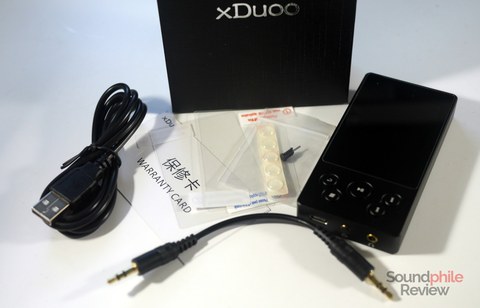
| Spec | xDuoo X3ii |
|---|---|
| Body material | All-metal |
| High-res playback | DSD128 |
| Connectivity | Bluetooth, USB DAC mode, OTG support |
| Latest stock firmware | Version 1.3 (also referenced: 1.2) |
| Update method | FAT32 microSD card, System Update menu |
| Custom firmware | Community-maintained, .upt file via SD card |
Stock Firmware Versions
Official firmware for the X3ii has iterated gradually rather than through dramatic overhauls, generally focusing on stability improvements, minor bug fixes, and small usability tweaks to the menu system. If you bought your unit used or it has sat in a drawer for a long stretch, checking your current version against the latest official release is worth doing before assuming any playback quirk is a hardware fault.
Updating to the Latest Stock Firmware
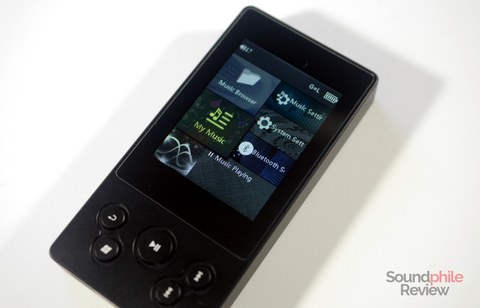
- Confirm your current firmware version through the System Settings menu on the X3ii.
- Download the latest official firmware file matching your exact model from xDuoo’s resources page.
- Copy the firmware file to the root of a FAT32-formatted microSD card.
- Insert the card and enter System Settings, then select System Update.
- Confirm the update when prompted; the player will flash automatically and restart when finished.
- Return to System Settings afterward to verify the new version number is showing correctly.
Custom Firmware: A Community Alternative
Beyond xDuoo’s own releases, a community-maintained custom firmware project exists for the X3ii, distributed as an update.upt file placed on an SD card the same way official updates are applied. This custom firmware, documented publicly on GitHub, offers tweaks some owners prefer over the stock experience. It is worth being cautious here: custom firmware is not officially supported by xDuoo, carries a higher risk of issues if something goes wrong mid-flash, and should only be attempted if you are comfortable troubleshooting a bricked device without manufacturer support.
Precautions Worth Repeating
- Only update firmware if you have a specific reason to, such as chasing a documented bug fix
- Always back up your music library and settings before starting
- Keep the device charged throughout the entire flashing process
- Understand that firmware updates, official or custom, always carry some risk of bricking the device if interrupted
Why the X3ii Still Has an Active Community
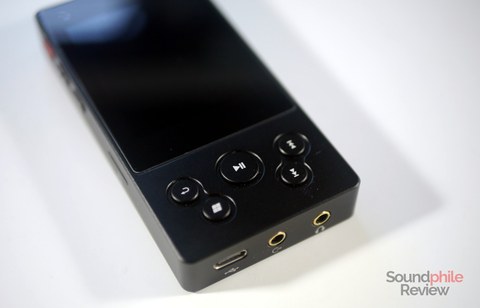
Despite being an older, entry-level player at this point, the X3ii retains a surprisingly active following among budget-audio enthusiasts, which is exactly why community firmware projects still exist for it. Part of the appeal is the combination of an all-metal body, respectable DSD128 support, and genuine USB DAC functionality at a price point where many competitors cut corners on build quality or feature set. That ongoing community interest is also why checking firmware status on a used or long-owned X3ii is worth doing, since fixes and refinements have continued to appear well after its initial release window.
Deciding Between Stock and Custom Firmware
For most owners, sticking with official stock firmware is the sensible default, since it comes with whatever limited manufacturer support still exists and carries less risk during the update process itself. Custom firmware makes more sense for owners who have already exhausted what stock firmware offers and specifically want a documented tweak that the community version provides, and who are comfortable accepting the added risk that comes with an unofficial release. If you are unsure which category you fall into, staying on the latest official version is the safer starting point.
Verifying a Successful Update
After any firmware flash, official or custom, take a few minutes to actually use the player rather than just checking the version number and moving on. Play a few tracks across different formats, including at least one DSD file if your library includes them, test Bluetooth pairing if you use it, and confirm USB DAC mode still connects properly to a computer if that feature matters to you. Catching an issue immediately after updating, while the previous firmware file is still fresh in your downloads folder, is much easier than discovering a problem weeks later and trying to remember which version you were running before.
Where to Find Reliable Firmware Sources
Because the X3ii has been out for a long time, firmware files for it circulate on a number of third-party mirror sites in addition to xDuoo’s own resources page. When downloading from a mirror rather than the manufacturer directly, take a moment to compare file size and version labeling against what is listed on official channels, since mismatched or renamed files are an easy way to end up flashing the wrong firmware onto your player.
Long-Term Ownership Notes
Owners who have kept an X3ii for several years generally report that the hardware itself, particularly the metal chassis and buttons, holds up well with regular use. The main wear point tends to be the headphone jack after extensive daily plugging and unplugging, which is true of nearly any portable audio device rather than something specific to this model. Combined with an active firmware update history, the X3ii remains a reasonable secondhand purchase for anyone looking for a budget DAP without buying new.
Troubleshooting Firmware Update Problems
Update won’t start or the player doesn’t detect the firmware file
Confirm the SD card is formatted as FAT32 rather than exFAT or NTFS, since the X3ii’s updater generally only recognizes FAT32 media. Also make sure the firmware file sits at the root of the card rather than inside a subfolder, and that the filename hasn’t been altered from what it was downloaded as.
Player freezes or won’t boot after flashing
Don’t panic and don’t remove the battery-free device from power if it’s plugged in. Leave it alone for several minutes first, since some flashes take longer to complete than the screen indicates. If it’s still unresponsive after that, try a forced restart using the device’s reset pinhole, then attempt the update again with a freshly downloaded firmware file in case the original download was corrupted.
Firmware update fails partway through
A partial flash is one of the more serious things that can happen to the X3ii, so keep the device charged above 50% before starting any update to reduce the risk of this happening in the first place. If a flash does fail partway, retry with the same official firmware file before trying anything else, since a repeat attempt often completes successfully once the card is reseated.
Bluetooth or USB DAC mode stops working after an update
This is occasionally reported after jumping between stock and custom firmware. Reflashing the official stock firmware cleanly, rather than updating on top of an existing custom build, usually restores normal Bluetooth and USB DAC behavior.
Custom firmware won’t revert back to stock
Download a fresh copy of the official firmware directly from xDuoo’s resources page rather than reusing an older file you may already have, then flash it the same way as any other update. Confirm in the release notes for your specific custom firmware version whether a full revert is documented as supported before assuming it will work identically to a normal stock-to-stock update.
FAQ
What is the difference between firmware 1.2 and 1.3 on the X3ii?
Both are incremental stability and bug-fix releases rather than major feature additions, so check the specific release notes for your version if you want the exact change list.
Is custom firmware safe to install?
It carries more risk than official firmware since it is not manufacturer-supported, and should only be attempted by users comfortable with the possibility of needing to recover a bricked device on their own.
Does the X3ii support USB DAC mode out of the box?
Yes, USB DAC functionality is part of the X3ii’s standard feature set rather than something added later through firmware.
Can I switch back to stock firmware after installing a custom version?
In most cases yes, by flashing the official firmware file the same way, though always verify this is supported for your specific custom firmware version before assuming it is reversible.
Where can I check my current firmware version?
The System Settings or System Information menu on the X3ii displays the currently installed firmware version.
The X3ii has quietly stuck around as one of the more dependable budget DAPs, and I still recommend checking its firmware status whenever I get asked about used units.