If you have spent any time reading about budget planar-magnetic in-ear monitors, the Shuoer S12 has probably come up. It was one of the first affordable IEMs to bring a planar magnetic driver to a wide audience, and years later it still gets recommended as a value pick. The catch is that the stock tuning is not for everyone. Straight out of the box the S12 leans bass-forward with a treble region that can feel peaky or uneven depending on your ear tips and source. This guide walks through how to EQ the original Shuoer S12 (not the newer LETSHUOER S12 Pro) so it sounds more balanced without losing what makes a planar driver special in the first place.
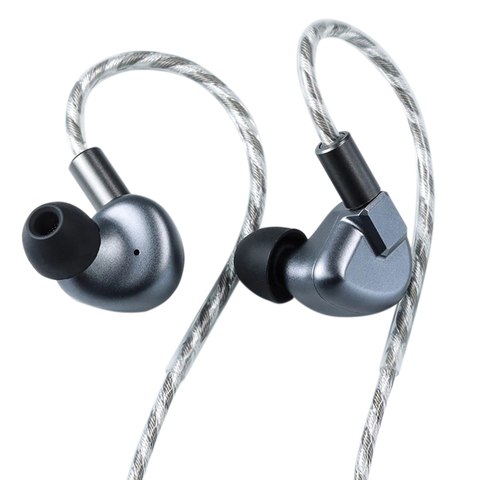
Shuoer S12 Quick Facts
| Driver type | Single planar magnetic driver, roughly 14.5mm class |
| Stock tuning | Bass-forward with a known treble peak around 6-9kHz |
| Impedance/sensitivity | Easy to drive from phones and dongles, no dedicated amp required |
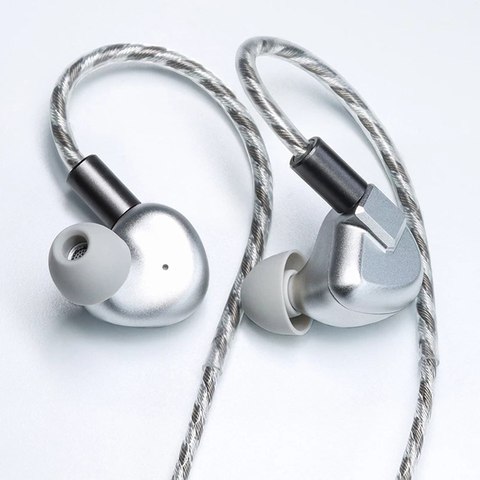
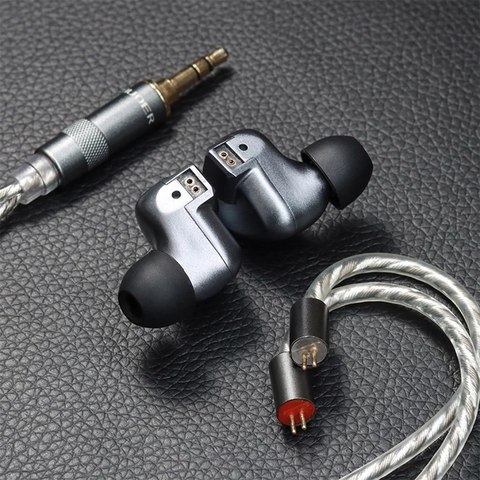
| Cable | Detachable braided cable, standard 2-pin connectors |
| Recommended EQ target | Harman-leaning AutoEQ in-ear target curve |
| Successor model | LETSHUOER S12 Pro (14.8mm driver, refined stock tuning) |
A quick note on naming: S12 vs S12 Pro
Shuoer as a brand rebranded to LETSHUOER a while back, and the company also refreshed its lineup. The S12 Pro (14.8mm planar driver) is the newer, refined successor to the original S12 covered in this post, and we’ve already covered that model in detail in our S12 Pro review. The original S12 uses a planar driver from the same general lineage — around the 14.5mm class — but with an older tuning philosophy that the S12 Pro was specifically built to correct. If you already own an S12 Pro, this EQ guide is not for you; it’s aimed at owners of the original S12, which is still floating around at a very approachable price and still worth owning if you’re willing to tune it.
Why the stock S12 needs EQ in the first place
Planar drivers move differently than the dynamic drivers found in most budget IEMs. They tend to have faster transient response, which is part of why planar bass can sound so controlled and “fast.” But that same speed can create a strange side effect: the attack of a bass note (the slam) can separate audibly from its sustain (the body), especially if you EQ by ear without paying attention to what you are actually hearing. Cut the wrong band and the S12 can go from punchy to thin very quickly, even though a graph might say the frequency response looks more “correct.”
On top of that, the S12’s treble has a well-known peak that shows up in most independent measurements. It is not subtle. Left alone, it can push sibilant consonants and cymbals into fatiguing territory on brighter recordings. The good news is that both issues respond well to EQ if you approach them with a light touch instead of trying to force the frequency response into a perfectly flat line.
Step-by-step EQ approach
- Start from a Harman-leaning target, not a flat one. AutoEQ profiles built around the Harman IE 2019 target are a reasonable starting point for the S12 and are freely available online. Load one into your player’s parametric EQ (Wavelet on Android, EqualizerAPO with Peace GUI on Windows, or the built-in EQ on players like HiBy and FiiO apps) and listen before making further changes.
- Address the treble peak with a broad, moderate cut. Most measurements place the S12’s main treble spike somewhere in the 6-9kHz region. A wide bell filter with roughly -3 to -5dB gain and a moderate Q (around 1.0-1.5) usually tames the harshness without making the sound dull. Avoid narrow, deep notches here — they tend to create an artificial “scooped” quality.
- Leave the sub-bass and mid-bass shelf mostly alone. This is the part people get wrong most often. Because the planar driver’s bass has that fast, detached quality, cutting midbass by ear can leave the low end feeling hollow even when a measurement graph suggests it’s “too much.” If anything, apply a very small cut (1-2dB) below 100Hz rather than the larger cuts you’d use on a bass-heavy dynamic-driver IEM.
- Check the 2-4kHz presence region. Some AutoEQ profiles will suggest a mild boost here to bring vocals forward. On the S12 this is usually fine to keep, but if vocals start to sound shouty, pull it back by a couple dB rather than removing it completely.
- Re-tip before you re-EQ. Foam tips or wide-bore silicone tips change the treble response noticeably on the S12. If you’re still hearing harshness after EQ, try a different tip before adding more cuts — you may be fighting a seal issue rather than a frequency response issue.
- A/B against the unequalized signal regularly. It’s easy to drift toward an over-processed sound after twenty minutes of tweaking. Bypass the EQ every few minutes to make sure you’re still moving toward “more natural” and not just “different.”
Troubleshooting Common S12 EQ Problems
Even with a good starting profile, a few issues come up often enough with the S12 that it’s worth knowing the fix before assuming your EQ software is broken.
- Bass sounds thin or hollow after EQ: This almost always means you cut too much in the sub-bass or midbass shelf. Undo those cuts first before touching anything else — the planar driver’s bass doesn’t need much correction, and over-cutting here is the single most common mistake people make on this IEM.
- Treble still sounds harsh even after a broad cut: Try widening the Q of your filter rather than deepening the cut. A narrow, deep notch can leave residual harshness right at the edges of the band while making the center sound artificially scooped.
- EQ app won’t apply system-wide on Android: Wavelet requires enabling its accessibility service and, on some phones, disabling battery optimization for the app specifically, or the system will kill the audio processing service in the background.
- Sound changes only in some apps, not others: This usually means the EQ app isn’t hooked into that specific audio stream. On Windows, confirm EqualizerAPO is installed on the correct playback device in Windows’ sound settings, since it needs to be applied per-device.
- Left and right channels sound uneven after EQ: This is more often a seal or tip-fit issue than an EQ problem. Swap tips and reinsert both earpieces before adjusting any filters, since an inconsistent seal affects bass and can masquerade as a channel imbalance.
What to expect after EQ
Done carefully, an EQ’d S12 keeps the things that make planar IEMs appealing — low distortion, fast decay, good separation on busy tracks — while losing most of the harshness that makes long listening sessions tiring. It won’t turn into a S12 Pro; the newer model has genuine hardware and tuning refinements the original can’t replicate through software alone. But for the price most people paid for the original S12, a well-tuned unit is still a legitimately good-sounding IEM, and that’s really the whole point of this exercise.
- Don’t chase a perfectly flat graph — chase what sounds natural to your ears on music you know well.
- Make small changes and listen for at least a full track before adjusting further.
- If your EQ software supports saving presets, save your “before” settings so you can always roll back.
- Cable and tip changes can matter as much as EQ on this particular IEM, so don’t treat software as the only lever you have.
For general background on the AutoEQ project and how Harman-target correction works, the AutoEQ GitHub project is a solid reference, and sites like RTINGS publish measurement methodology that’s useful background reading even if they haven’t measured this specific model.
Frequently asked questions
Does the S12 need an amp? No, it’s easy to drive from phones and dongles. EQ software running on the source matters more than raw power here.
Will EQ fix a bad seal? No. If you’re hearing thin bass or odd treble, try different ear tips before assuming it’s a tuning problem.
Can I use these same settings on the S12 Pro? Not directly. The S12 Pro has a different stock tuning and generally needs less correction, so applying the same aggressive treble cut can make it sound dull.
I’ve spent a fair amount of time going back and forth between stock and EQ’d profiles on a unit like this, and the biggest lesson is patience: the S12 rewards small, deliberate EQ moves far more than big dramatic ones. Give yourself a few listening sessions to dial it in rather than trying to nail it in one sitting.
Written by a long-time PC hardware and audio enthusiast who has been tinkering with budget IEMs and EQ profiles for years as part of covering driver and device compatibility for this site.