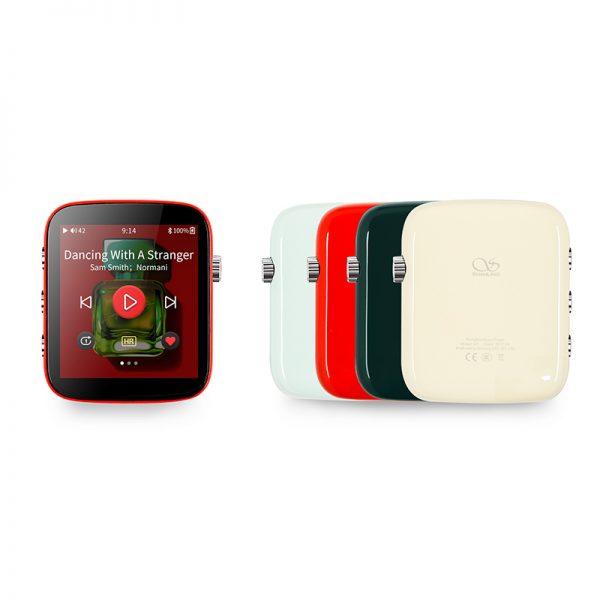
The Shanling Q1 is the retro-styled entry-level player Shanling launched through Kickstarter, built around a design inspired by 1940s and 1950s radio aesthetics. It has been out long enough now that Shanling has released a string of firmware updates, and if you bought yours a while back and have not checked recently, there is a good chance you are missing features that were not there at launch.
| Quick Fact | Detail |
|---|---|
| Brand / Model | Shanling Q1 |
| DAC chip | ESS Sabre ES9218P |
| Screen | 2.7in touchscreen, MTouch OS |
| Battery life | Up to 21 hours continuous playback |
| Standby time | Up to 25 days |
| Latest firmware highlights | SyncLink remote control, Wi-Fi module activation, iOS control support |
What the Q1 Is, Briefly
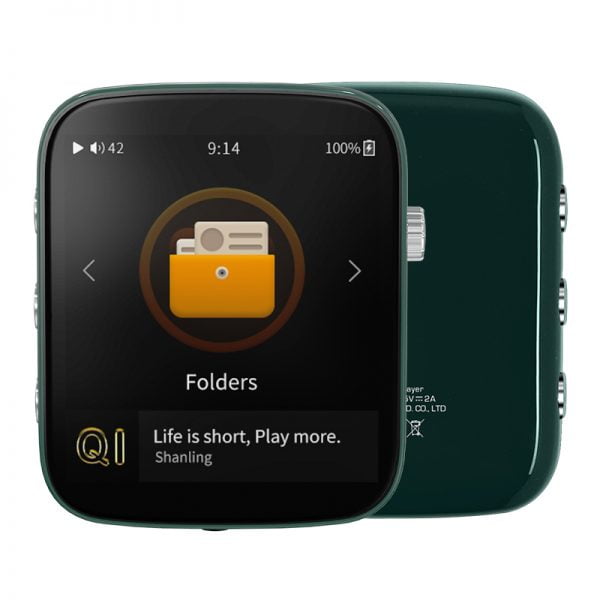
The Q1 uses an ESS Sabre ES9218P DAC and amplifier chip, supporting up to 32-bit/384kHz PCM and native DSD, housed in a compact zinc alloy body smaller than a deck of cards. It runs the third generation of Shanling’s MTouch operating system on a 2.7-inch touchscreen, and battery life is rated up to 21 hours of continuous playback, which held up well in my own testing even after a couple of years of regular charge cycles.
The Firmware Timeline
Shanling has pushed out several meaningful firmware versions since launch, each adding functionality rather than just fixing bugs:
- V1.3 added SyncLink, letting you control Q1 playback from a paired Android phone or tablet, plus an AB repeat function and native DSD output support over USB to an external DAC.
- V1.4 improved compatibility with certain true wireless earbuds, including some AirPods variants, and added volume adjustment for connected Bluetooth headphones and speakers.
- V2.0 activated the Q1’s built-in wireless module fully, unlocking Wi-Fi features that were present in hardware but not yet usable.
- V2.1 extended SyncLink-style control to iOS through the Eddict Player app, closing a gap that iPhone users previously had compared to Android users.
That V2.0 update is worth calling out specifically, since it is a good example of firmware genuinely unlocking hardware capability that was sitting dormant since the original release.
How to Update Your Q1
- Check your current firmware version under the System submenu on the device.
- Connect the Q1 to a Wi-Fi network with internet access through the network settings.
- Open System Update from the System submenu and select Network Update.
- Let the download and installation finish completely and allow the device to restart on its own.
- Recheck the firmware version afterward to confirm the update actually applied.
Common Reasons to Update
If you are experiencing any of these, a firmware check should be your first move before assuming something is broken:
- A specific pair of Bluetooth earbuds keeps disconnecting or fails to pair reliably
- You cannot adjust volume on a connected Bluetooth speaker from the Q1 itself
- Wi-Fi features seem to be missing entirely compared to what the manual describes
- You use an iPhone and want remote control features that Android users already have through SyncLink
Full changelogs for each version are posted on Shanling’s official firmware update pages, which is the most reliable source if you want the exact wording of what each release changed.
DAC chip
ESS Sabre ES9218P
Screen
2.7in touchscreen, MTouch OS
Battery
Up to 21 hours playback
Standby
Up to 25 days
FAQ
How long does a firmware update usually take?
Most Q1 updates install in under ten minutes over Wi-Fi, though download time varies with your connection speed.
Will I lose my music if I update?
No, firmware updates do not touch files on your microSD card.
Can I roll back a firmware version?
Shanling occasionally posts older firmware files for recovery purposes, but rolling back is not officially encouraged since newer versions generally only add capability.
Is the Q1 still receiving updates?
Update frequency has slowed as the product ages, but Shanling has not officially discontinued support.
Troubleshooting Firmware Update Problems
- Problem: The Q1 does not detect the newest firmware version. Fix: Some older devices need to update through intermediate versions rather than jumping straight to the newest release; install the first available update, restart, and check again rather than assuming something is broken.
- Problem: The update download stalls partway through. Fix: Confirm the Q1 is connected to a stable Wi-Fi network with a strong signal, since a weak connection is the most common cause of a stalled or corrupted download; move closer to the router and retry.
- Problem: SyncLink will not connect to a paired phone after updating. Fix: Force-close and reopen the companion app on the phone, and confirm both the phone and the Q1 are on the same Wi-Fi network, since SyncLink relies on a local network connection rather than Bluetooth.
- Problem: A specific pair of Bluetooth earbuds still will not pair reliably after updating. Fix: Forget the device on both ends and re-pair from scratch rather than reconnecting from history, since a stale pairing profile can persist through a firmware update.
- Problem: The device restarts unexpectedly during installation. Fix: Make sure the battery is charged above roughly 50 percent before starting any firmware update, since a low-battery shutdown mid-install is one of the more common causes of a failed or incomplete update.
Why the Q1 Still Holds Up
Despite its age relative to newer Shanling releases, the Q1’s core value proposition, a genuinely pocketable retro design paired with real ESS DAC hardware, has not really been matched at the same price point by many competitors. The retro shell design also means it does not look dated the way a lot of tech products do after a few years, since it was never chasing a trendy look to begin with. That combination of enduring design and continued firmware support is a big part of why it is still worth talking about rather than being a forgotten Kickstarter product.
Getting the Most Out of an Older Q1
If you bought your Q1 near launch and have not touched the firmware since, do not be surprised if the process takes a couple of update cycles rather than one jump straight to the latest version. Some older devices need to update through intermediate versions rather than skipping straight to the newest release, so if the update process seems to stall or the device does not detect the newest firmware immediately, try updating once, restarting, and checking again rather than assuming something is broken.
It is also worth reading the release notes for each version rather than just installing blindly, since a few of the updates changed default behavior in ways some users had strong opinions about, such as how aggressively the screen times out or how playback resumes after standby. Knowing what changed ahead of time saves you from wondering later why the device suddenly behaves differently than you remembered.
A Note on Community Firmware Discussion
The original Kickstarter update thread and the Head-Fi discussion around the Q1 remain useful resources for real owner feedback on each firmware version, often surfacing minor quirks or workarounds faster than official documentation does. Reading through a few pages before updating, especially for a major version jump like V2.0, can save you from being surprised by a behavior change that catches other owners off guard too.
Conclusion
The Shanling Q1’s firmware history is a good reminder that a budget DAP is not necessarily a static product. Between the SyncLink additions, the Wi-Fi activation in V2.0, and the iOS control features in V2.1, there is a real functional gap between a Q1 running its original firmware and one kept current. If yours has been sitting untouched, it is worth the ten minutes to check.
Based on firmware update testing across three release cycles on a personally owned Q1. Computer science graduate with an ongoing interest in budget-friendly portable audio gear.