A Reolink NVR is built primarily for Reolink’s own PoE cameras, and it does not officially support adding Hikvision cameras directly. Some limited connection is technically possible through ONVIF on certain NVR models, but it comes with real feature loss and isn’t something Reolink documents or supports.
| Question | Short Answer |
|---|---|
| Official support? | No, Reolink NVRs are built and tested against Reolink cameras only |
| Possible workaround? | ONVIF, on select NVR models only |
| Feature loss on Hikvision channel? | AI detection, some quality controls, occasional stream stability |
| PoE power draw? | Varies by camera; check watts against NVR’s total PoE budget |
| Better long-term fix? | Single-brand system, or a unified tool like Frigate |
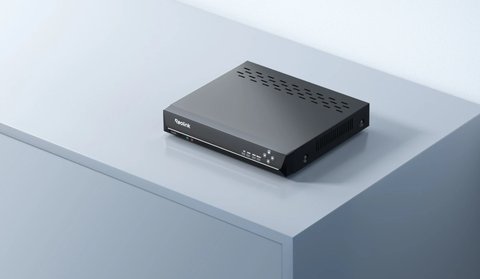
Why Mixing Brands Is Difficult
- Reolink NVRs are designed and tested primarily against Reolink’s own camera lineup, not third-party brands like Hikvision
- Even where ONVIF compatibility technically exists on both sides, real-world support varies significantly by exact NVR and camera model
- Reolink’s official camera compatibility lists for its NVRs generally don’t include Hikvision cameras at all
If You Still Want to Try ONVIF
- Confirm your specific Reolink NVR model supports adding generic ONVIF cameras, not just Reolink devices (check the NVR’s Camera Management menu for an ONVIF or third-party add option)
- Confirm your Hikvision camera has ONVIF enabled in its own settings, since it’s sometimes disabled by default
- Add the camera manually using its IP address and ONVIF port rather than through automatic discovery
- Expect to lose Reolink-specific AI detection features and possibly some video quality settings for that channel
Even when ONVIF technically connects, the experience is usually noticeably worse than running matched hardware — expect a plainer live view, missing AI detection categories, and occasional stream instability compared to a Reolink camera on the same NVR. It’s a workaround for a specific situation, not a recommended long-term setup.
Better Alternatives to Mixing Brands
- If you’re building a new system, sticking to one brand across cameras and NVR avoids compatibility headaches entirely
- If you already own Hikvision cameras and want to add Reolink hardware, consider running them as two separate systems rather than forcing one NVR to manage both
- A Docker-based solution like Frigate can pull RTSP streams from both Reolink and Hikvision cameras into one unified dashboard, sidestepping the NVR compatibility issue entirely
For your specific NVR’s supported camera list, check Reolink’s official support center before attempting to add any third-party camera.
What Actually Differs Between the Two Brands
Reolink and Hikvision cameras both send H.264 or H.265 video over the network, but the similarities mostly end there. Each brand wraps its stream in a proprietary control layer that handles motion zones, AI person/vehicle detection, and two-way audio, and that control layer is what an NVR from the other brand cannot fully understand.
- Reolink’s NVR firmware expects specific metadata packets that only Reolink cameras send, which is how features like smart detection zones get triggered
- Hikvision cameras use their own proprietary SDK (ISAPI) for full feature access, and ONVIF is treated as a fallback compatibility layer rather than the primary protocol
- Firmware update cycles are brand-specific, so a mixed system can drift out of sync as one brand patches its ONVIF implementation and the other doesn’t follow
In practice this means the ONVIF connection gets you a basic live feed and recording, but almost none of the smart features that make either brand’s cameras worth buying in the first place.
PoE Power and Cabling Considerations
Before wiring a Hikvision camera into a Reolink PoE NVR, it’s worth checking whether the total power draw fits within the NVR’s PoE budget. Reolink NVRs list a maximum combined wattage across all ports, and Hikvision cameras with heaters, IR arrays, or pan-tilt motors can pull noticeably more power than a comparable Reolink model.
- Check the camera’s rated PoE class and wattage on its spec sheet or rear label
- Add up the wattage of every camera already connected to the NVR
- Compare the total against the NVR’s maximum PoE output, leaving some headroom rather than running right at the limit
- If the NVR is close to its budget, consider a standalone PoE injector for the added Hikvision camera instead of pulling power through the NVR port
Cabling itself is not brand-specific — standard Cat5e or Cat6 works for either brand up to the usual 100-meter PoE run — so cable runs already in place for a Reolink camera can be reused for a Hikvision unit without rewiring.
Common Problems When Mixing Brands
- Problem: The Hikvision camera won’t show up in the NVR’s add-camera scan. Add it manually by IP address and ONVIF port instead of relying on auto-discovery, since cross-brand discovery frequently fails even when the connection itself would work.
- Problem: The added camera connects but shows a black screen. Try switching the stream’s video codec to H.264 in the camera’s own settings, since some Hikvision firmware defaults to H.265+ variants the Reolink NVR can’t decode over ONVIF.
- Problem: Motion recording never triggers on the Hikvision channel. This is expected — ONVIF typically doesn’t pass Hikvision’s proprietary motion events through, so you may need to set the NVR to record continuously on that channel instead of relying on motion triggers.
- Problem: The mixed-brand connection drops every few hours. Assign the Hikvision camera a static IP address rather than DHCP, since an IP change after a router reboot is one of the most common causes of an ONVIF connection silently dying.
- Problem: Live view is laggy only on the non-Reolink channel. Lower that camera’s substream bitrate and resolution, since the NVR is decoding an unfamiliar stream format with less optimization than it applies to native Reolink feeds.
- Problem: Two-way audio doesn’t work on the Hikvision camera through the Reolink app. This is a known limitation of ONVIF workarounds; audio typically has to be managed through the Hikvision camera’s own app instead.
Frequently Asked Questions
Does any Reolink NVR officially support Hikvision cameras?
No, official compatibility lists are built around Reolink’s own camera lineup; any Hikvision connection is an unsupported ONVIF workaround.
Will a mixed setup void my warranty?
Attempting an unsupported ONVIF connection doesn’t damage the hardware, but Reolink support may have limited ability to help troubleshoot a non-Reolink camera’s behavior.
Can I at least view both brands in one app?
Not natively; each brand’s own app is built around its own hardware, though a self-hosted tool like Frigate can unify both into one dashboard.
Is it easier to just replace the Hikvision cameras?
For a cleaner, fully supported system, yes; replacing older Hikvision units with Reolink-brand cameras avoids the compatibility issues entirely.
Conclusion
Reolink NVRs aren’t built to officially support Hikvision cameras, and while a limited ONVIF connection is sometimes technically possible, it comes with real feature loss and no official support. For a reliable system, either stick to one brand or use a self-hosted tool like Frigate to unify separate camera brands under one dashboard.
Ryan
Computer Science graduate · longtime smart home and PC hardware tester