The Reolink E1 Outdoor and E1 Pro share a similar pan-tilt design and both skip battery power in favor of a plug-in connection, but they’re built for genuinely different environments: the E1 Outdoor is a 4K exterior camera with optical zoom, while the E1 Pro is a 3K indoor camera tuned around baby and room monitoring.
| Quick Fact | Detail |
|---|---|
| Brand | Reolink |
| Models Compared | E1 Outdoor vs E1 Pro |
| Category | Plug-powered pan-tilt Wi-Fi cameras |
| Best For | E1 Outdoor: exterior security; E1 Pro: indoor/baby monitoring |
| Top Resolution | 4K (E1 Outdoor) / 3K (E1 Pro) |
| Weatherproof | E1 Outdoor: yes, IP65; E1 Pro: no, indoor only |
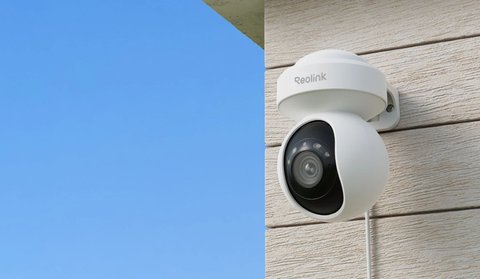
E1 Outdoor vs E1 Pro: Side-by-Side Comparison
| Category | E1 Outdoor | E1 Pro |
|---|---|---|
| Intended use | Outdoor security camera | Indoor camera, often used for baby/room monitoring |
| Resolution | 4K (8MP) | 3K (5MP) |
| Zoom | 3x optical zoom | Digital zoom only |
| Pan / tilt | 355° pan / 50° tilt | 360° pan / 50° tilt, dual-motor design |
| Weatherproofing | IP65, full outdoor rated | Indoor use only, not weatherproof |
| Special features | Dual-color night vision spotlights | Crying detection for baby monitoring use |
| Wi-Fi | Dual-band Wi-Fi 6 | Dual-band Wi-Fi |
| Power | Plug-powered | Plug-powered |
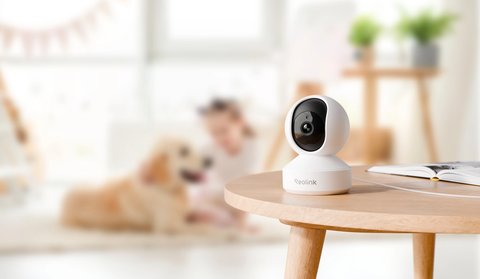
The core pan-tilt hardware and app experience feel similar between the two, but they’re genuinely not interchangeable: the E1 Pro isn’t weatherproof and shouldn’t go outside, and the E1 Outdoor’s zoom and weatherproofing are overkill for a nursery or living room.
When the E1 Outdoor Makes More Sense
- You need a camera that can actually be mounted outside and withstand weather
- 3x optical zoom matters for checking a specific distant point, like a gate
- 4K resolution is worth the higher price over 3K for your use case
When the E1 Pro Makes More Sense
- You need an indoor camera specifically, like for a nursery or living room
- Crying detection is a feature you actually want for baby monitoring
- 3K resolution is plenty for close-range indoor use
Trying to use the E1 Pro outdoors, even under a covered patio, is a common mistake worth avoiding — it isn’t weatherproof, and moisture exposure over time can cause real damage that isn’t covered under warranty for outdoor misuse of an indoor-rated device.
For full specs on both models, see Reolink’s official E1 Outdoor Pro product page and E1 Pro product page.
Setting Up Either Camera
Both cameras go through essentially the same pairing flow in the Reolink app, since they share the same plug-powered pan-tilt platform under the hood. Where they differ is mounting: the E1 Outdoor needs a weatherproof junction box or eave mount and a route for the power cable to reach an outlet, while the E1 Pro usually just sits on a shelf or gets wall-mounted with the included bracket.
- Plug the camera into power and wait for the status light to indicate it’s ready to pair
- Open the Reolink app, tap add device, and scan the QR code on the camera or its packaging
- Join the camera to your Wi-Fi network, using the 2.4GHz band if the 5GHz signal is weak at the install location
- For the E1 Outdoor, route the power cable through a drilled hole or existing conduit rather than leaving it exposed to weather
- For the E1 Pro, position it where the crying-detection microphone has a clear line to the crib or room area you’re monitoring
Troubleshooting Common Issues With the E1 Series
- Problem: The camera won’t complete Wi-Fi pairing. Temporarily disable 5GHz on your router or create a 2.4GHz-only guest network, since both E1 models pair more reliably on the slower band even if they support dual-band afterward.
- Problem: Pan and tilt controls in the app feel laggy or delayed. This is usually a Wi-Fi signal strength issue rather than a hardware fault; move the router closer or add a mesh node near the camera’s location.
- Problem: The E1 Pro’s crying detection triggers false alerts from background noise. Lower the detection sensitivity in the app’s AI settings and narrow the detection zone if the room has a fan, TV, or other consistent ambient sound.
- Problem: The E1 Outdoor’s night vision spotlight doesn’t turn on automatically. Check that the camera is set to auto or smart night vision mode rather than manually forced to infrared-only in the display settings.
- Problem: Optical zoom on the E1 Outdoor looks soft or out of focus at max zoom. Wipe the lens housing, since outdoor units accumulate dust and moisture film over time that’s most noticeable when zoomed in.
- Problem: Either camera keeps disconnecting after a firmware update. Power cycle the camera and, if it persists, remove and re-add the device in the app rather than trying to reconnect the existing entry.
Another practical difference between the two models shows up in how each one handles firmware updates. The E1 Pro tends to receive feature updates a little earlier than the E1 Outdoor, since Reolink typically rolls out software to newer hardware first before backporting compatible changes to older models. This is not a dealbreaker for either camera, but if a specific software feature you have read about is not showing up yet on the E1 Outdoor, checking the changelog inside the app rather than assuming a fault is worth doing before troubleshooting further.
Frequently Asked Questions
Can the E1 Pro be used just inside a window facing outside?
Yes, that’s a common and safe use case since the camera itself stays indoors and dry.
Does the E1 Outdoor work well for indoor use too?
Yes, there’s no issue using it indoors, though its zoom and weatherproofing are unnecessary features for that context.
Which one has better night vision?
The E1 Outdoor’s dual-color spotlight setup generally offers more night vision flexibility, suited to its outdoor role.
Do both require the same app?
Yes, both use the standard Reolink app with the same core navigation and setup process.
Can I add local storage to either camera?
Yes, both models accept a microSD card for local recording, so cloud storage remains entirely optional on either one.
Is the price difference between the two significant?
The E1 Outdoor typically costs more than the E1 Pro, reflecting its higher resolution, optical zoom, and weatherproof housing; check current retailer listings for exact pricing since it shifts over time.
Conclusion
The E1 Outdoor and E1 Pro share a family resemblance in pan-tilt design but are built for different rooms in your life, literally — one for outside, one for inside. Match the choice to where the camera will actually live rather than picking based on resolution alone.
Ryan
CS graduate · tests every camera and driver he writes about firsthand