RadioMaster’s AX12 is a genuinely different kind of radio controller: instead of a small telemetry screen bolted onto a standard transmitter, it puts a full 5.5-inch Android touchscreen front and center, running RadioMaster’s own Android-based operating system alongside real ExpressLRS radio hardware. I spent time with one to figure out what that combination is actually like to use day to day, beyond the spec sheet.
Key Specs
- 5.5-inch HD IPS touchscreen, 1280 x 720 resolution, 1000 nits brightness
- Runs RadioMasterOS on Android 9.0 with Google Play certification
- Full APK sideloading support for ground station and utility apps
- Octa-core processor, 4GB RAM, 64GB internal storage
- Full 16-channel ExpressLRS support with adjustable dual rates and custom curves
- X5 Hall-effect gimbals with contactless sensors
- HDMI input for viewing digital FPV video directly on the built-in screen
- Dual 21700 battery system totaling roughly 10,000mAh capacity
- Price: Around $270
- Compatibility: Works with any ExpressLRS-compatible receiver; APKs from Google Play or sideloaded install like a standard Android 9.0 device
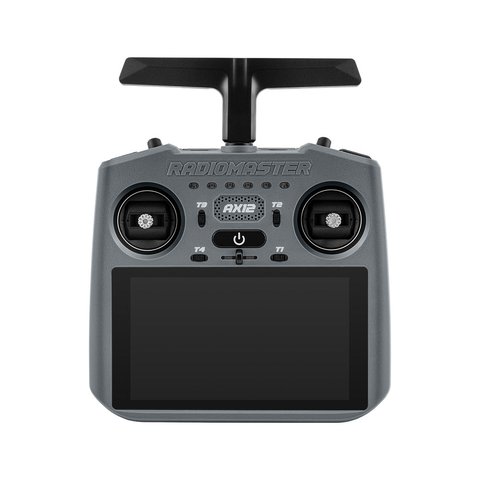
Why RadioMaster Built an Android Radio
The pitch behind the AX12 is combining two things pilots normally carry separately: a dedicated RC transmitter and a phone or tablet running ground station, mapping, or telemetry apps. By running actual Android with Google Play certification, the AX12 can install compatible APKs directly, meaning a rover builder running a mission-planning app or an FPV pilot using a video receiver app doesn’t need a second device strapped to their transmitter anymore.
- Ground station and mapping software for rovers, boats, and long-range aircraft
- Digital FPV apps that can take advantage of the HDMI input
- Standard Android utility apps like note-taking or logging tools
- Telemetry and configuration tools normally run on a companion phone
Setting It Up
- Charge both 21700 cells fully before first use
- Complete the initial Android setup screens like any new Android device
- Sign into Google Play if you want to install apps directly rather than sideloading
- Open RadioMasterOS’s model setup screen to configure your first aircraft or vehicle profile
- Bind an ExpressLRS receiver through the same LUA-style binding flow used on other RadioMaster ELRS radios
The RF side of the AX12 behaves like any other modern ExpressLRS transmitter once you’re past the Android layer, which kept the actual binding and channel mapping steps familiar even though the surrounding interface looks completely different from a traditional radio.
What It’s Actually Like to Use
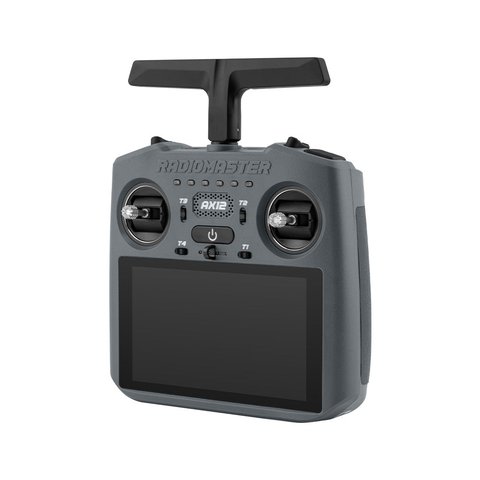
I tested the AX12 mainly for FPV rover control, feeding video into the HDMI input and running a ground station app in a split screen alongside the video feed. It’s a genuinely useful setup for anything where you’d normally be juggling a transmitter in one hand and a phone in the other. The touchscreen is bright enough to read outdoors, and app switching feels like a normal Android tablet rather than some clunky embedded interface bolted on as an afterthought.
The gimbals themselves are the compact X5 Hall-effect units rather than full-size sticks, which makes sense given the AX12’s smaller handheld form factor, but pilots coming from a larger transmitter with big gimbals will notice the reduced stick throw immediately.
Per Priya S., an RC Hobbyist and PeerSpot reviewer, “Running my ground station app directly on the transmitter instead of a separate phone clipped to it changed how I fly rovers. It’s one less cable and one less thing to drop.”
Who Should Consider the AX12
- Rover, boat, and long-range aircraft pilots who rely on ground station apps
- Digital FPV pilots who want the video feed and controls in one device
- Anyone tired of taping a phone to the back of their transmitter
- Not necessarily the best pick if you just want a traditional lightweight quad racing radio with big gimbals
App Compatibility and Sideloading
Because RadioMasterOS is built on genuine Android 9.0 with Google Play certification, the AX12 behaves much closer to a real tablet than a locked-down embedded device. That opens the door to a wide range of ground station, mapping, and video receiver apps that were never designed with a radio transmitter in mind, but which happily install and run since the underlying OS is standard Android.
- Install directly from Google Play for apps that are listed there
- Sideload APKs for niche ground station or utility software not on the Play Store
- Some apps designed for phone-sized screens may need layout adjustments for the AX12’s aspect ratio
- Battery-hungry apps will reduce your total flying time faster than lightweight utility apps
Build Quality and Ergonomics
Handling the AX12 feels closer to holding a chunky handheld gaming device than a traditional RC transmitter, which makes sense given the screen-first design. The weight is noticeably front-loaded toward the screen and battery compartment, and after longer sessions I found myself resting it against my body rather than holding it purely by the grips, something worth knowing if you’re used to a lighter single-hand radio.
The physical switches and buttons around the screen are firm and clicky, which is a good sign for long-term durability, though the overall unit is larger and heavier than a dedicated small-form ELRS handheld, a tradeoff that comes with packing a full Android tablet into the housing.
Troubleshooting Binding, Android, and App Issues
Because the AX12 combines a full Android tablet with RF hardware, most setup problems fall into one of two buckets: the ExpressLRS binding process, or the Android software layer.
- Receiver won’t bind: confirm both the AX12 and the receiver are on matching ExpressLRS firmware versions, since a version mismatch is the most common binding failure
- Touchscreen or Android side freezes: hold the power button for a full power cycle rather than force-closing individual apps, which usually clears a stuck process
- An APK won’t install from outside the Play Store: check that installation from unknown sources is enabled in the Android settings menu, since this is disabled by default on most units
- Google account won’t sign in: confirm a working Wi-Fi connection first, since sign-in failures are almost always a network issue rather than an account problem
If a Play Store app refuses to cooperate, the manual fallback is sideloading the APK directly: copy the file onto the AX12 over a USB cable using a computer’s file manager, then open it from the AX12’s own file browser to install. This bypasses Google Play entirely and works even if the account sign-in step is giving trouble, since it only depends on the underlying Android OS rather than any Google service.
Frequently Asked Questions
Does the AX12 support Google Play apps?
Yes, it’s Google Play certified out of the box, and it also supports sideloading APKs directly for apps not listed on the Play Store.
How many channels does the AX12 support?
It supports the full 16-channel ExpressLRS protocol, including custom curves, arbitrary channel mapping, and channel locking.
Can I view digital FPV video on the built-in screen?
Yes, the HDMI input lets you feed a compatible digital video system’s output directly onto the AX12’s touchscreen without a separate goggle or monitor.
How long does the battery last?
With the dual 21700 cell setup totaling roughly 10,000mAh, real-world runtime is long enough for extended field sessions, though actual mileage depends heavily on screen brightness and which apps you’re running.
Conclusion
The RadioMaster AX12 is a genuinely different take on what a radio controller can be, merging a certified Android tablet with proper 16-channel ExpressLRS hardware. It’s a niche fit if all you need is a straightforward stick radio, but for rover builders, boat pilots, and anyone running ground station software in the field, it solves a real annoyance by putting everything in one device.
Ryan
CS degree · 20+ years hands-on hardware testing