The RadioMaster T8L is a screenless, compact ExpressLRS transmitter that packs most of the features of a full-size radio into a small handheld shell. It was the first officially supported screenless controller for ExpressLRS, which means setup happens through a web browser instead of a built-in display. If you just picked one up, this guide walks through what is in the box, how the controls are laid out, and how to get through initial setup and binding without digging through a lengthy PDF.
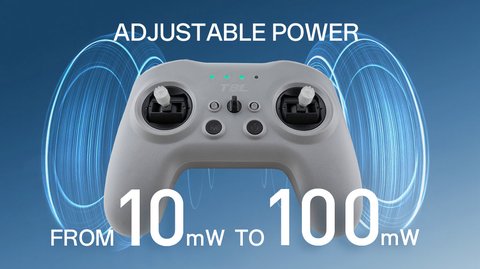
Key Specs
- Dimensions: about 165mm x 120mm x 70mm
- Weight: approximately 204g without batteries
- Power: 2x 3.7V 18650 Li-ion cells (batteries not included)
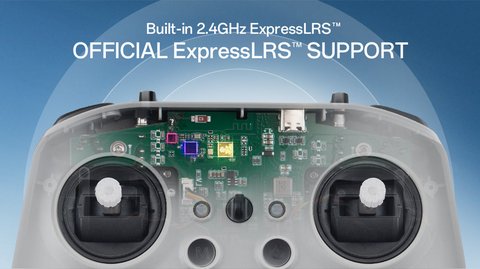
- Built-in 2.4GHz ExpressLRS with up to 10 channels
- Maximum range around 100m from the internal module alone (external module bay optional)
- Quad-bearing Hall effect gimbals
- 5-way trim buttons with LED and audible feedback
- USB-C port for charging and configuration
- No screen; configuration is done through a browser-based Web UI
Unboxing and First Look
Inside the box you get the T8L transmitter body, a neck strap, a USB-C cable, and a quick start card. There is no printed full manual, since RadioMaster expects most owners to reference the online documentation. Physically, the T8L feels closer in size to a game controller than a traditional radio, with the two gimbals sitting close together and a small cluster of trim buttons and switches between them.
Setting Up the T8L Through the Web Configurator
Because there is no onboard screen, all model setup, channel mapping, and firmware updates happen through a Web UI. Here is the general process:
- Connect the T8L to your computer using the included USB-C cable
- Open Chrome or Edge, since the Web UI relies on WebUSB, which Firefox and Safari do not support
- Navigate to the RadioMaster or ExpressLRS Web Flasher page and select your device
- Configure channel order, switch assignments, and packet rate from the browser interface
- Save your settings, which get written directly to the transmitter’s internal storage
Binding to a receiver works the same way any ExpressLRS radio does. Hold the bind button on your receiver while powering it on, then trigger bind mode on the T8L, either through a button combo or the Web UI’s bind command. Once bound, the T8L remembers the pairing, so you will not need to repeat this step unless you change receivers or reflash firmware without a saved bind phrase.
Living Without a Screen
I was skeptical about the screenless design at first, expecting to miss telemetry readouts mid-flight. In practice, the LED and audio trim feedback covers most of what you need in the field, and any telemetry you actually care about (RSSI, battery voltage, link quality) still gets sent to your goggles’ OSD if you are flying FPV, so the lack of a physical screen on the transmitter itself barely matters once you are airborne. Where the screenless design does bite is during initial setup, since you cannot tweak anything without plugging into a computer first.
A few practical notes from using it regularly:
- Keep a USB-C cable in your field bag, since you may need it if a setting needs adjusting on site
- The Hall effect gimbals hold up well and rarely need recalibration
- Battery life easily covers a full flying session on two decent 18650 cells
- The lack of a screen keeps the whole unit noticeably lighter than screen-equipped radios like the TX16S
Per Danny O., an RC Hobbyist and PeerSpot reviewer, “The T8L surprised me. I expected to hate not having a screen, but once it’s set up and bound, you genuinely just fly. It disappears in your hands the way a good controller should.”
Maintenance and Common Issues
The T8L is a simple radio mechanically, which means most maintenance issues are minor and easy to fix at home. The most common complaint owners run into is stick drift developing after months of heavy use, which is usually solved by recalibrating the gimbals through the Web UI rather than needing any hardware repair. Switch chatter, where a switch reports a slightly inconsistent position, can often be traced to dust or debris around the switch mechanism rather than a defect.
A short maintenance checklist worth running through every few months:
- Recalibrate gimbals if you notice drift or an off-center resting position
- Check the USB-C port for lint or debris, since it is the only physical connection point on the unit
- Keep firmware updated through the Web UI to pick up ExpressLRS bug fixes and new features
- Store the radio with batteries partially charged rather than fully depleted if it will sit unused for weeks
One issue that trips up new owners specifically is forgetting that the T8L has no way to display an error message on its own. If a bind fails or a setting did not save, the only feedback you get is the LED or audio cues, so if something feels off, plugging back into the Web UI to double check your settings is almost always the fastest way to diagnose it.
Frequently Asked Questions
Do I need a computer every time I want to change a setting on the T8L?
Yes, since there is no onboard screen, any configuration change beyond basic bind and trim adjustments requires connecting to the Web UI through a browser.
Can I use the T8L with an external RF module for longer range?
The T8L’s internal module is built specifically for 2.4GHz ExpressLRS, so it does not have an external module bay the way larger radios like the TX16S do.
Which browsers work with the T8L’s Web UI?
Chrome and Edge both support the WebUSB standard the Web UI relies on. Firefox and Safari currently do not support this feature.
What batteries does the T8L use?
It takes two 3.7V 18650 lithium-ion cells, which are not included in the box, so you will need to source your own before your first flight.
Conclusion
The RadioMaster T8L proves that a screenless radio can still be genuinely usable, as long as you are comfortable doing initial configuration through a browser instead of a built-in menu. For pilots who want a lightweight, budget-friendly ExpressLRS transmitter without sacrificing gimbal quality, the T8L delivers exactly what it promises.
Ryan tests RC transmitters and receivers alongside his usual PC hardware coverage. He writes at softwaredriverdownload.com.