The M5Stack UnitV2 M12 is the lens-swappable version of M5Stack’s standalone AI camera, and the “M12” in the name refers to the industry-standard M12 lens mount it uses instead of a fixed lens. I looked closely at the official specs and comparisons between the standard UnitV2 and this M12 variant because the difference is easy to gloss over if you only skim the product title.
Here is what actually sets the M12 version apart, its full hardware specs, and where it makes sense to use one over the standard UnitV2 or a general-purpose webcam.
What Makes the M12 Version Different
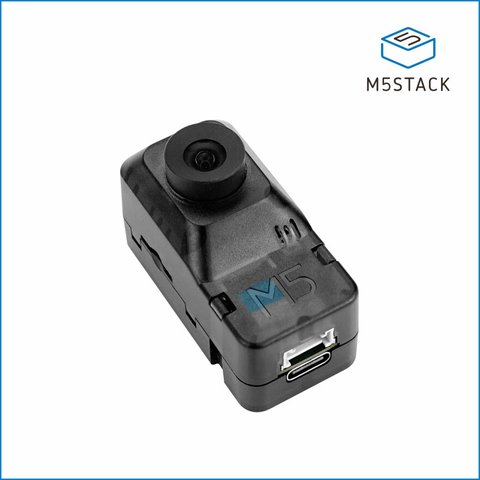
The base UnitV2 ships with a fixed lens soldered to the board. The M12 version replaces that with a proper M12 lens mount, which is a screw-thread standard used across machine vision and CCTV cameras. That single change has a few practical effects:
- You can swap lenses for different fields of view instead of being stuck with one
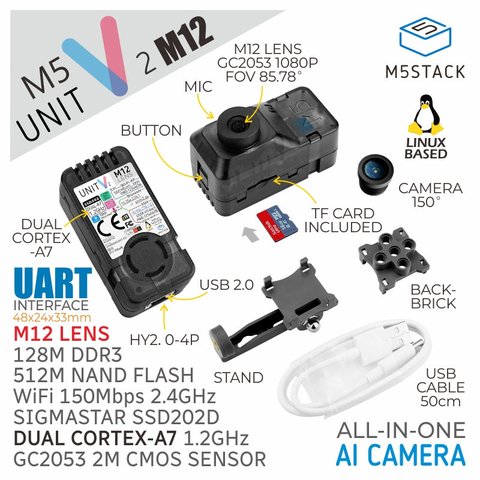
- M5Stack includes two lenses in the box: a standard focal length lens (85° field of view) and a wide-angle fisheye lens (150° field of view)
- Both lenses support manual focus, so you can fine-tune sharpness for the distance you are shooting at
- The mount is compatible with other M12 lenses on the market if the included ones do not fit your project
Everything else about the board — the SoC, the onboard AI processing, connectivity — stays the same between the standard and M12 versions.
Full Hardware Specifications
According to M5Stack’s official documentation, the UnitV2 M12 is built around the following hardware:
- SoC: SigmaStar SSD202D, a dual-core Cortex-A7 processor at 1.2 GHz
- Memory: 128MB DDR3 RAM
- Storage: 512MB NAND flash, expandable through a microSD card slot
- Camera sensor: GC2053, a 1080p color sensor
- Connectivity: USB Type-C, UART, built-in Wi-Fi (802.11 b/g/n, 2.4GHz), and an SR9900 Ethernet option
- Extras: built-in microphone, an active cooling fan, and status indicator lights
Physically, it is a compact unit — about 48 x 24 x 32mm with the lens attached and roughly 26.5g, so it fits easily into a robot chassis, a 3D-printed enclosure, or a fixed mount on a wall or ceiling.
Software and What It Runs
The UnitV2 series runs an embedded Linux OS with OpenCV built in, which is a meaningful difference from many other tiny AI camera boards that only support a proprietary SDK. That means:
- You can develop with standard OpenCV workflows rather than learning a closed toolchain
- The onboard processor handles image recognition tasks locally instead of streaming raw video to another device for analysis
- It can operate as a standalone unit over Wi-Fi or Ethernet, without needing to be tethered to an M5Stack Core controller
That local-processing setup is what M5Stack markets it for: industrial visual inspection, sorting lines, and general machine vision development where you want a self-contained camera that already understands what it is looking at, rather than a dumb sensor feeding a separate computer.
When to Pick the M12 Version
Whether the M12 variant is worth the choice over the standard UnitV2 really comes down to your field-of-view needs:
- Choose the M12 version if your project needs a wide-angle or fisheye view (154° coverage for room monitoring or wide industrial lines), or if you expect to experiment with different lenses over time.
- Choose the standard UnitV2 if you just need a fixed, narrower field of view and want to save a bit on cost and size, since it skips the mount hardware.
- Skip both if your project needs 4K resolution or heavy on-device deep learning beyond basic detection and tracking — the 1080p sensor and Cortex-A7 CPU are aimed at lightweight, real-time vision tasks, not large neural networks.
For hobbyist robotics, small-scale sorting or counting systems, and DIY security setups, the flexibility of swappable M12 lenses tends to be worth the small premium over the fixed-lens model.
Getting Started With the Hardware
Setting one up for the first time is fairly quick if you have worked with any small Linux single-board device before:
- Attach whichever lens fits your project — the standard lens for a narrower, more focused view, or the fisheye for wide coverage — and adjust the manual focus ring until the image is sharp.
- Power the unit through its USB-C port using a standard 5V supply or a host computer.
- Connect over Wi-Fi for wireless setups, or plug in Ethernet if you want a more stable link for continuous monitoring.
- Access the onboard tools to load a detection or tracking model, or write your own OpenCV-based script if you want full control over the pipeline.
- Insert a microSD card if you plan to log images or video locally instead of streaming everything over the network.
Because the board already runs embedded Linux with OpenCV, most of the setup friction people hit with other AI camera modules — wrestling with a closed SDK, or flashing a separate toolchain — simply is not there. That is one of the bigger practical advantages of the UnitV2 line over cheaper AI camera modules that lock you into vendor-specific software.
Frequently Asked Questions
What does the M12 in UnitV2 M12 actually mean?
It refers to the M12 lens mount standard, not a chip model or version number. The M12 UnitV2 uses interchangeable screw-mount lenses instead of a fixed lens.
Does the UnitV2 M12 need to be connected to an M5Stack Core device to work?
No. It is a standalone unit that runs its own embedded Linux OS and can operate independently over Wi-Fi, Ethernet, or a direct USB-C connection.
Can I use third-party M12 lenses with it?
Yes, since M12 is an open industry standard, other compatible M12 lenses should physically fit, though you should confirm the thread pitch and back focal distance match before buying one.
What resolution does the camera shoot at?
The GC2053 sensor captures at 1080p, which is enough for most detection and inspection tasks this device is designed for, though it is not a 4K sensor.
Is the UnitV2 M12 good for outdoor or long-term security use?
It can work for light-duty monitoring, but it lacks a weatherproof housing out of the box, so outdoor use generally means adding your own enclosure.
Conclusion
The M5Stack UnitV2 M12 is the same SigmaStar SSD202D-powered standalone AI camera as the regular UnitV2, just with a swappable M12 lens mount and two lenses included — one standard and one wide-angle fisheye. That flexibility makes it a solid pick for machine vision projects where field of view matters, while the embedded Linux and OpenCV support keep development approachable for anyone already comfortable with standard computer vision tools. If your project is locked into one fixed viewing angle forever, the plain UnitV2 will save you a little money; otherwise the M12 version is the more future-proof choice.
Specs cross-checked against M5Stack’s official unit documentation rather than third-party reseller pages, which occasionally list outdated figures.