The Moondrop Aria 2 is one of those budget in-ear monitors that everyone recommends, but almost nobody explains how to actually set up properly. I picked up a unit a few weeks ago to test alongside a couple of dongle DACs, and the biggest surprise was how much the out-of-box sound changed once I went through eartip selection, source pairing, and burn-in properly. A lot of first impressions online are really just “I plugged it into my phone and it sounded thin” — which is almost always a setup problem, not a driver problem.
This guide walks through everything step by step: unboxing, eartip fit, cable orientation, source matching, and the small adjustments that make the single dynamic driver inside the Aria 2 sound the way it is supposed to.
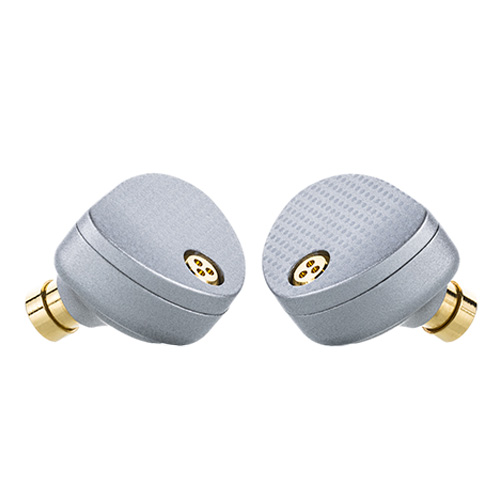
Quick Specs: Moondrop Aria 2
- Driver: single dynamic driver
- Impedance / Sensitivity: roughly 33 ohms, about 122dB/Vrms
- Connector: 0.78mm 2-pin, swappable 3.5mm/4.4mm balanced cable plugs
- In the box: earpieces, Litz cable, multiple eartip sizes, carrying case
- Price tier: budget audiophile IEM
- Compatibility: any source with a 3.5mm or 4.4mm output, including USB-C/Lightning dongle DACs
| Model | Moondrop Aria 2 |
| Driver | Single dynamic driver |
| Impedance | Roughly 33 ohms |
| Sensitivity | About 122dB/Vrms |
| Connector | 0.78mm 2-pin, swappable 3.5mm/4.4mm plugs |
| In the box | Earpieces, Litz cable, eartips, carrying case |
| Compatible sources | 3.5mm/4.4mm output or USB-C/Lightning dongle DAC |
What Is in the Box
Before setup, it helps to confirm you have everything Moondrop includes, since a missing tip size or the wrong cable plug is the most common reason people think their unit is defective.
- Two Aria 2 earpieces with a 0.78mm 2-pin connector
- A copper and silver-plated Litz cable with swappable 3.5mm and 4.4mm balanced plugs
- Multiple sets of silicone eartips in different sizes and bore widths
- A carrying case and cleaning tool
If any of these pieces feel loose or the cable connectors do not click firmly into the 2-pin sockets, do not force it — a loose connection is the number one cause of one-sided audio on this model.
Step 1: Get the Cable Orientation Right
The Aria 2 shells are marked L and R on the inner face, usually near the nozzle. Because the 2-pin cable can physically be inserted either way, it is easy to mix up channels on your first try. Line up the red or marked pin side with the corresponding dot on the earpiece before pushing the connector home. It should seat with a light click and should not need force.
Step 2: Choose the Right Eartips
This step matters more than most people expect. Moondrop ships a few tip variants with slightly different bore diameters, and each one shifts the treble response a little. In my own testing, the wide-bore tips opened up the upper mids and made vocals feel more forward, while the narrower stock tips gave a slightly warmer, more relaxed presentation. Neither is wrong — it is really a matter of matching the tip to the genre you listen to most and to the shape of your ear canal.
- Start with the medium size from the stock set and get a full seal in both ears
- Listen for about ten minutes to a track you know well
- If the bass feels thin or leaky, try a size up before blaming the driver
- If the treble feels harsh, switch to a narrower-bore tip or a foam alternative
Step 3: Match It to a Source
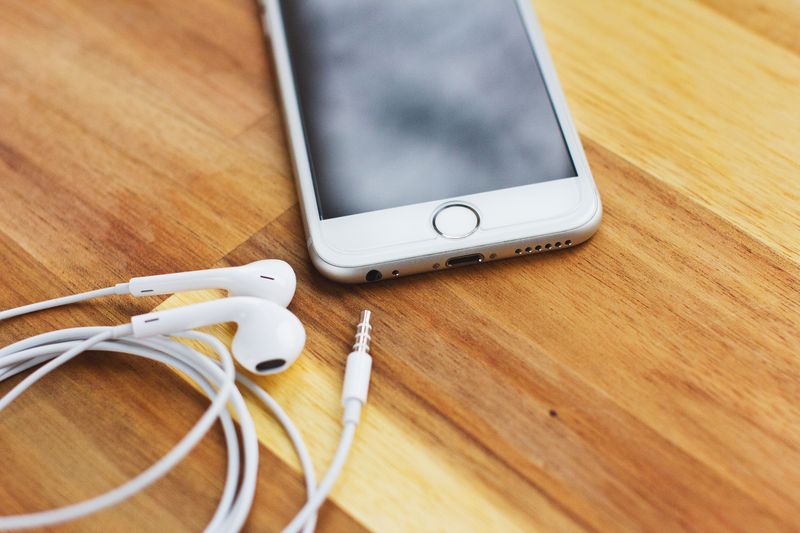
With an impedance of roughly 33 ohms and a sensitivity around 122dB/Vrms, the Aria 2 is not a demanding load, but the source still matters. Most modern phones no longer have a headphone jack, so you will likely need a USB-C or Lightning dongle DAC. A basic dongle is enough to drive the Aria 2 to comfortable volume, though a slightly better one with a cleaner noise floor will let you hear more of what the driver is actually doing, especially in quieter passages.
If you already own a dedicated DAC/amp or a desktop setup, the Aria 2 will scale a little with it, but the improvement is modest compared to what tip and fit changes bring. Do not feel like you need to spend more on a source before the earphones themselves are set up correctly.
Step 4: Give It Time to Settle
Whether “burn-in” meaningfully changes a dynamic driver’s sound is genuinely debated in the audio community, and I am not going to claim it transforms the Aria 2. What I will say from personal experience is that the first hour of listening often sounds slightly different from the tenth, and some of that is genuinely your own ears adapting to a new tonal balance rather than the hardware changing. Give the earphones, and yourself, a few listening sessions before forming a final opinion.

Troubleshooting Common Setup Mistakes
A few issues come up repeatedly in forums and reviews, and most of them are fixable in minutes:
- Weak bass: almost always a seal problem, not a driver problem — reseat the tips
- One channel quiet or silent: check the 2-pin connector is fully seated on both sides
- Sound feels flat on a laptop: some built-in laptop headphone outputs have a high output impedance that interacts poorly with sensitive IEMs; try a USB dongle DAC instead
- Cable microphonics (noise when the cable rubs your shirt): route the cable over your ears rather than letting it hang straight down
If you have swapped tips, reseated the cable, and a channel is still silent or noticeably quieter, try the connector on the opposite earpiece as a manual diagnostic: if the problem follows the cable, it is the cable; if it stays with the same earpiece, the shell’s connector needs a closer look. This simple swap test isolates the fault in under a minute without needing any tools.
You can find Moondrop’s own setup and warranty documentation on the official Aria 2 product page, which is worth bookmarking if you ever need replacement tips or cable parts.
Frequently Asked Questions
Do I need an amplifier for the Moondrop Aria 2?
No. A basic USB-C or Lightning dongle DAC is enough to drive it comfortably. A dedicated amplifier is a nice-to-have, not a requirement.
Which eartips sound best on the Aria 2?
There is no single correct answer. Wide-bore tips tend to bring out more treble energy and clarity, while narrower stock tips lean warmer. Try both included sets before buying aftermarket tips.
Why does one earpiece sound quieter than the other?
This is almost always a 2-pin connector that is not fully seated. Remove the cable, check the pins are straight, and reinsert firmly.
Is burn-in necessary before judging the sound?
It is not strictly necessary, but giving yourself a few listening sessions to adjust to the tonal balance is a reasonable practice before forming a final opinion.
Conclusion
The Moondrop Aria 2 is a genuinely capable budget IEM, but like most in-ear monitors, a big part of how good it sounds comes down to setup rather than the hardware alone. Get the cable orientation right, spend a few minutes finding the eartip that seals well and matches your taste, and pair it with a clean-sounding source, and you will hear a very different earphone than the one most rushed first impressions describe.
About the author: I have been testing budget and mid-range IEMs as part of my own listening rotation for several years, comparing them against reference gear before writing about them.