Reference clocks sit at the far end of the audiophile upgrade path – a component with no volume control, no digital inputs for music, and no analog output at all, whose entire job is to hand a more accurate timing signal to whatever DAC or transport is willing to accept one. Matrix Audio’s SC-1 is exactly that kind of device, and it’s worth understanding both what it does and, just as importantly, when it actually matters before spending on one.
| Brand | Matrix Audio |
| Model | SC-1 |
| Type | Reference clock, 10MHz output |
| Oscillator | OCXO, SC-Cut quartz crystal |
| Outputs | 4x independently buffered BNC |
| Phase noise | ≤ -118dBc at 1Hz offset |
| Weight | 9.7 lbs |
What a reference clock is for
Every digital audio device needs a clock signal to know precisely when to read or convert each sample. Timing errors in that clock, known as jitter, translate into small distortions in the reconstructed analog waveform. Most DACs and streamers have an internal clock that’s good enough for very high fidelity playback on its own. A reference clock like the SC-1 exists for the subset of gear that includes an external clock input specifically so that an even lower-jitter, more stable master clock can take over that timing duty.
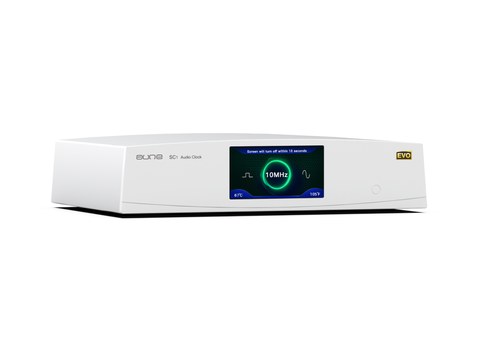
- The SC-1 outputs a 10MHz reference signal, the standard reference frequency used across professional and audiophile equipment with external clock inputs
- Four independently buffered 10MHz outputs on BNC connectors, all derived from the same internal master oscillator
- Selectable sine or square wave output, with square wave offering higher locking accuracy for compatible receiving devices
The oscillator itself
At the core of the SC-1 is an oven-controlled crystal oscillator, or OCXO, using a specialized SC-Cut quartz crystal that’s more temperature-stable and precise than the AT-cut crystals found in typical consumer electronics. The “oven” part of OCXO isn’t a marketing term: the crystal genuinely sits inside a small temperature-controlled enclosure that keeps it at a constant operating temperature, since crystal oscillators drift in frequency as their temperature changes. Rated phase noise comes in at ≤ -118dBc at 1Hz offset, measured at the clock output, which is a strong figure for a component at this price point.
Power supply design
The SC-1 runs off a toroidal transformer split into two independent circuits: one dedicated entirely to powering the crystal oscillator itself, and a second dedicated to the temperature-controlled oven enclosure. Separating these two loads prevents the oven’s heating cycles, which draw variable current as they cycle on and off to maintain temperature, from injecting noise into the oscillator’s own supply rail. It’s a small detail, but it’s exactly the kind of thing that separates a purpose-built reference clock from a generic clock module in a plastic box.
Calibration and long-term accuracy
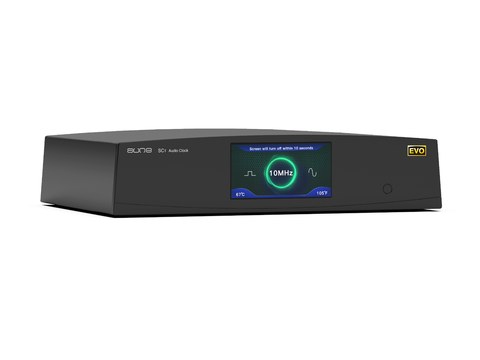
- A 1PPS (one pulse per second) reference input allows the SC-1 to auto-calibrate against an external time reference for long-term accuracy
- Matrix Audio offers free factory calibration support, which matters for a device whose entire value proposition rests on precise timing holding up over years, not just out of the box
- Four dedicated feet and a solid metal chassis minimize mechanical vibration and external interference reaching the oscillator
When it actually helps
This is the section that matters most before spending money on a reference clock, and it’s also the one most product pages gloss over: an external clock only helps if your DAC or transport has a dedicated external clock input built in, and only if that device’s internal clock is genuinely the bottleneck in your system’s overall jitter performance. Devices like Matrix Audio’s own ND-1 DAC include this input specifically for pairing with a unit like the SC-1. If your current DAC doesn’t have an external clock input, the SC-1 has nothing to connect to and won’t do anything for your system.
Even among gear with a compatible input, the improvement from adding a high-quality external clock ranges from clearly audible to essentially inaudible depending on how good the internal clock already was and how sensitive the rest of the digital chain is to jitter. It’s a genuine, if second-order, upgrade for a system that’s already resolved everything upstream of the clock – not a fix for a system with other, bigger issues.
Physical specs
The SC-1 weighs 9.7 lbs, which is substantial for a component that does nothing but output a timing signal, but that weight reflects the toroidal transformer and OCXO oven assembly rather than any padding for effect. It’s built to sit in a rack as a permanent fixture rather than something you’d move around often.
Cabling and setup notes
Getting a reference clock into a system correctly is a bit more finicky than plugging in a digital source, and it’s worth getting right given the cost involved:
- Use good quality 50 ohm BNC cables rated for the clock frequency you’re running – a mismatched or poor-quality cable can introduce more jitter than the clock removes
- Match cable lengths across multiple devices if you’re feeding more than one component from the SC-1’s four outputs, since even small length differences can introduce timing skew between synced devices
- Give the unit time to warm up after power-on before critical listening; OCXO ovens take a few minutes to reach stable operating temperature, and the frequency will drift slightly during that warm-up window
- Keep the SC-1 physically separated from sources of vibration or heat in the rack, since both can affect long-term oscillator stability even with the oven regulation in place
Common Setup Problems and Fixes
- Problem: No audible difference after connecting the SC-1. Confirm your DAC or transport actually has a dedicated external clock input in the first place — without one, the SC-1 has nothing to lock to and cannot change the sound at all.
- Problem: Connected device will not lock to the external clock signal. Try switching between sine and square wave output, since some receiving devices lock more reliably to one waveform than the other.
- Problem: Sound seems worse right after power-on. This is usually the OCXO oven still warming up; give the unit several minutes to reach stable operating temperature before doing any critical listening.
- Problem: Timing skew between multiple synced devices fed from the four outputs. Check that all BNC cable runs are matched in length, since even small differences between cables can introduce timing skew across synced components.
- Problem: Frequency drifts over long-term use. Use the 1PPS input to auto-calibrate against an external reference, or send the unit back to Matrix Audio for their free factory calibration service.
FAQ
What does a reference clock actually do?
It provides a more accurate timing signal to a DAC or transport with a compatible external clock input, potentially reducing jitter-related distortion in digital-to-analog conversion.
Will the SC-1 improve any DAC?
No. It only helps devices with a dedicated external clock input, and even then, the audible benefit depends on how much jitter was actually limiting that specific DAC beforehand.
What frequency does it output?
A 10MHz reference signal across four independently buffered BNC outputs.
What is an OCXO?
An oven-controlled crystal oscillator, which holds its crystal at a constant temperature inside a small heated enclosure to minimize frequency drift.
Does it need calibration?
It supports a 1PPS input for auto-calibration against an external reference, and Matrix Audio offers free factory calibration for long-term accuracy.
Reference clocks are one of the few upgrades in this hobby where I’d genuinely tell most readers to skip it unless their existing gear specifically supports one – and this piece is written with that caveat front and center.