Streaming has quietly become the default front end for most home audio setups, but a lot of “streamers” are really just a network card bolted onto an existing DAC design. Matrix Audio took a different approach with the Element S: a dedicated transport built specifically around getting music off the network and out through a clean digital signal, with the actual digital-to-analog conversion left to whatever DAC you already own. After spending time comparing notes from owners and dealers on how it behaves in a real system, here is what stands out about this streamer and who it makes sense for.
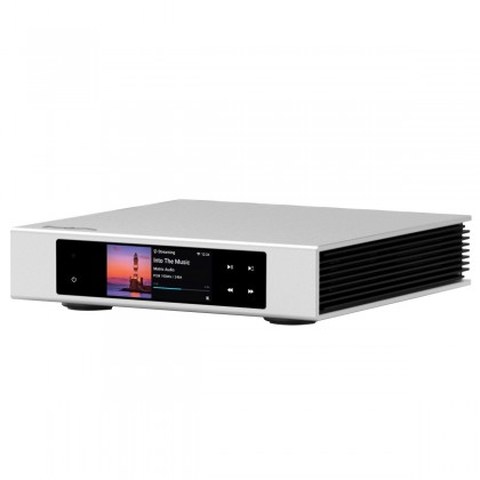
What the Element S actually is
The Element S is a pure network transport with USB DAC output, meaning it is built to source music from streaming services, network shares, or local storage and hand that signal off to an outboard DAC in the cleanest possible form. It does not include an internal DAC chip of its own for the analog stage, which keeps the design focused on jitter reduction and clock accuracy rather than trying to also compete as a standalone converter.
- Ethernet and dual-band Wi-Fi networking for flexible placement
- 3.46 inch touchscreen with an on-device interface for browsing and playback
- Roon Ready certification, plus Tidal Connect, Spotify Connect, DLNA and UPnP support
- Digital outputs covering USB, AES, coaxial, optical, and isolated I2S over HDMI
Clocking and jitter reduction
Matrix built the Element S around a pair of ultra-low phase noise Accusilicon “femto” clocks paired with an FPGA that handles data marshalling before the signal leaves the chassis. In plain terms, the box is doing the timing-critical work upstream of the DAC so that whatever converter is downstream receives a cleaner, lower-jitter signal than it would from a typical network player. This is the whole reason the Element S exists as a separate product rather than being folded into an all-in-one unit like the Matrix Audio MS-1 streamer/DAC.
For anyone running a dedicated outboard DAC that they are happy with, this separation of duties is the appeal. You keep your existing converter and its house sound, and you upgrade only the transport layer feeding it.
Digital output options
The rear panel gives you several ways to connect to a DAC, and which one you pick will depend heavily on what your downstream gear supports:
- USB Audio – the most universal option, supported by nearly every modern DAC
- I2S via HDMI – often considered the lowest-jitter path when both ends use compatible pinouts, with four selectable I2S-LVDS pinout configurations built in for cross-brand compatibility
- AES/EBU – a solid balanced digital option for gear that supports it
- Coaxial and optical S/PDIF – the most widely compatible legacy options
PCM is supported up to 32-bit/768kHz and native DSD up to DSD512 across these outputs, which covers essentially every high-resolution format currently in circulation.
Setup notes from real installs
Getting the Element S running is straightforward for anyone who has set up a network streamer before, but a few details make the first hour smoother:
- Wired Ethernet is worth the extra cable run if you can manage it; Wi-Fi works fine for most listening but a wired connection removes one variable when troubleshooting dropouts
- The MA Remote app handles most day-to-day control, so the touchscreen is really for glanceable status rather than constant interaction
- If you are pairing it with a DAC over I2S/HDMI, double-check the pinout mode in the settings menu before assuming a cable fault – mismatched pinout standards between brands is the most common “it doesn’t work” complaint
- Roon users should let the unit fully register on the network before searching for it in Roon’s audio settings; a premature scan sometimes needs a manual refresh
Firmware updates are handled over the network and have generally been reliable, though as with any streaming device it is worth checking for an update immediately after unboxing since retail stock can sit on shelves for a while before it reaches a buyer.
Where it fits versus the rest of the lineup
Matrix Audio’s catalog spans everything from all-in-one desktop units to flagship separates, and the Element S sits in an interesting middle spot. It costs less than a full streamer/DAC/preamp like the Element X2 Pure, but it is more focused than a general-purpose network bridge, because the whole design brief was “be an excellent transport and nothing else.” If you already own a DAC you like, that focus is exactly what you want. If you are starting from scratch and need conversion built in, an all-in-one unit will get you further per dollar spent.
Who should consider it
The Element S makes the most sense for listeners who already have a DAC they are attached to, whether for its sound signature or simply because it was an expensive purchase they are not ready to retire. It also suits anyone building a modular system piece by piece, since a dedicated transport can be swapped out later without touching the conversion or amplification stages. It is a less obvious choice for someone who wants a single box that does everything, since paying for a standalone transport only pays off once you already have somewhere good for that clean digital signal to go.
FAQ
Does the Element S have a built-in DAC?
No. It is a dedicated transport with USB, I2S, AES, coaxial and optical digital outputs, and relies on an external DAC for the analog conversion stage.
Is it Roon Ready?
Yes, along with Tidal Connect, Spotify Connect, AirPlay 2, DLNA and UPnP support for other streaming sources.
What is the highest resolution it supports?
PCM up to 32-bit/768kHz and native DSD up to DSD512 across its digital outputs.
Can I use it with Wi-Fi instead of Ethernet?
Yes, it has dual-band Wi-Fi built in, though a wired connection is generally more consistent for high-resolution streaming and removes network variables when troubleshooting.
Does it work with any DAC?
Most DACs will work over USB or S/PDIF. I2S compatibility depends on matching pinout standards between the Element S and the receiving DAC, so it is worth checking the specific I2S mode before assuming a connection issue is a cable problem.
I’ve spent more evenings than I’d like to admit swapping digital cables behind a rack trying to chase down a jitter problem that turned out to be a mismatched I2S pinout setting. If a streamer’s manual mentions pinout modes, read that section first.