A quick heads-up before diving in: the KZ XZ10 is not an in-ear monitor in the way KZ’s ZS10 Pro or ZSX are. It is a Bluetooth earhook module – a small wireless adapter that clips behind your ear and connects to a compatible 2-pin detachable wired earphone, converting it into a wireless setup without buying an entirely new pair of earbuds. If you searched for “KZ XZ10 review” expecting a standalone IEM, this is a different (and honestly pretty clever) product category, so let’s cover what it actually does.
I tested the XZ10 with a spare 2-pin wired IEM I already had lying around, and the appeal became obvious within a day: instead of buying a second wireless-only earphone, I got to keep the sound signature of an IEM I already liked and simply make it Bluetooth.
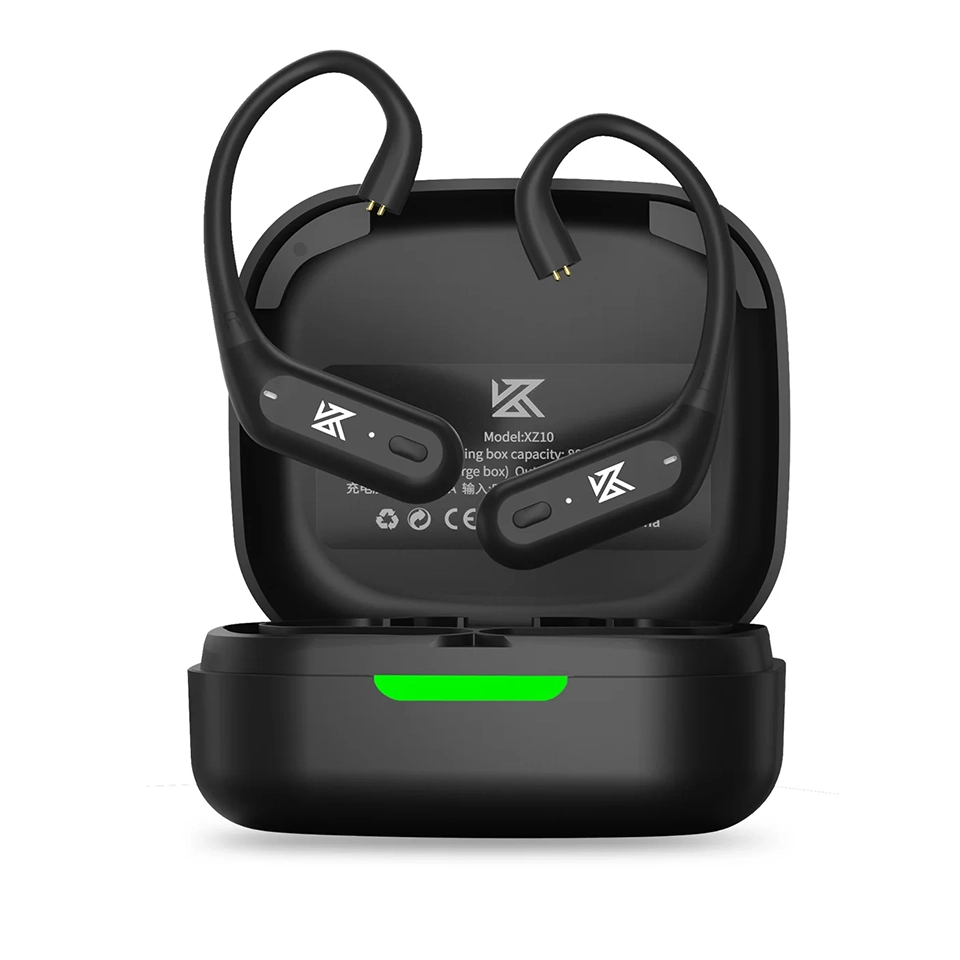
Quick Specs: KZ XZ10
- Model / Applies to: KZ XZ10 Bluetooth earhook adapter (not a standalone IEM)
- Chipset: Qualcomm QCC5171, Bluetooth 5.3
- Connector: standard 0.75mm 2-pin, for detachable-cable IEMs
- Battery: roughly 12 hours per charge, 800mAh charging case
- Price tier: budget accessory, priced well below a full wireless IEM
- Compatibility: any wired IEM using a standard 0.75mm 2-pin connector; not compatible with MMCX or proprietary connectors
| Model | KZ XZ10 |
| Product type | Bluetooth earhook adapter (not a standalone IEM) |
| Chipset | Qualcomm QCC5171 |
| Bluetooth version | 5.3 |
| Connector | 0.75mm 2-pin, detachable |
| Codec support | SBC, AAC, aptX Adaptive |
| Battery life | About 12 hours, 800mAh charging case |
| Range | Up to roughly 15 meters, open conditions |
What the XZ10 Actually Is
The XZ10 uses a Qualcomm QCC5171 Bluetooth chipset and connects to your phone or laptop over Bluetooth 5.3, supporting SBC, AAC, and aptX Adaptive codecs. On the earphone side, it terminates in a standard 0.75mm 2-pin connector, which is one of the most common detachable-cable standards in the budget IEM world (including several of KZ’s own IEMs), so compatibility with a wired earphone you already own is likely, though not guaranteed — always check your existing earphone’s connector type before buying.
- Connector: 0.75mm 2-pin, compatible with a wide range of KZ and third-party detachable IEMs.
- Bluetooth version: 5.3, with a rated range up to roughly 15 meters in open conditions.
- Battery life: Around 12 hours per charge on the earhooks themselves, with the 800mAh charging case rated for several additional recharges.
- Codec support: SBC, AAC, and aptX Adaptive for lossless-leaning wireless transmission where your source device supports it.
Setting It Up
- Confirm your existing wired IEM uses a standard 0.75mm 2-pin connector before purchasing, since some KZ and third-party models use a slightly different pin spacing or a proprietary connector.
- Charge the XZ10 case fully before first use.
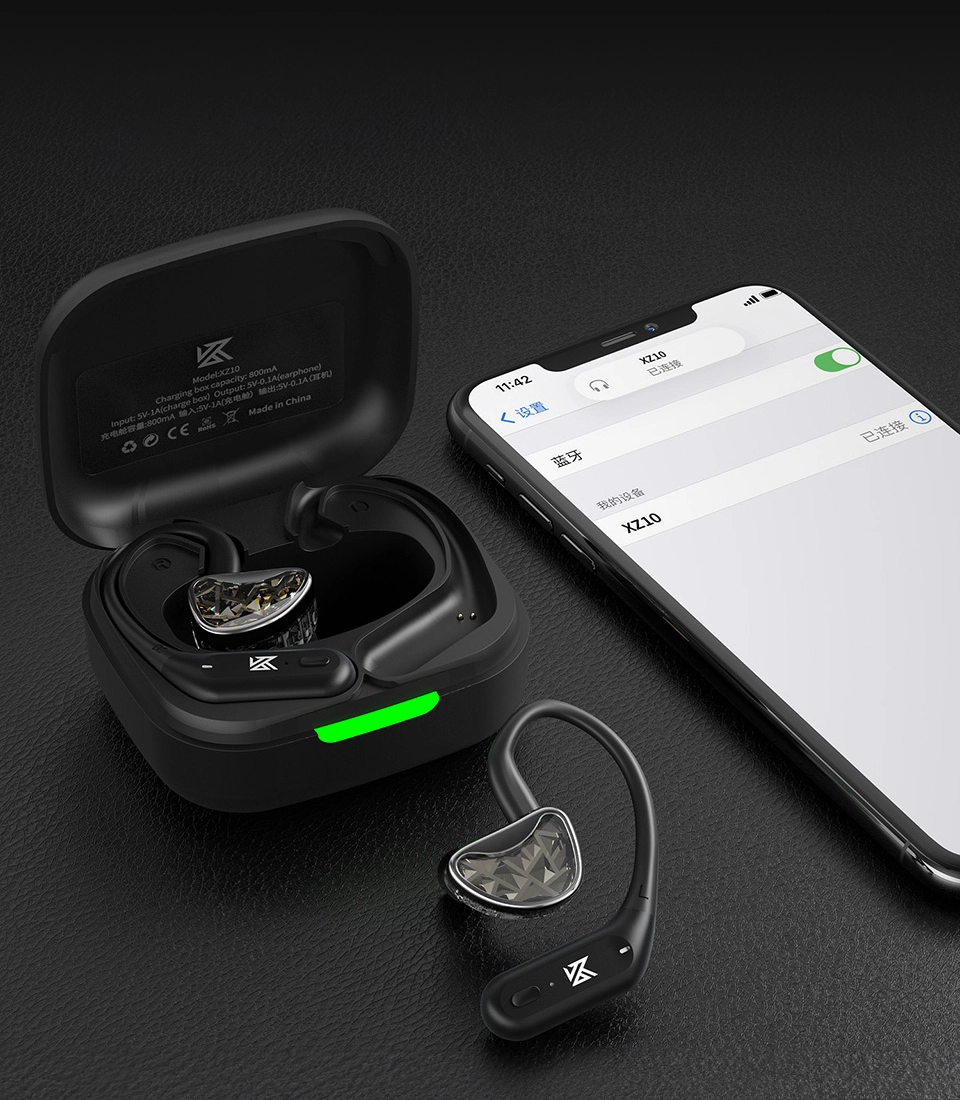
- Detach the stock cable from your wired IEM and plug the earhook’s 2-pin connector into the IEM shells directly.
- Power on the earhooks and pair with your phone through Bluetooth settings, the same as any other wireless earbud.
- Adjust the earhook fit behind your ear so the IEM sits naturally in your ear canal.
Sound Quality and Everyday Use
Because the XZ10 is purely a wireless transmission module, the actual sound signature depends entirely on which IEM you pair it with, not on the XZ10 itself. What the XZ10 contributes is signal quality and a stable connection, and in my testing it did not introduce any obvious compression artifacts or noticeable latency during normal music listening. Gaming or video with tight lip-sync requirements is where any Bluetooth earhook adapter like this is more likely to show its limits, so treat it primarily as a music and podcast solution rather than a low-latency gaming accessory.
Comfort-wise, the earhook design distributes weight differently than a standard TWS earbud stem, and I found it stayed more secure during a light jog than a typical stemless true wireless earbud would, though your mileage will depend on your ear shape and the weight of the IEM shell you are pairing it with.
Who This Makes Sense For
The XZ10 is a niche but genuinely useful product for a specific type of buyer: someone who already owns a wired IEM they like the sound of and does not want to give it up just to gain wireless convenience. If you do not already own a compatible 2-pin wired IEM, buying the XZ10 alone does not get you a complete listening setup, since you would still need to purchase a compatible earphone separately. Full technical specs and compatibility notes are available on KZ’s official XZ10 product page.
XZ10 vs Buying a New Wireless IEM
It is worth weighing the XZ10 against simply buying a dedicated true wireless IEM outright, since both routes get you to the same basic destination: a wireless in-ear listening setup.
- Choose the XZ10 if you already own a 2-pin wired IEM whose sound signature you like and do not want to replace, or if you own several compatible wired IEMs and want the flexibility to swap which one goes wireless.
- Choose a dedicated TWS IEM instead if you are starting from scratch with no existing wired IEM, since buying the XZ10 alone leaves you without an earphone to actually plug into it.
- Consider cost carefully – once you add the price of the XZ10 to a wired IEM you still need to buy, the total can approach or exceed what a decent all-in-one wireless earphone costs, so the value proposition is strongest when you already own the wired half of the equation.
In my case, reusing an IEM I had already broken in and knew the sound of made more sense than starting over with an unfamiliar wireless model, and that is really the core use case this product is built around.
Troubleshooting Setup and Pairing Issues
- IEM plugs in but no sound: double-check the 2-pin connector orientation — it can physically insert reversed on some shells, which mutes or garbles audio on that side.
- Bluetooth won’t pair on first use: hold the earhooks’ power/pairing button until the LED flashes rapidly to force pairing mode, then select the XZ10 fresh from your phone’s Bluetooth list rather than reconnecting to a stale saved entry.
- Connection keeps dropping: confirm nothing metal (a phone case, a bag) is blocking the antenna path near the earhook, and move within the roughly 15 meter open-air range while troubleshooting.
- IEM feels loose in the earhook: the 2-pin connector should click firmly into place; a shell that wiggles free during movement usually means the connector was not fully seated during setup, not a defect.
If Bluetooth pairing continues to fail after a forced reset, the manual fallback is to fully drain the earhooks’ battery, recharge from empty, and re-pair as a “new” device — this clears out corrupted pairing records that a simple forget-and-reconnect sometimes does not.
Frequently Asked Questions
Is the KZ XZ10 an in-ear monitor?
No. It is a Bluetooth earhook adapter that connects to a separate 2-pin wired IEM to add wireless functionality. It does not include its own driver or sound signature.
Will the XZ10 work with any wired IEM?
Only with earphones using a standard 0.75mm 2-pin detachable connector. Always check your earphone’s connector type before buying, since not all budget IEMs use this exact standard.
Does the XZ10 reduce sound quality compared to a wired connection?
With aptX Adaptive support on a compatible source device, quality loss is minimal for typical music listening, though a wired connection will always be technically lossless by comparison.
How long does the battery last?
Around 12 hours per charge on the earhook modules themselves, with the charging case providing multiple additional top-ups before it needs to be plugged in again.
Conclusion
The KZ XZ10 is not the model to search for if you want a standalone wireless IEM — it is a smart, affordable accessory for extending the life and versatility of a wired earphone you already own and like. If that describes your situation, it is a straightforward, well-specified way to add Bluetooth 5.3 and aptX Adaptive support without replacing gear you already trust.
Tested and written by Ryan, who keeps a small collection of 2-pin wired IEMs specifically to try Bluetooth earhook adapters like this one against them.