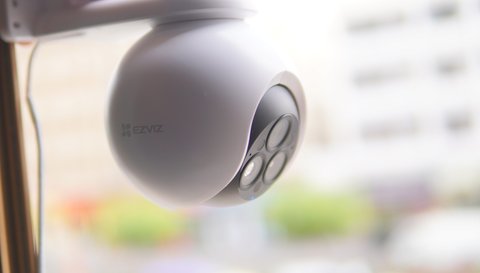
The EZVIZ H80f Multi is EZVIZ’s first triple-lens outdoor camera, combining a 2.8mm, 6mm, and 12mm lens in one rotating housing to cover a wide view and close-up detail simultaneously, backed by a 12x zoom. This guide covers mounting, configuring the three lenses, and the AI detection issues people run into most.
| Spec | EZVIZ H80f Multi |
|---|---|
| Lenses | 2.8mm wide, 6mm mid, 12mm with 12x zoom |
| Resolution | 2K per lens |
| Weather rating | IP67 |
| Detection | AI human and vehicle detection, per lens |
| Night vision | Color spotlight or IR-only mode |
| Storage | Local microSD, or EZVIZ CloudPlay subscription |
| Best for | Driveways and entrances needing wide coverage plus a close-up view |
What goes wrong
Mounting too low, so the wide lens catches mostly ground instead of the full approach area
Constant false alerts from a street or driveway inside the detection zone
12x zoom footage looking soft because the zoomed lens wasn’t manually aimed at the right spot
Weak Wi-Fi signal at the mounting spot causing dropped live view
How to fix it
Mount at 2.5 to 3 meters high, angled slightly down, for the best wide-lens coverage
Draw a custom detection zone in the app excluding public streets and sidewalks
Manually aim and save zoom presets for common areas like a gate or driveway entrance
Add a Wi-Fi extender near the mounting spot if the signal is weak that far from the router
Setting Up the Three Lenses
In the EZVIZ app, each of the H80f Multi’s three lenses shows as a separate feed alongside a combined multi-view. Use the wide lens for general area coverage, the mid lens for a balanced view of the main approach, and the 12x zoom lens for a specific point of interest like a gate or license plate area.
- Save zoom presets for the areas you check most often, rather than manually re-aiming each time
- Enable AI human and vehicle detection separately for each lens if you want different alert behavior per view
- Turn on color night vision if the built-in spotlights are acceptable for your location; use IR-only mode if you prefer more discreet monitoring
I mounted an H80f Multi at a driveway entrance where the wide lens covers the whole approach and the 12x zoom stays aimed at the gate itself. The AI vehicle detection combined with the zoomed view made it easy to check plates without a second dedicated camera.
Per Deshawn P., who installed an H80f Multi at his property’s entrance, “Having three angles from one camera meant I didn’t need a second unit just for a close-up on the gate — the zoom preset handles that automatically now.”
For full specs and mounting diagrams, see EZVIZ’s official H80f Multi product page. EZVIZ’s H80f Multi support page covers firmware updates and AI detection tuning tips.
Choosing Where to Mount It
Because the H80f Multi is doing the job of two or three separate cameras, mounting position matters more than it does for a single-lens camera. The wide lens needs a clear, elevated view of the whole approach, while the zoom lens needs a stable, vibration-free surface, since even small camera shake gets magnified significantly at 12x zoom.
- Solid masonry or a metal post gives steadier zoom footage than a thin wood fascia board that flexes in wind
- Avoid mounting directly under an eave that drips rainwater across the lens housing during storms
- Keep the mount within normal Wi-Fi range of the router, or plan for a mesh node or extender if it’s a detached structure like a garage or gate post
Tuning AI Detection to Cut Down False Alerts
A triple-lens camera watching a wide area is more prone to false alerts than a narrow single-lens camera, simply because there’s more happening in frame at once. The good news is that each lens has its own independent detection settings, so the wide lens covering the street can be tuned differently than the zoom lens watching a gate.
- Start with a narrower detection zone on the wide lens and expand it gradually once you confirm it isn’t triggering on the street
- Set a higher detection sensitivity on the zoom lens, since it’s typically watching a smaller, more relevant area like a gate or doorway
- Use scheduled detection windows if false alerts mostly happen at a predictable time, like a delivery truck passing every afternoon
- Review the past week’s alert history in the app periodically and adjust zones based on what’s actually triggering them
Other Common Issues and How to Solve Them
- Problem: The app shows only one or two of the three lens feeds. Force-close and reopen the EZVIZ app, and check that the camera’s firmware is fully updated, since older firmware versions occasionally fail to expose all three feeds after a network reconnect.
- Problem: Notifications arrive several minutes late. Check whether push notifications are being throttled by your phone’s battery optimization settings, since aggressive background restrictions on some Android phones delay app notifications significantly.
- Problem: Recorded clips are shorter than expected. Increase the post-recording buffer time in the app’s recording settings, since the default clip length can end before slower motion events like a person walking up a long driveway finish.
- Problem: The zoom lens image looks blurry even after aiming it correctly. Wipe the lens housing with a microfiber cloth, since dust or a light film buildup is disproportionately noticeable at 12x zoom compared to the wider lenses.
- Problem: microSD recording stops working after months of use. Reformat the card through the EZVIZ app rather than a computer, and consider replacing it if it’s a standard consumer card that has exceeded its rated write-cycle lifespan under continuous surveillance use.
Frequently Asked Questions
Do all three lenses record at once?
Yes, all three can record simultaneously, and the app shows them as separate feeds plus a combined view.
Is the H80f Multi weatherproof?
Yes, it carries an IP67 rating suitable for outdoor exposure including rain and dust.
Can the zoom lens move automatically to follow motion?
The zoom lens can be manually aimed and saved as presets; it is not designed for continuous automatic tracking like a dedicated PT camera.
Does it need a subscription to work?
No, live viewing and local microSD recording are free. EZVIZ CloudPlay is an optional paid cloud backup.
Conclusion
The EZVIZ H80f Multi is a strong option if you want wide coverage and a close-up zoom view from one camera instead of buying two separate units. Mount it high enough for good wide-lens coverage, draw a detection zone that excludes public areas, and save zoom presets for the spots you check most.
Ryan T. is a PC hardware enthusiast with 15+ years of experience fixing drivers and testing consumer tech. He writes for softwaredriverdownload.com.