Cayin’s N6iii digital audio player follows the same swappable-module idea as its predecessor, the N6ii, but with an updated module standard that isn’t backward compatible. The E203 is one of the first cards released for this newer platform, and like every N6iii/N6ii module, it’s not something you can buy and use on its own — it only works clipped into an N6iii chassis, replacing the player’s DAC and amplifier section entirely.
- Applies to: Cayin N6iii digital audio player only (Gen2 module slot, not compatible with N6ii)
- DAC / amp chipset: single ESS ES9039SPRO DAC paired with an OPA1612 op-amp, Class A/AB switchable
- Connectors: 3.5mm single-ended and 4.4mm balanced headphone outputs; no line-out
- Power output: 300mW/900mW (SE/balanced) at 32ohm, up to 400mW/900mW with Hyper mode engaged
- Decoding: native DSD512 and PCM up to 32-bit/768kHz
- Release recency: one of the first Gen2 modules released alongside the C201 for the N6iii platform
- Price: around $359
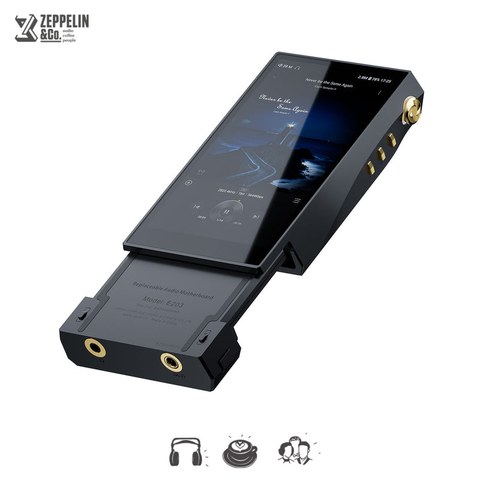
What the E203 actually is
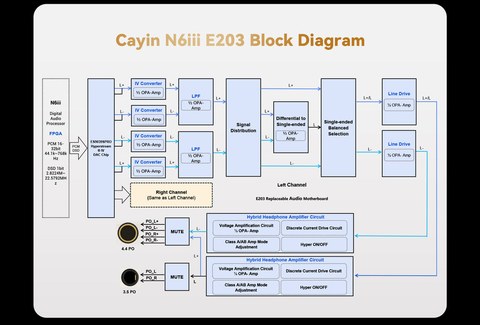
Rather than a full replacement chassis, the E203 is a compact circuit board that slots onto the bottom of the N6iii body. Inside it, a single ESS ES9039SPRO DAC chip handles digital-to-analog conversion, paired with an OPA1612 op-amp for the amplification stage. That’s a notably different design philosophy from cards that split duties across two DAC chips — a single well-implemented DAC chip driving a well-matched amp stage, rather than more silicon chasing more channels.
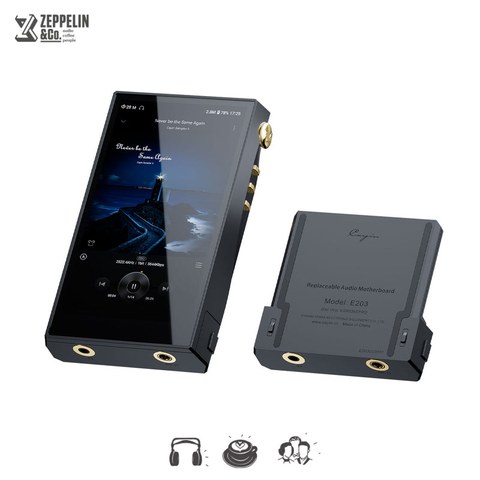
Specs and output power
- DAC chip: single ESS ES9039SPRO
- Amplifier: OPA1612, fully-balanced circuit, Class A/AB switchable
- Single-ended output: 300mW @32ohm (400mW with Hyper mode engaged)
- Balanced output: 700mW @32ohm (900mW with Hyper mode engaged)
- Decoding: up to DSD512 and PCM 32-bit/768kHz
- Outputs: 3.5mm single-ended and 4.4mm balanced, no dedicated line-out
- Price: $359
The lack of a line-out is worth flagging directly, since some N6ii/N6iii modules do include one. The E203 is built purely around headphone output, which tells you where Cayin’s engineering focus went with this specific card — driving headphones and IEMs directly rather than feeding a downstream amplifier.
How it sounds
Twister6’s extended testing of the N6iii with the E203 installed describes a fuller, more neutral midrange compared to the player’s stock module, along with a wider sense of soundstage. The review calls out the Hyper mode specifically as a favorite setting, since it adds headroom without noticeably changing the tonal balance — useful when a pair of in-ear monitors needs more current than the base power figures suggest. That combination of balanced output, Class A/AB switching, and the Hyper mode headroom boost is why the E203 gets recommended specifically to power-hungry IEM users rather than being pitched as a universal upgrade.
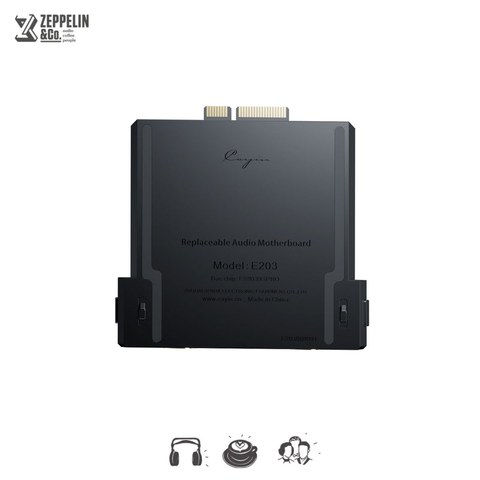
Who should buy it
As with any N6ii or N6iii module, ownership of the player itself is a prerequisite — this is an upgrade path, not an entry point. If you already own an N6iii and use demanding in-ear monitors that need more clean power than the stock configuration provides, the E203’s balanced output and Hyper mode make it one of the more targeted options in Cayin’s module lineup. If your listening is mostly through easy-to-drive headphones, or if you need a line-out to feed a separate desktop amp, this specific card isn’t the right fit and it’s worth comparing against Cayin’s other N6iii modules first.
A note on naming confusion
Because Cayin’s module names are similar across platforms, it’s easy to mix up the E203 with the E02 covered elsewhere on Cayin’s module lineup. The E02 is built for the older N6ii and uses a different (dual-DAC) design; the E203 is built for the newer N6iii and cannot be swapped between the two players. Always check which player you own before ordering a specific module.
Class A vs Class AB, and when to use each
The E203’s Class A/AB switch is one of the more genuinely useful controls on the card, rather than a spec-sheet checkbox. Here’s how the two modes generally play out in real listening:
- Class A tends to sound smoother and more textured through the midrange, at the cost of noticeably higher battery drain
- Class AB is more power-efficient and keeps the N6iii running longer between charges, with only a modest step back in outright smoothness
- Pairing Class A with the Hyper mode gives the richest, most headroom-heavy combination, best suited to demanding IEMs during a critical listening session at a desk
- Class AB without Hyper is the sensible default for a full day of commuting or travel, where battery life matters more than the last few percent of refinement
Because these are physical toggles rather than software settings buried in a menu, switching between them takes seconds, which makes it easy to actually use the feature instead of leaving it on one setting permanently out of inconvenience.
How the E203 compares with the N6iii’s other Gen2 modules
The E203 shipped alongside the C201 as one of the first Gen2 audio motherboards for the N6iii, and Twister6’s side-by-side testing treated the two as genuinely different listening experiences rather than minor variations on a theme. Where the E203 leans into fuller mids and a more relaxed treble with deep sub-bass rumble, other modules in the same generation are tuned toward different priorities, such as a cleaner line-out signal or a brighter, more resolving top end. The practical takeaway is that choosing a module is closer to choosing a distinct pair of headphones than picking a firmware update — it’s worth listening to your own music library through more than one card before deciding which one stays installed day to day. Because none of these cards are cheap, that kind of side-by-side comparison — ideally borrowed or demoed rather than bought sight unseen — is the single best way to avoid an expensive mismatch between a module’s tuning and your own headphones.
Troubleshooting: module swaps and no-sound issues
Swapping DAC/amp modules is a physical, not just a software, change, and a small number of installation issues cause most of the support questions Cayin owners run into. A few things worth checking before assuming the module itself is faulty:
- N6iii doesn’t recognize the module after installation: power the player off completely before swapping cards, confirm the module is seated flush against the pins with no visible gap, and re-tighten the retaining screws evenly rather than one at a time — an uneven seat is the most common cause of a module that looks installed but isn’t detected.
- No sound, or sound from only one output jack: the N6iii’s Android-based OS caches the previous module’s output configuration in some firmware builds. A full restart (not just standby) after a module swap clears this, and it’s worth confirming the correct output — 3.5mm versus 4.4mm — is selected in the system audio settings.
- Firmware mismatch: newer Gen2 modules like the E203 depend on player firmware that recognizes the updated module standard. Before installing, update the N6iii to the latest firmware from Cayin’s support page; an out-of-date player firmware can fail to initialize the module correctly even when it’s seated properly.
- Class A/AB switch or Hyper mode not responding: these are physical toggles, and a stuck or unresponsive switch usually clears with a full power cycle rather than repeated toggling. If it persists after a restart, that’s a hardware fault worth raising with Cayin support rather than a settings issue.
- Need a line-out and don’t have one: since the E203 has no dedicated line-out, the practical alternate path is running the 4.4mm balanced output into a desktop amp that accepts a balanced input, rather than looking for a line-out workaround that doesn’t exist on this specific module.
Frequently asked questions
Does the Cayin E203 have a line-out?
No. This module is built around headphone output only, with 3.5mm single-ended and 4.4mm balanced jacks and no dedicated line-out.
What does the Hyper mode do?
It boosts output headroom — from 300mW to 400mW single-ended, and 700mW to 900mW balanced — without a significant change to the tonal balance, according to reviewer testing.
Will the E203 fit a Cayin N6ii?
No. The E203 is built for the N6iii’s module standard, which is not compatible with the older N6ii’s module slot.
Is the E203 a good match for sensitive, easy-to-drive IEMs?
It can be, but it’s specifically aimed at power-hungry in-ear monitors. If your IEMs are already easy to drive, a lower-power module may be a more efficient match for battery life.