Aune’s N7 headphone amplifier already had a solid reputation as a Class-A desktop amp, and the N7D takes that same platform and bolts on a proper DAC section, turning it into a single-box solution for anyone who does not want to run a separate DAC and amp. I spent time with it running both as a desktop headphone rig and as a preamp feeding a pair of powered speakers, and it handled both roles competently.
Quick Facts
| Category | Detail |
|---|---|
| Brand | Aune |
| Model | N7D |
| DAC chip | Cirrus Logic CS43198 (dual) |
| Amplifier class | Two-stage Class-A bias control |
| Volume control | 30-step R2R |
| Max output power | 6.5W |
| Outputs | 6.35mm single-ended, 4.4mm balanced Pentaconn |
| Digital input support | PCM up to 384kHz, DSD up to 256 over USB-C |
What sets the N7D apart from the plain N7
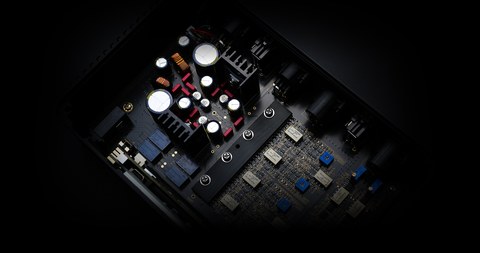
The N7D is fundamentally the N7 amplifier with the addition of a Cirrus Logic CS43198 dual DAC converter, giving it a USB-C digital input alongside the amplifier’s existing analog inputs. That means you can feed it directly from a computer over USB without needing a separate DAC in the chain, while still retaining the option to use it purely as an analog preamp and headphone amp if you already have a DAC you prefer.
- Fully balanced circuit design with Twin-JFET input stage
- Two-stage Class-A bias control for the amplifier section
- 30-step R2R volume control for precise, low-noise level adjustment
- Cirrus Logic CS43198 dual DAC for the USB-C digital input
- PCM up to 384kHz and DSD up to 256 supported over USB
Output power reaches 6.5W, available from both a 6.35mm single-ended headphone jack and a 4.4mm balanced Pentaconn output, which is enough headroom for the vast majority of headphones on the market, including many planar designs that other amps in this price range struggle with.
Sound character
Reviewers and my own listening notes land in the same place: the N7D is built around continuity and long-session comfort rather than an aggressive, forward presentation. It handles vocals and instruments with a natural sense of coherence rather than spotlighting any single frequency range, which makes it genuinely comfortable for multi-hour listening without fatigue creeping in. A detailed listening writeup covering both the amp and DAC sections is available from Mobile Audiophile, and a companion piece on the plain N7 amplifier is up at the same site if you want to compare notes between the two models.
Using it as a preamp
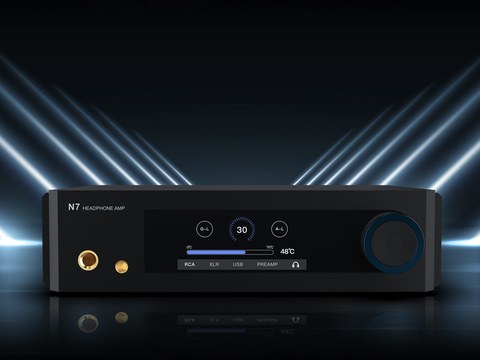
Because the N7D can double as a preamp, it fits naturally into a system where you eventually want to add powered speakers alongside your headphones, without needing to buy a separate preamp later. I ran it feeding a pair of active monitors for a stretch and it handled that role cleanly, with the same coherent, non-fatiguing character carrying over from headphone listening. This kind of flexibility is genuinely useful if your setup might grow over time, since you are not locked into headphones only.
Who should buy this over the plain N7
If you already own a DAC you are happy with and only want an amplifier, the plain N7 saves you some money over the N7D. But if you want to consolidate your desktop into fewer boxes, or if you are building a system from scratch and do not already own a DAC, the N7D’s added digital input makes it the more sensible starting point. The design and voicing are shared closely enough between the two that choosing between them mostly comes down to whether you need the built-in DAC.
Cable and connection tips
Since the N7D offers both single-ended and balanced outputs, it is worth confirming which cable termination your headphones actually ship with before assuming you need to buy an adapter or aftermarket cable. A lot of higher-end headphones now include swappable termination options in the box, and using the balanced 4.4mm output where available generally nets a slightly lower noise floor and marginally more control over dynamic headphones compared with the single-ended jack.
If you are using the USB-C digital input, a good quality, reasonably short USB cable is worth the small investment, since some longer or poorly shielded cables can introduce audible noise into sensitive DAC sections, even ones as well engineered as the Cirrus Logic chip used here. This is a cheap insurance policy against an otherwise avoidable source of noise.
Comparing against a separates approach
It is fair to ask whether a dedicated separate DAC and separate amp would outperform the N7D’s combined approach, and the honest answer is that it depends on budget. At a similar combined price to two separate quality components, a dedicated pair will usually edge out an all-in-one unit on outright performance. What the N7D offers instead is convenience, a smaller desk footprint, one less set of interconnects to buy and manage, and a voicing that has clearly been tuned as a complete system rather than assembled from mismatched parts after the fact.
Troubleshooting the N7D
- Problem: The computer doesn’t recognize the N7D over USB-C. Try a different USB-C cable before anything else, since a charge-only cable lacking data lines is a surprisingly common cause of a DAC that appears completely dead to the host computer.
- Problem: Audio cuts out intermittently over the USB digital input. Swap to a shorter, well-shielded cable and avoid running it alongside power cables or near other electronics, since interference on longer or poorly shielded runs can disrupt the digital signal.
- Problem: The unit runs noticeably hot during extended sessions. This is expected behavior for a Class-A design with two-stage bias control, but make sure it has open ventilation space on the desk rather than being boxed in by other gear.
- Problem: One channel sounds quieter than the other through the balanced output. Check the 4.4mm cable termination is fully seated, and try the same headphones through the single-ended jack to isolate whether the issue follows the cable or the amp section.
- Problem: No sound comes through when using it as a preamp for powered speakers. Confirm the speakers are set to the correct input and that the N7D’s output is actually routed to line-out rather than headphone-only mode, if your unit’s firmware distinguishes between the two.
- Problem: DSD playback doesn’t work even though PCM plays fine. Check your playback software’s output settings, since DSD often needs to be explicitly enabled or routed through a native DSD or DoP mode rather than relying on automatic detection.
FAQ
What is the difference between the Aune N7 and N7D?
The N7D adds a Cirrus Logic CS43198 dual DAC and USB-C digital input on top of the same amplifier platform used in the plain N7.
Can the N7D be used as a preamp for speakers?
Yes, it can function as a preamp in addition to its headphone amp role, making it suitable for systems that include powered speakers.
What is the maximum output power?
Up to 6.5W, available from either the 6.35mm single-ended jack or the 4.4mm balanced output.
What resolutions does the USB-C input support?
PCM up to 384kHz and DSD up to 256.
Does the N7D run hot?
Being a Class-A design with two-stage bias control, it does run warmer than a typical Class-AB amp, so give it some ventilation space on a desk.
Final thoughts
All-in-one desktop units always involve some level of compromise compared with fully separate components, but the N7D makes that compromise easier to accept than most, since both halves of the design, the amplifier and the DAC, are genuinely competent rather than one being clearly an afterthought bolted onto the other. For anyone consolidating a desktop setup, it is one of the more sensible single-box picks in Aune’s current lineup.
As someone who has rebuilt more than one desktop audio setup from scratch over the years purely to reduce cable clutter, the N7D’s all-in-one approach is exactly the kind of practical upgrade I appreciate.