Plenty of phones dropped the headphone jack years ago, and the fix most people reach for is a cheap dongle that barely qualifies as an audio adapter. The HiBy Digital D1 is aimed at the opposite crowd — people who still want a proper digital-to-analogue conversion stage in their pocket, minus the bulk of a full portable amp. I have been carrying one clipped to a phone case for a few weeks now, and it has mostly replaced a bulkier dongle I used to keep in a laptop bag.
This is not a flagship product, and HiBy does not pretend otherwise. It sits at the entry point of the HiByDigital dongle lineup, priced well under the FC-series units, yet it still carries a genuine JAS Hi-Res certification and a level of build quality that feels out of place at this price.
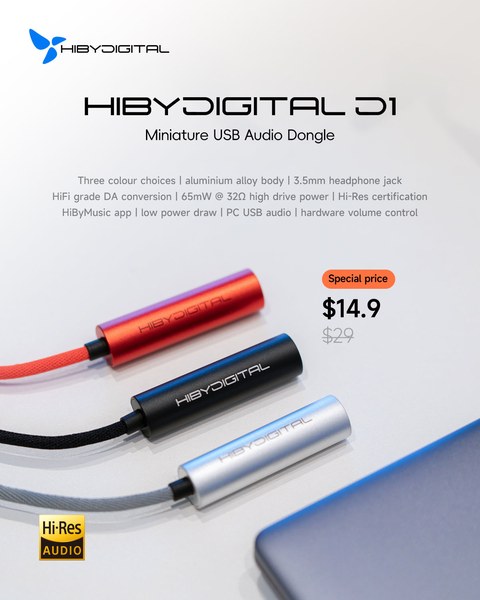
Quick Facts: HiBy Digital D1
| Spec | Value |
|---|---|
| Type | USB-C dongle DAC |
| Output | 3.5mm single-ended |
| Decoding | PCM up to 32-bit/384kHz |
| Output power | 65mW at 32Ω |
| Weight | ~10g, cable included |
| Certification | JAS Hi-Res Audio |
| Volume control | Hardware buttons, 50 steps |
What the D1 actually is
The HiBy Digital D1 is a USB-C dongle DAC — a small inline adapter that takes a digital audio signal from a phone, tablet, or computer over USB and converts it to an analogue signal for a pair of wired headphones or in-ear monitors. The whole thing weighs about 10 grams, cable included, so it disappears in a pocket in a way that dedicated dongle-amps like the FC5 do not.
- Aluminium alloy chassis, available in three colour finishes
- 3.5mm single-ended headphone output
- USB-C input, compatible with Android, iOS (with the right cable/adapter), and PC/Mac
- Physical volume buttons with 50 discrete steps
- JAS Hi-Res Audio certification
One detail worth calling out before the spec sheet: the DAC chip inside the D1 is not consistently reported across the sources I checked. Some retailer listings and reviews point to an AK4493EQ, while others reference a CS46L41. I could not find a single authoritative teardown that settles this cleanly, and it is plausible that HiBy has sourced slightly different chips across production batches, which would not be unusual for a budget dongle. If the exact silicon inside matters to you, I would not take any single source’s word for it — treat it as an open question rather than a confirmed spec.
Specs that are not in dispute
Regardless of which DAC chip actually ships in a given unit, the numbers HiBy publishes are consistent everywhere I looked:
- PCM decoding up to 32-bit/384kHz
- 65mW of output power at 32 ohms
- Hardware volume control via the two side buttons, in 50 steps
- Physical weight of roughly 10g
65mW at 32 ohms is enough to drive most easy-to-power in-ear monitors and many low-impedance portable headphones to a comfortable volume, but it is not going to do anything useful with a full-size planar or a high-impedance studio headphone. This dongle is built for IEMs and portable cans, not desk-bound gear.
Using it day to day
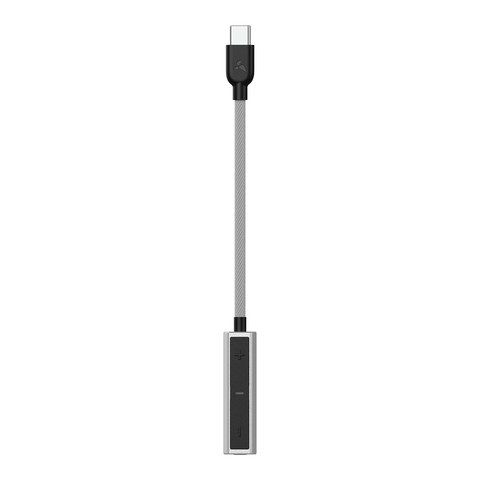
On Android, plugging the D1 in triggers the usual USB audio permission prompt, and from there it behaves like any other USB DAC — system volume and media volume both route through it, and the physical buttons on the dongle itself adjust hardware volume independently of the phone’s software volume, which is a nice touch for fine-tuning levels without pulling the phone out of a pocket. Pairing it with the HiByMusic app on Android or iOS unlocks a few extra options — things like gain behaviour and format indicators — that a generic media player will not surface, though the dongle works perfectly well as a plain USB audio device without the app installed.
On a laptop, it is recognised immediately as a standard USB DAC on both Windows and macOS, no drivers needed for basic PCM playback. I used it through several video calls and a chunk of casual listening on a Windows machine with zero setup beyond plugging it in.
Sound impressions
For the price, the tonal balance is inoffensive and slightly warm rather than clinical. It is not going to out-resolve a proper desktop DAC/amp stack, and nobody buying a $15 dongle should expect that. What it does deliver is a noticeably cleaner noise floor than the built-in DAC on most Android phones, and enough drive for sensitive IEMs without audible hiss, which is the actual bar a product like this needs to clear.
Troubleshooting Common Issues
A handful of practical snags come up often enough with dongle DACs like the D1 that they’re worth covering directly.
- Phone doesn’t recognize the D1 at all: Check that your USB-C cable actually carries data and isn’t a charge-only cable; a surprising number of USB-C cables skip the data lines entirely.
- No sound on an iPhone: You need a genuine USB-C-to-Lightning adapter (or a direct USB-C connection on newer iPhone models), and a cheap uncertified adapter can fail to pass digital audio even though it charges fine.
- Crackling or dropouts during playback: On Android, disable USB power-saving or battery optimization for the audio app in use; aggressive power management is a common cause of intermittent dropouts with external USB DACs.
- Volume seems too low even at maximum: Check both the phone’s system volume and the D1’s own hardware volume buttons separately — the two are independent, and it’s easy to max one while forgetting the other is turned down.
- Phone battery drains noticeably faster with the D1 attached: This is expected and not a defect; the dongle draws its power entirely from the phone, so heavier listening sessions will use more battery than playing through the phone’s built-in output.
Build quality and design
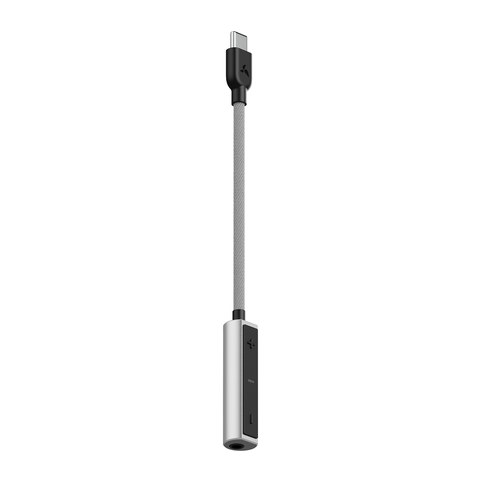
The aluminium shell is the standout part of the package at this price point. It feels solid rather than hollow, the fabric-braided cable resists tangling better than the rubber cables bundled with cheaper dongles, and the volume buttons have enough tactile feedback that you can operate them by feel through a pocket. HiBy sells the D1 in three colours, which is a small thing but makes it easy to colour-match a case or a set of earphones.
Where to find it
The D1 is sold directly through HiBy’s own store, and it also shows up on Amazon and through independent audio retailers. Coverage and hands-on impressions are also available from outlets like Headfonics and Stereoindex, alongside the Hi-Fi Ratings testing database, if you want a second and third opinion beyond mine before buying.
Who this is actually for
If you already own a dedicated DAP or a proper desktop DAC/amp, the D1 is not going to replace either. Where it earns its keep is as the dongle you leave in a bag or attached to a spare cable, for days when you forgot the good gear at home, or as a first step up from a phone’s built-in output for someone who has never used an external DAC before. It is not trying to be a flagship dongle, and judged on those terms it does its job cleanly.
Frequently asked questions
Does the HiBy Digital D1 work with iPhones?
Yes, with a USB-C to Lightning adapter or cable where required depending on the iPhone model, or directly on USB-C iPhone models. It shows up as a standard USB audio class device.
Do I need the HiByMusic app to use it?
No. The D1 works as a plain USB DAC with any media player or on a PC/Mac without any app installed. HiByMusic simply adds extra format and gain information for users who want it.
What DAC chip does the D1 use?
Sources disagree here — some list an AK4493EQ, others a CS46L41. Given the conflicting information and the possibility of batch-to-batch variation, I would not treat either answer as definitive without a teardown of your specific unit.
Can the D1 drive full-size headphones?
Not comfortably. At 65mW into 32 ohms, it is sized for in-ear monitors and low-impedance portable headphones rather than high-impedance or planar-magnetic full-size cans.
I have been testing portable audio gear as a hobby for a long time, mostly out of curiosity about how much a small dongle can actually improve on a phone’s stock output, and pieces like this one reflect hands-on time with the actual hardware rather than a spec-sheet summary.