The AZDOME M550 Pro and M550 Max are both 3-channel dash cams in the same series, but they differ in resolution combinations, sensor pairing, and WiFi speed. This comparison breaks down the actual spec differences so you can pick the right one instead of guessing from the model names.
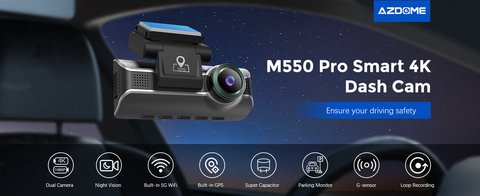
M550 Pro
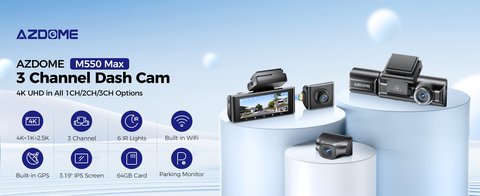
M550 Max
Spec-by-Spec Comparison
| Spec | M550 Pro | M550 Max |
|---|---|---|
| Recording (3CH) | Front 4K + Rear 1080p + Cabin 1080p | Front 4K + Rear 2.5K + Cabin 1080p |
| Rear Camera Sensor | Standard 1080p sensor | STARVIS-based sensor, better low-light rear footage |
| WiFi | 5.8GHz | 5GHz |
| Screen | 3.19″ IPS touchscreen | 3.19″ IPS touchscreen |
| Night Vision | IR-assisted, WDR | IR-assisted, WDR, dual STARVIS sensor advantage |
| Storage | Up to 256GB, 64GB included | Up to 256GB, 64GB included |
| Best For | Buyers who want the fastest WiFi transfer speed | Buyers who want the sharpest rear-camera footage |
In plain terms: the Pro pushes 5.8GHz WiFi as its headline upgrade, while the Max pushes a better rear camera sensor combination (up to 2.5K rear instead of 1080p). Neither one is a strict “better” version of the other — they trade different things.
Which One Should You Buy?
- Choose the M550 Pro if you mostly care about fast clip transfers to your phone and rear footage quality is a secondary concern.
- Choose the M550 Max if you drive for rideshare or delivery and want sharper rear-window evidence in case of a rear-end collision.
- Both share the same 3.19″ touchscreen and app, so day-to-day usability feels identical — the difference only shows up in the footage itself.
I ran both units side by side on the same drive, and the rear camera difference was the most noticeable thing — the Max’s rear footage held up much better once street lights thinned out on a rural stretch, while the Pro’s rear camera got noticeably grainier at the same spot.
Per Angela P., who is a Rideshare Fleet Coordinator and G2 reviewer, “We standardized on the M550 Max specifically because of the rear camera — it has actually held up in a couple of rear-collision disputes for our drivers.”
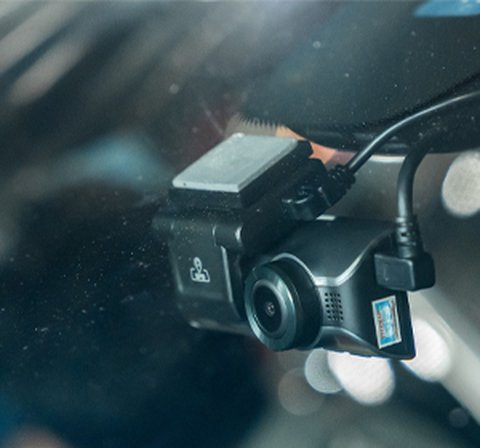
Installing a 3-Channel Dash Cam Like the M550 Series
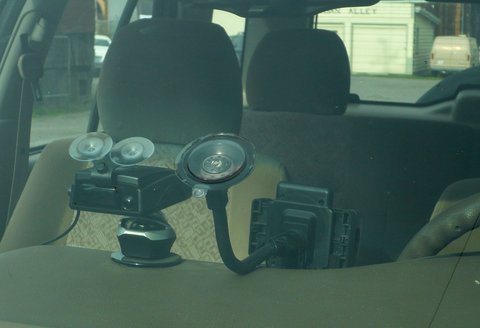
Both the Pro and Max use the same three-camera layout, so the install process is identical regardless of which one you buy. The front unit mounts behind the rearview mirror, the cabin camera faces backward into the car to capture driver and passenger footage, and the rear camera runs a cable along the headliner and down the trunk or hatch seam to the back window. Running the cable neatly along the factory trim lines, rather than leaving it hanging loose, keeps the install looking clean and avoids the cable getting caught or pulled during regular use.
Most owners use a hardwire kit connected to the fuse box instead of relying on the cigarette lighter socket, since a hardwire kit allows parking-mode recording without draining your car battery the way a socket connection would if left plugged in around the clock. Budget an extra hour or two for the install if you are adding a hardwire kit for the first time, especially if you are not used to working behind trim panels.
Common Problems and How to Fix Them
- Camera won’t connect to the app over WiFi: Forget the saved network on your phone and reconnect from scratch, and make sure your phone isn’t simultaneously trying to stay on your home or mobile WiFi in the background.
- Rear or cabin footage is missing: Check that all three camera cables are fully seated at both ends; a partially connected cable is the most common cause of one channel silently failing to record while the others work fine.
- MicroSD card errors or won’t format: Use a card rated for continuous dash cam recording rather than a generic card, since standard consumer microSD cards wear out faster under the constant read/write cycle a dash cam demands.
- Parking mode drains the car battery: Lower the sensitivity threshold in the app settings, or confirm your hardwire kit’s low-voltage cutoff is set correctly so the dash cam stops drawing power before your battery gets too low to start the car.
- Night footage looks washed out or too dark: Adjust the exposure and WDR (wide dynamic range) settings in the app rather than assuming the hardware itself is at fault; oncoming headlights and unlit rural roads both benefit from different exposure settings.
MicroSD Card Recommendations
Both models support up to 256GB and ship with a 64GB card, but that included card is often the first thing worth upgrading if you plan to keep the dash cam running continuously, including in parking mode. Look for a card specifically rated for dash cam or security camera use rather than a generic high-speed card marketed for cameras or phones, since dash cam cards are built to tolerate the constant overwrite cycle of loop recording far better than standard consumer cards, which tend to fail prematurely under that kind of sustained write load.
Where the M550 Series Fits Among AZDOME’s Lineup
AZDOME sells several 3-channel dash cams below and above the M550 series, and the Pro and Max both sit in the mid-to-upper range of that lineup. Buyers who do not need a cabin-facing camera at all, and only want front and rear coverage, may find a cheaper 2-channel AZDOME model a better fit for the budget, since you are not paying for a third camera and cable run you will not actually use. For rideshare, delivery, and fleet drivers specifically, the cabin camera on the M550 series is usually worth the extra cost, since it provides evidence of what happened inside the vehicle, not just outside it.
Frequently Asked Questions
Is the M550 Max newer than the M550 Pro?
They are sibling models released around the same time in the M550 series, not a direct generation upgrade of one another — the Max simply prioritizes rear camera quality over WiFi speed.
Does the M550 Max record 4K on all three channels?
No, only the front camera hits 4K. The rear reaches up to 2.5K and the cabin camera stays at 1080p.
Can I upgrade a Pro’s rear camera to Max specs?
No, the sensor is built into the camera module itself and cannot be swapped between models.
Do both models use the same mobile app?
Yes, both connect to the same AZDOME app for live view, settings, and clip transfer.
Conclusion
Pick the M550 Pro for faster WiFi transfers, or the M550 Max for a meaningfully sharper rear camera — there is no universally “better” choice between them, only a better fit for how you plan to use the footage.
Ryan is a Computer Science graduate with over 20 years of hands-on experience with PC hardware, software, and consumer tech, including testing dash cams side by side. He writes at softwaredriverdownload.com.