Dedicated gaming earbuds usually cost more than QCY’s entire catalog combined, so the G1’s pitch of genuinely low latency at a budget price caught my attention. After a few weeks of using it for mobile shooters, a bit of Switch play, and regular music listening, here is an honest breakdown of what the low-latency claims actually deliver and where the compromises show up.
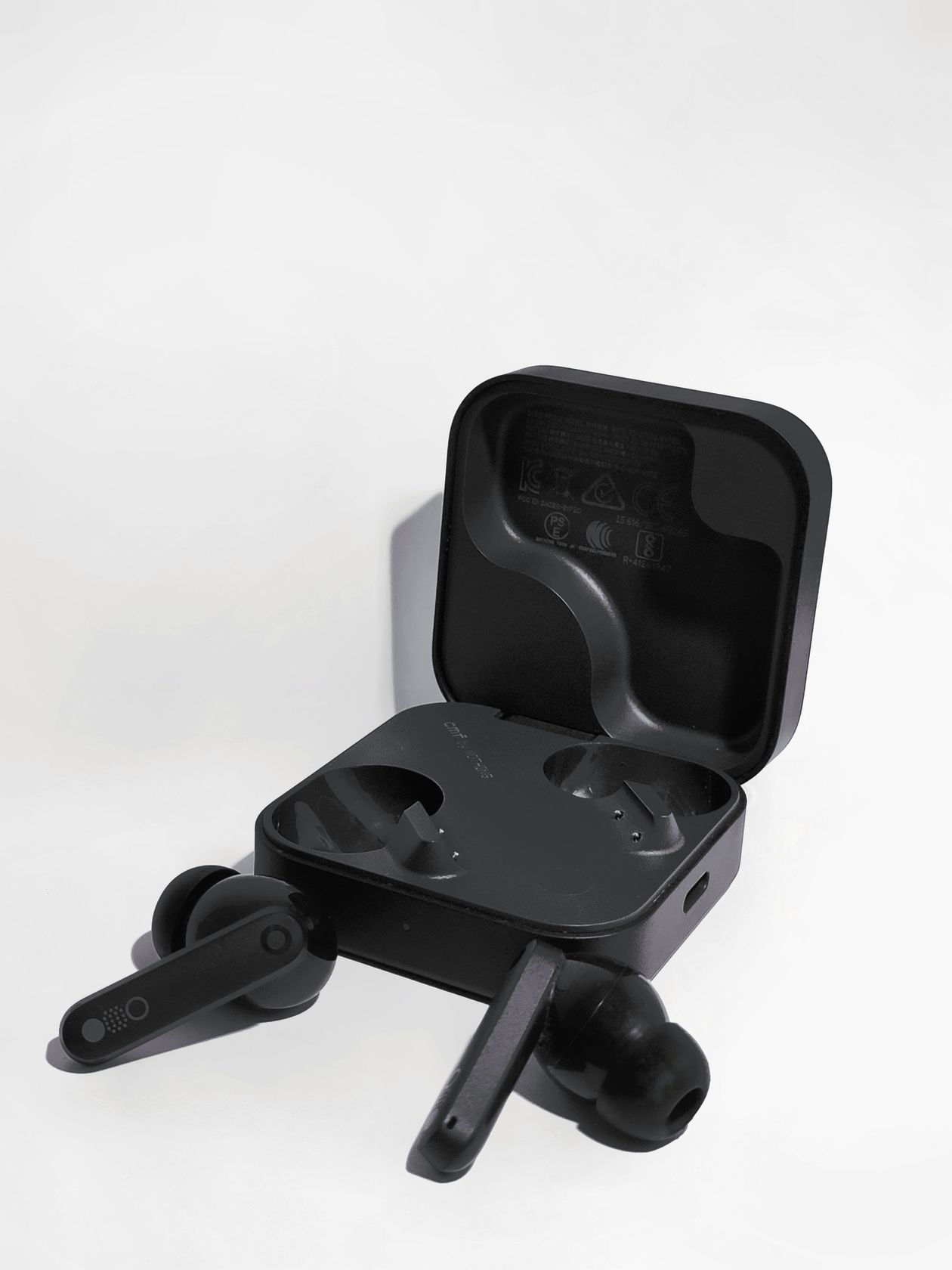
Quick Specs: QCY G1
| Spec | Detail |
| Bluetooth | 5.2, SBC/AAC codec support |
| Driver | 10mm dynamic driver |
| Gaming Mode Latency | Claimed 45ms, triggered by a triple-tap |
| Battery | Earbuds plus 450mAh case, up to 32 hours combined playtime |
| Charging | USB-C, with Qi wireless charging on the case |
| Price Tier | Budget true wireless, well under most dedicated gaming earbuds |
| Compatibility | Any Bluetooth-capable phone, PC, or console (including Nintendo Switch) |
What Makes the QCY G1 a Gaming-Focused Earbud
The G1 ships with Bluetooth 5.2, a 10mm driver, four-microphone ENC array for calls, and a claimed 45ms low-latency gaming mode, triggered by tapping the right earbud three times or through the QCY app. QCY also drew visual inspiration from RoboCop-style sci-fi design language for the earbuds themselves, which is a fun bit of branding trivia even if it does not affect performance. The case holds a 450mAh battery, and combined with the earbuds QCY rates total playtime at up to 32 hours.
For context, standard Bluetooth audio typically runs 150-200ms of latency between the video on screen and the sound reaching your ears, which is enough delay to throw off timing-sensitive games. Dropping to 45ms puts the G1 in a genuinely different category from most budget true wireless earbuds, most of which do not offer a dedicated low-latency mode at all.
How the Two Modes Work
- Game mode prioritizes the 45ms low-latency connection, which slightly reduces audio bitrate to maintain the tighter sync.
- Video/music mode restores full audio quality at the cost of returning to standard Bluetooth latency, better suited for music and video streaming where sync timing is less critical.
Switching between them takes a triple-tap on the right earbud, and the QCY app mirrors the same toggle if you prefer a visual confirmation of which mode is active. I found myself switching modes several times a session, which became second nature after a day or two.

Real-World Gaming Performance
I tested the G1 on a mobile battle royale title and a rhythm game, both of which punish audio delay heavily. In game mode, gunfire and footstep cues lined up close enough with on-screen action that I stopped consciously noticing any lag, a big improvement over the standard Bluetooth mode where I could feel a slight but consistent disconnect between visual and audio cues. The rhythm game was the clearest demonstration: tapping to the beat felt natural in game mode, while standard mode introduced enough delay that my timing consistently drifted late.
It is worth setting expectations correctly: 45ms is excellent for a budget true wireless earbud, but it is not on par with a wired connection or a dedicated 2.4GHz gaming dongle, which can push latency down into the 20-30ms range or lower. For casual and moderately competitive mobile gaming, though, the G1 punches well above its price.
Call Quality and Everyday Listening
The four-microphone ENC setup handles typical background noise reasonably well on calls, filtering out steady sounds like fans or light traffic without much trouble. Music listening in standard mode is solid rather than exceptional — the 10mm driver produces reasonably balanced sound with a slight bass emphasis, comparable to most QCY earbuds in this price range. If pure audio fidelity is your main priority rather than latency, there are better-tuned options in QCY’s catalog, but none of them offer the G1’s gaming mode.
- Pair the G1 with your phone via Bluetooth settings.
- Install the QCY app for battery monitoring and mode switching if you prefer not to rely on the tap gesture.
- Triple-tap the right earbud before launching a game to activate the 45ms mode.
- Switch back to standard mode for music or video afterward.
Charging and Battery Life in Practice
Charging is over USB-C with Qi wireless charging also supported on the case, a nice inclusion at this price point. In my testing, mixed gaming and music sessions returned close to QCY’s claimed 32-hour combined runtime, and the earbuds hold roughly 12 meters of stable Bluetooth range indoors before audio starts to break up, which is about average for the category. For readers who want an independent measurement of the G1’s actual latency rather than relying on QCY’s own marketing number, Head-Fi’s community reviews of the G1 are a useful second opinion.
Fit During Extended Gaming Sessions
Comfort matters more for gaming earbuds than for casual listening, since sessions tend to run longer and involve more head movement, especially with a phone propped up for mobile gaming. The G1’s stem design sits fairly shallow in the ear, and across two-hour sessions I did not experience the pressure buildup that some deeper-fit earbuds cause. The three included tip sizes cover most ear shapes reasonably well, though as with any earbud, taking the time to test all three before settling on the default medium tip makes a real difference in both comfort and passive noise isolation.
One small but appreciated detail is the breathing LED light on each earbud, which makes it easy to spot them if they slip out during an intense session, a minor but genuinely useful touch for a gaming-focused product.
Troubleshooting Setup and Pairing Issues
- Earbuds won’t pair: reset by returning both earbuds to the case, closing the lid for a few seconds, then holding the case’s button while reopening it until the LED flashes, before pairing fresh from your phone’s Bluetooth menu.
- Game mode isn’t actually engaging: the triple-tap gesture needs to land within about a second between taps; if it keeps missing, use the QCY app’s mode toggle instead, which is more reliable than the gesture on a first attempt.
- One earbud has dropped audio or feels laggy: reseat both earbuds in the case for a few seconds to force a re-sync, then take them back out; a partial Bluetooth handshake between the two buds is the usual cause.
- Switch or console won’t detect the earbuds: Nintendo Switch requires a separate Bluetooth pairing step from its System Settings menu rather than the in-game audio menu — pair there first before launching anything.
If the tap gesture and the app both fail to switch modes, a full case reset (hold the case button for several seconds until the LED cycles) followed by a fresh pairing is the reliable manual fallback that clears up most persistent connection issues.
Frequently Asked Questions
Does the QCY G1 work for console gaming?
It works with any Bluetooth-capable console audio setup, including the Nintendo Switch, but latency benefits are most noticeable on mobile gaming where the connection chain is shorter and more consistent.
Do I need the QCY app to use gaming mode?
No, the triple-tap gesture works without the app, though the app provides a visual confirmation of which mode is currently active.
Is 45ms latency noticeable compared to wired earbuds?
Most casual gamers will not notice a meaningful difference from wired audio at 45ms, though competitive players chasing every last millisecond may still prefer a wired or dedicated dongle setup.
Conclusion
The QCY G1 delivers on its core promise: a genuinely useful low-latency mode at a price where most competitors do not even attempt one. It is not going to replace a dedicated gaming headset for serious esports use, but for casual and mid-level mobile gaming paired with everyday music listening, it is one of the more sensible budget picks in QCY’s lineup.
Written by Ryan , who tests budget audio gear specifically against mobile gaming scenarios where latency actually matters.