The WOLFBOX G900 and G900 Pro share the same 12″ mirror form factor and 4K front recording, but the Pro version adds a meaningfully newer sensor and extra storage. Here’s the actual difference between the two, and whether the upgrade is worth the extra cost for your driving situation.
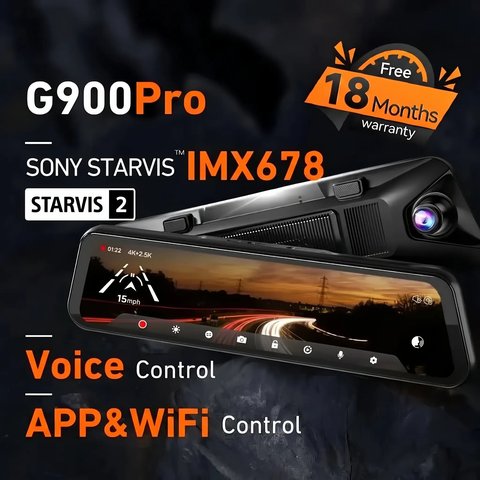
Spec Comparison
| Spec | G900 | G900 Pro |
|---|---|---|
| Front resolution | 4K/30fps | 4K/30fps |
| Rear resolution | 2.5K/30fps | 2.5K/30fps |
| Sensor | Standard low-light sensor | STARVIS 2 IMX678 |
| Display | 12″ touchscreen | 12″ touchscreen |
| WiFi | 5.8GHz | 5.8GHz |
| Operating range | -4°F to 158°F | -4°F to 158°F |
| Price tier | Mid-range mirror dash cam | Modest premium over base G900 |
| Compatibility | Standard 12″ rearview mirror clip mount, most sedans and SUVs | Same mount and vehicle fit as the base G900 |
Is the Sensor Upgrade Worth It?
- STARVIS 2 handles low-light and high-contrast scenes (tunnel exits, oncoming headlights) noticeably better than the standard sensor
- Daytime footage looks close to identical between the two — the gap widens mainly after dark
- The Pro’s larger included card matters if you don’t want to buy storage separately
- Both models use the same 12″ mirror mounting hardware, so physical installation is identical regardless of which you choose
If most of your driving happens in daylight and you’re not particularly price-sensitive to storage, the base G900 covers the same core resolution numbers as the Pro — the upgrade really pays off specifically for night driving and dense urban glare, not as a general improvement across the board.
What “STARVIS 2” Actually Changes Under the Hood
STARVIS 2 is Sony’s second-generation low-light CMOS sensor architecture, and the practical difference from the standard sensor comes down to how it handles dynamic range in a single frame. A scene with both bright headlights and dark shadows — a common nighttime driving situation — is where older sensors either blow out the highlights or lose shadow detail entirely. STARVIS 2 captures more usable detail across that full range simultaneously, which is why WOLFBOX reserves it for their higher-tier models rather than including it across the whole lineup.
This matters most in specific scenarios: driving through underpasses and tunnels, navigating unlit rural roads, or parking in dim garages where the parking mode footage needs to remain usable as evidence. If none of those describe your typical driving, the practical gap between the two sensors narrows considerably.
Storage: 128GB vs the Base Card Size
The G900 Pro typically ships with a larger included microSD card than the base G900, which reduces how often you need to think about storage at all. If you’re comfortable buying and swapping in your own larger card regardless of which model you pick, this difference becomes less of a deciding factor and the sensor quality becomes the more relevant consideration.
Compare both directly on WOLFBOX’s dash cam collection page.
Practical Scenarios Where the Difference Shows Up
Think through your actual commute and parking situation before deciding. A driver who parks in a well-lit garage and drives mostly during daylight hours will rarely notice the sensor gap. A driver who regularly drives at dusk, through unlit rural roads, or parks on the street overnight will get more consistent, usable footage from the G900 Pro’s STARVIS 2 sensor, particularly for parking mode clips captured under streetlights or ambient city glow rather than direct illumination.
Reviewing Footage: What the Sensor Difference Looks Like in Practice
When comparing side-by-side footage samples between the two sensors, the difference is most visible in the shadow detail around a scene’s darker areas at night, not in overall brightness. The standard sensor on the base G900 tends to render dark areas as flatter, noisier black, while the STARVIS 2 sensor on the Pro retains more visible detail and texture in those same shadow regions. This is the kind of difference that matters far more when reviewing footage after an incident than during normal daytime driving.
Troubleshooting Setup and Pairing Issues
- App won’t find the mirror over WiFi: both models broadcast their own 5.8GHz WiFi hotspot for the app — confirm your phone is connected to that hotspot (not your home WiFi) before opening the WOLFBOX app.
- GPS not locking: give the unit a few minutes with a clear view of the sky after first power-on; GPS logging on both models needs an unobstructed windshield view to establish a fix.
- MicroSD card errors or “card full” loops: format the card in-app or in-menu on a fresh install rather than formatting it on a computer, since dash cams expect a specific FAT32/exFAT structure for continuous loop recording.
- Touchscreen unresponsive after installation: confirm the mirror clip is seated flat against the windshield mount — a loose mechanical fit can cause intermittent power drops that look like a frozen screen.
If the app pairing process still fails after a WiFi reconnect, both models support a manual fallback: pull the microSD card and review footage directly on a computer with a card reader, which sidesteps the app entirely while you troubleshoot the WiFi connection.
Frequently Asked Questions
Is the resolution actually different between G900 and G900 Pro?
No, both record 4K front and 2.5K rear; the difference is in sensor quality and low-light performance, not resolution numbers on the spec sheet.
Does the Pro version cost significantly more?
Pricing varies by retailer and promotions, so it’s worth checking current listings rather than assuming a fixed gap.
Can I install the same accessories on either model?
Yes, both share the same 12″ mirror mount and rear camera cabling approach.
Which is better for a vehicle that’s mostly parked outdoors?
The Pro’s wider operating range and improved sensor handle harsh lighting conditions from parking mode footage somewhat better.
Does the base G900 still support voice commands?
Yes, voice control is a shared feature across both models, not exclusive to the Pro version.
Will daytime highway footage look different between the two?
In good daylight, differences are minimal; the sensor gap becomes most noticeable specifically in low-light and high-contrast conditions.
Is one model easier to find in stock than the other?
Availability can shift over time between retailers; check current stock on WOLFBOX’s official site or major retailers before assuming either is readily available.
Does either model require a subscription for app access?
No, the WOLFBOX app is free to use for both models, with no recurring subscription required for basic footage access and settings.
Is the physical camera housing identical between the two?
Yes, both use the same 12″ mirror body and mounting hardware, so the visual difference between the two on your windshield is negligible.
Is customer support the same for both models?
Yes, both models are covered under WOLFBOX’s standard support and warranty channels, with no separate tier based on which version you own.
Does the standard G900 still include GPS and G-sensor features?
Yes, GPS logging and G-sensor collision detection are standard across both models, not exclusive to the Pro version.
Conclusion
Choose the G900 Pro if you regularly drive at night or in high-contrast lighting; the base G900 covers daytime use just as well for less money. Check current pricing before deciding, since the value gap shifts with promotions and the core resolution specs are identical either way, making the sensor the real deciding factor rather than anything else on the spec sheet.
Ryan
Computer Science graduate · longtime smart home and PC hardware tester