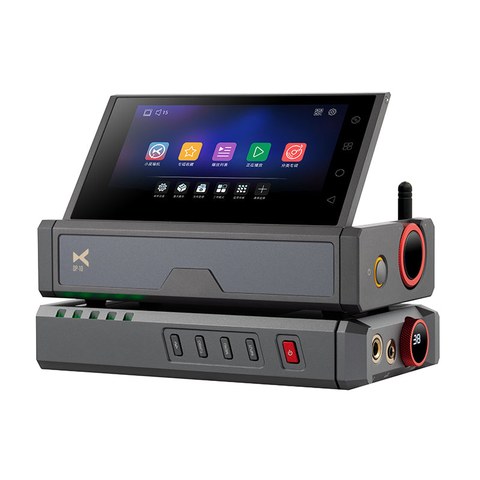
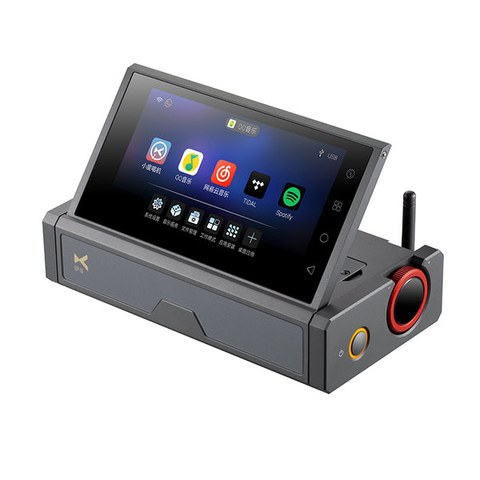
The DP-10 is one of xDuoo’s more unusual releases, and understanding what it deliberately leaves out is just as important as knowing what it includes. This is a pure digital music transport: a networked, touchscreen-driven source component that pulls in local files, network shares, and streaming services, then sends a clean digital signal out to a separate DAC or amplifier. It does not convert that signal to analog audio itself, so you will need a DAC downstream to actually hear anything.
| Spec | Detail |
| Processor | Quad-core ARM Cortex-A55, 8GB RAM, 64GB storage |
| Screen | 5.5-inch, 1080×1920 touchscreen |
| Max Resolution | PCM 768kHz / DSD512 |
| Networking | Gigabit Ethernet, dual-band WiFi 6 |
| Digital Outputs | USB, coaxial, optical, AES/EBU, HDMI, IIS |
Core Hardware
Under the hood sits a quad-core ARM Cortex-A55 processor paired with 8GB of RAM and 64GB of internal storage, running on Android. That is enough horsepower to handle a 5.5-inch, 1080×1920 touchscreen smoothly while decoding files up to PCM 768kHz and DSD512 internally before handing them off digitally. Networking covers both Gigabit wired Ethernet and dual-band WiFi 6, which matters if you plan to stream lossless files from a NAS or an online service without stutter.
Output Options
Because the DP-10 has no analog stage, its value depends entirely on its digital outputs, and xDuoo did not skimp here:
- USB output for feeding an external USB DAC
- Coaxial and optical (Toslink) digital outputs
- AES/EBU balanced digital output
- HDMI and IIS output for compatible high-end DAC chains
That range of connectors is unusually broad for a device in this price range and signals that xDuoo is targeting people who already own a serious standalone DAC and simply need a flexible, well-built source to feed it, rather than an all-in-one solution.
How It Compares to a Phone or Laptop as a Source
A common question is why spend on a dedicated transport when a phone can already stream Tidal or Qobuz. The short answer is signal integrity and control. Phones and laptops share their processing and radio hardware with dozens of other tasks, which can introduce electrical noise and timing jitter into a USB or digital output. A transport built around a single audio-focused task, with a dedicated clean power path to each output, tends to deliver a steadier bitstream to the downstream DAC. Whether that translates into audible improvement depends on your DAC and ears, but it is the reasoning behind purpose-built transports as a category, something outlets like HomeTheaterReview discuss in more depth in their coverage of the DP-10.
Setting Up Streaming Services
- Connect the DP-10 to your home network over WiFi 6 or Gigabit Ethernet during initial setup.
- Install your streaming app of choice from the built-in Android app environment.
- Log into your existing streaming account as you would on any Android device.
- Select your external DAC as the active output in the device’s audio routing settings.
- Confirm the sample rate shown on your DAC matches the source file to verify a clean digital handoff.
Who This Device Is For
The DP-10 is a niche product by design. If you already own a well-regarded DAC or DAC/amp and have been feeding it from a laptop or a budget streamer, this is a meaningful upgrade path that keeps your existing analog stage in place. If you do not yet own a separate DAC, this is the wrong starting point, since you would need to budget for that component separately before the DP-10 does anything audible at all.
Local Files vs Streaming on the Same Device
One underrated strength of a transport built on Android rather than a closed proprietary interface is that it treats local files and streaming services as equally native. You can browse a NAS share full of ripped CDs and FLAC downloads in one app, then switch straight into Tidal or Qobuz in another, without the awkward hand-off some closed-ecosystem streamers force between local and networked libraries. For anyone who has spent years accumulating a local collection but has also started supplementing it with a streaming subscription, this dual approach avoids having to choose one workflow over the other.
Build Quality and Everyday Handling
- The touchscreen responds quickly thanks to the Cortex-A55 processor, without the lag some budget streamers exhibit when navigating large libraries
- Gigabit Ethernet is worth using over WiFi when streaming very high-resolution DSD or PCM files, since it removes any wireless variability from the equation entirely
- The metal chassis feels substantial on a desk, avoiding the light, hollow feel that some competing streamers have at a similar price
Pairing the DP-10 With Different DAC Types
Because the DP-10 offers such a wide spread of digital outputs, from USB and coaxial through to AES/EBU and even IIS, it is worth thinking about which connection your specific DAC prioritizes before committing to a cable setup. Many mid-range DACs treat USB as a secondary input behind their coaxial or AES stage, since some engineering teams optimize their internal clock recovery around a wired digital connection rather than USB. If your downstream DAC lists a preferred digital input in its own documentation, matching that recommendation on the DP-10 side is likely to give the most consistent results rather than defaulting to whichever cable happens to be handy.
A Realistic Look at the Price Point
At close to a thousand dollars, the DP-10 sits well above entry-level streamers, and it is fair to ask whether that premium is justified for something that adds no analog conversion of its own. The honest answer depends on what you already own. If your existing DAC is a genuinely capable one that has been bottlenecked by a mediocre source, the DP-10 addresses that bottleneck directly. If your current source has never been a limiting factor in your chain, the money may be better spent upgrading the DAC or amplifier stage itself rather than the transport feeding it.
Troubleshooting Common Issues
- No sound at all from the system: remember the DP-10 has no internal DAC, so silence at the DP-10’s own output jacks is expected; confirm your external DAC is powered on and set to the correct digital input rather than assuming a fault with the transport.
- WiFi 6 streaming stutters on high-resolution files: switch to wired Gigabit Ethernet for DSD or very high sample rate playback, since even a strong WiFi 6 signal can introduce occasional dropouts that a wired connection avoids entirely.
- Touchscreen becomes slow or unresponsive: like any Android device, background apps can accumulate over time; a restart clears most slowdowns, and periodically closing unused streaming apps from the recent-apps view helps keep things snappy.
- Streaming app won’t accept your login: confirm the app has been updated through the built-in Android app environment, since an outdated cached version can fail silently on login even with correct credentials.
- Downstream DAC won’t lock onto the signal: double check that the sample rate shown on the DAC matches the source file and that you have selected the correct digital output type (USB, coaxial, AES/EBU, and so on) in the DP-10’s audio routing settings, since a mismatched output selection is the most common cause of a DAC failing to lock.
FAQ
Does the DP-10 have a headphone jack?
No, since it has no internal DAC or amplifier, there is no headphone output; all audio must pass through an external DAC first.
Can it play files from a USB drive?
Yes, alongside network and streaming sources, local playback from external storage is supported.
What streaming services are supported?
Because it runs on Android, most major streaming apps that publish an Android client can be installed directly on the device.
Is the touchscreen necessary or could I control it remotely?
The touchscreen is the primary interface, though as an Android-based device it is possible to explore third-party remote control apps if you prefer not to reach for the unit directly.
What is the maximum sample rate it can send out digitally?
It can handle files up to PCM 768kHz and native DSD512, though your downstream DAC needs to support the same rates to make full use of that ceiling.
Between reviewing DACs and streamers for this site and running my own home rig, I have learned that the unglamorous transport in the chain often matters more than people expect.