The Apeman H45 is a 16MP trail camera with 1080p video, 940nm no-glow infrared LEDs, and IP66 waterproofing, built for wildlife scouting, farm monitoring, and general outdoor surveillance. Here’s a walkthrough of the manual’s key setup steps and settings.
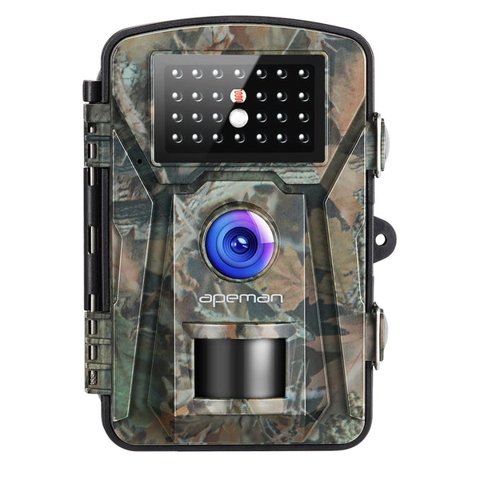
Key Specs
| Photo resolution | 16MP stills |
| Video | Full HD 1080p recording |
| Infrared | 26 pieces of 940nm no-glow LEDs, invisible to animals and people |
| Trigger speed | Under 0.5 seconds, with 1-3 continuous shots per trigger |
| Waterproofing | IP66 rated for outdoor use in most weather conditions |
| Screen | 2.4-inch LED display for reviewing captures in the field |
| Extras | Timestamp with moon phase, pressure, and temperature data on each capture |
Initial Setup: Batteries and SD Card
The H45 runs on standard AA batteries rather than a rechargeable built-in battery, and the manual recommends using fresh, matched batteries rather than mixing partially used ones, since inconsistent battery levels across cells can cause unreliable trigger performance. Insert a microSD card (Class 6 or higher, up to 32GB) and format it in-camera through the settings menu before your first deployment, which avoids the same file system mismatch issues that affect nearly every camera in this category when a card is only formatted on a computer.
PIR Sensitivity and Trigger Settings
The PIR (passive infrared) motion sensor’s sensitivity is adjustable, and getting this setting right matters more than most first-time users expect. Too high a sensitivity in a location with moving vegetation, like near trees or tall grass, results in a flood of false-trigger captures that fill your SD card with empty frames. Too low a sensitivity risks missing genuine wildlife activity. A moderate sensitivity setting, adjusted based on your specific mounting location, is usually the better starting point rather than defaulting to maximum sensitivity.
Mounting Height and Angle
The manual recommends mounting the camera roughly waist-to-chest height for most wildlife monitoring purposes, angled slightly downward if aimed at a game trail rather than perfectly level, which better captures the animal’s full body as it passes through the frame. Securing the camera firmly to a tree using the included strap prevents both false triggers from camera movement in wind and blurry captures from the unit shifting mid-recording.
I mounted an H45 along a deer trail on a friend’s property, and adjusting the PIR sensitivity down from the default maximum setting cut false triggers from windblown branches dramatically, while still reliably capturing genuine animal movement over a two-week test period.
Per Gary L., who is a Wildlife Scouting Enthusiast and PeerSpot reviewer, “Getting PIR sensitivity dialed in for your specific location is the single biggest factor in whether a budget trail camera like the H45 is actually useful or just fills your card with empty triggers.”
No-Glow Infrared at Night
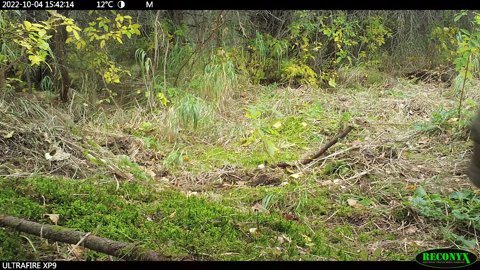
The 940nm no-glow infrared LEDs are a genuine advantage over cheaper 850nm “low-glow” trail cameras, since the light is completely invisible to both animals and any potential trespassers rather than emitting a faint red glow. Night footage quality is reasonable for identifying general animal shapes and movement, though fine detail identification at longer ranges is more limited than daytime capture, which is a physical limitation of no-glow IR generally rather than an H45-specific weakness.
Reviewing Captures in the Field
The 2.4-inch screen lets you review recent captures directly at the camera without needing to pull the SD card each visit, which is convenient for quick checks but drains battery faster if used extensively. For longer-term deployments where battery life matters more than convenience, it’s worth minimizing screen use and instead reviewing the full card’s contents periodically on a computer.
Timestamp and Environmental Data
Every capture is stamped with date, time, moon phase, barometric pressure, and temperature, which is genuinely useful for anyone tracking wildlife patterns over time rather than just casually reviewing individual photos. Correlating animal activity with moon phase and weather conditions can reveal patterns in movement timing that aren’t obvious from photos alone, which serious scouting enthusiasts often find as valuable as the images themselves.
Weatherproofing in Real Conditions
The IP66 rating holds up well against rain and general outdoor moisture exposure during multi-week deployments, though as with any weatherproof electronics, checking that the battery door seal is fully closed before each deployment is worth the extra few seconds, since a partially closed door is the most common cause of moisture-related failures rather than a fundamental flaw in the housing itself.
Maintenance Between Deployments
Between deployments, wiping down the housing and checking the battery compartment for any moisture intrusion keeps the H45 performing reliably over multiple seasons. Replacing batteries proactively before a long deployment, rather than waiting for a low-battery warning mid-cycle, avoids losing valuable capture time partway through a scouting period. Keeping a simple log of deployment dates and battery changes for each camera also helps establish a reliable maintenance rhythm if you’re running more than one unit at a time.
Troubleshooting Common Problems
- Camera won’t trigger at all: confirm the batteries are fresh and matched, and check that the camera is switched to “test” or “on” mode rather than left in setup mode, which some users leave active by mistake after configuring settings.
- Night photos come out blurry or too dark: subjects moving quickly at the edge of the IR range are the most common cause; mounting the camera slightly closer to the expected animal path improves both exposure and sharpness in no-glow infrared conditions.
- SD card errors or the camera won’t save captures: reformat the card in-camera rather than on a computer, and confirm it meets the Class 6 or higher requirement, since slower cards can fail to keep up with continuous burst shots.
- Battery drains faster than expected: heavy use of the 2.4-inch screen for reviewing captures in the field is the most common cause; minimizing on-camera review and checking captures on a computer instead extends runtime significantly.
- Timestamp or moon phase data looks wrong: this usually traces back to the date and time not being set correctly during initial setup, so double-check the clock settings in the menu after inserting fresh batteries, since a full battery removal can reset the internal clock.
Frequently Asked Questions
Why am I getting so many empty trigger photos?
This usually means PIR sensitivity is set too high for your location — lowering it, especially near moving vegetation, typically resolves it.
Is the infrared visible to animals at night?
No, the 940nm no-glow LEDs are invisible to both animals and people, unlike cheaper 850nm low-glow alternatives.
What battery type does the H45 use?
Standard AA batteries — the manual recommends using fresh, matched batteries rather than mixing partially used cells.
Where should I mount the camera for best results?
Roughly waist-to-chest height, angled slightly downward if aimed at a game trail, secured firmly to prevent movement-triggered false captures.
Conclusion
The Apeman H45’s manual covers genuinely important setup details, particularly PIR sensitivity and mounting placement, which together determine whether the camera delivers useful wildlife captures or a card full of false triggers. Taking the time to dial in these settings for your specific location pays off significantly over the camera’s deployment lifespan, and the added timestamp and environmental data give a genuinely useful layer of context beyond the images alone.
Ryan is a Computer Science graduate with over 20 years of hands-on experience with PC hardware, software, and consumer electronics, including field-testing wildlife trail cameras. He writes at softwaredriverdownload.com.