The WOLFBOX X5 is a compact 3-channel dash cam offering 4K front, 2.5K rear, and 1080P interior recording, built around the same STARVIS 2 IMX678 sensor found in WOLFBOX’s mirror cams but in a small dashboard-mount body instead. It’s aimed at drivers who want full front, rear, and cabin coverage without the bulk of a 12″ mirror replacement.
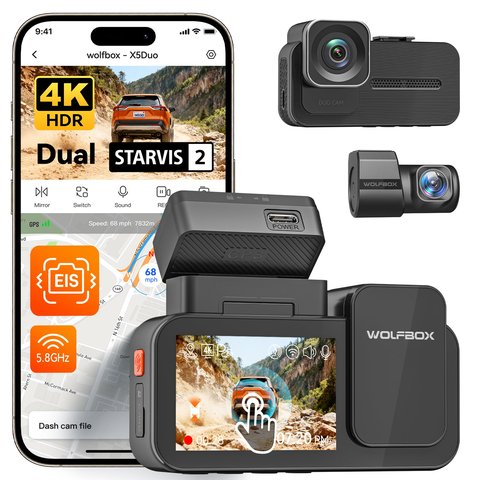
Key Specs
- 4K front, 2.5K rear, 1080P interior 3-channel recording (X5 Duo variant covers 4K+2.5K dual-camera)
- STARVIS 2 IMX678 and IMX675 sensors for front and rear/interior cameras
- 5.8GHz WiFi with the WOLFBOX app for footage access
- 12 voice commands and a touchscreen control panel
- GPS route logging and G-sensor collision detection
- 128GB (or 64GB depending on bundle) microSD card included
- Electronic image stabilization (EIS) to reduce shake on rough roads
| Quick Facts | WOLFBOX X5 |
|---|---|
| Channels | 3-channel: front, rear, interior |
| Resolution | 4K front / 2.5K rear / 1080P interior |
| Sensor | STARVIS 2 IMX678 (front), IMX675 (rear/interior) |
| Connectivity | 5.8GHz WiFi with WOLFBOX app |
| Storage included | 128GB or 64GB depending on bundle |
| Extras | GPS logging, G-sensor, EIS, voice commands |
Why Choose a Compact Cam Over a Mirror Cam
The X5’s small dashboard-mount body is far less conspicuous than a 12″ mirror replacement, and it doesn’t obstruct your view of the actual rearview mirror. The tradeoff is a smaller onboard display, so you’ll lean on the WOLFBOX app more for reviewing footage than you would with a full mirror-screen model. This makes the X5 a better fit if you’d rather keep your factory mirror untouched, or if you’re installing in a vehicle where a bulky mirror cam wouldn’t fit well against the windshield curvature.
Three-channel coverage (front, rear, interior) is worth prioritizing if you ever drive for rideshare or reasonably expect passenger-related incidents — the interior camera is the one channel most drivers skip when buying a dash cam, and it’s usually the one that ends up mattering in a dispute.
Understanding the X5 vs X5 Duo Naming
WOLFBOX sells this camera in two configurations under similar naming, which causes some confusion when shopping. The X5 Duo covers front and rear channels only, aimed at drivers who don’t need interior monitoring. The standard 3-channel X5 adds the interior camera on top of front and rear, which is the version worth choosing if cabin footage matters to you — for example, documenting passenger behavior, or capturing what happens inside the vehicle during a collision.
Both variants use the same STARVIS 2 IMX678 sensor for the front camera, so front-facing video quality is consistent regardless of which configuration you buy. The main tradeoff is simply whether you need that third interior channel.
Installation Basics
- Mount the front unit behind the rearview mirror using the included windshield bracket
- Route the rear camera cable along the headliner to the back window or license plate
- Position the interior camera lens to cover the cabin, typically angled toward the front seats
- Power via the 12V adapter, or a hardwire kit if you want parking mode support
- Connect to the WOLFBOX app over WiFi to confirm all three channels are recording correctly before relying on it
For full specs, see WOLFBOX’s official X5 product page.
STARVIS 2 Performance in a Smaller Body
It’s worth noting that despite its compact size, the X5 doesn’t compromise on front-camera sensor quality compared to WOLFBOX’s larger mirror cams — the same STARVIS 2 IMX678 sensor handles low-light and high-contrast scenes just as well in this smaller housing. The main functional tradeoffs versus a mirror cam come down to display size and on-device review convenience, not underlying video quality.
Ideal For Rideshare and Delivery Drivers
The X5’s 3-channel coverage makes it a genuinely practical choice for rideshare and delivery drivers, where interior footage can matter just as much as front and rear coverage in the event of a passenger dispute or fraudulent claim. The compact size also keeps the setup discreet, avoiding the more conspicuous look of a full 12″ mirror replacement that some passengers might find off-putting or intrusive during a ride.
Common Setup Problems and Fixes
- Problem: The rear or interior camera shows no signal after install. Fix: Double-check the cable connection at the front unit; the ports for the rear and interior cameras look similar and are easy to swap by mistake during first installation.
- Problem: The app won’t find the camera over WiFi. Fix: Make sure your phone is connected directly to the dash cam’s own WiFi network, not your home or car WiFi, since the X5 broadcasts its own local hotspot for app access.
- Problem: Parking mode doesn’t trigger on impact. Fix: Confirm you’re running the hardwire kit rather than the standard 12V adapter, since parking mode needs constant low-voltage power that a cigarette lighter adapter alone won’t provide.
- Problem: Voice commands aren’t being recognized. Fix: Speak the exact trigger phrase clearly and reduce background road noise where possible; voice recognition on compact dash cams is noticeably less forgiving than smart-home devices.
- Problem: The microSD card fills up faster than expected. Fix: This is normal with 3-channel 4K recording; loop recording should overwrite old footage automatically, so confirm that setting is enabled rather than assuming the card is faulty.
- Problem: Interior night vision looks too dark or grainy. Fix: Interior IR range is inherently shorter than the exterior cameras’ low-light performance; keep the interior lens unobstructed and avoid placing it too far from what you want to capture.
Frequently Asked Questions
Does the X5 come in a 2-camera and 3-camera version?
Yes, the X5 Duo covers front and rear only, while the standard 3-channel X5 adds the interior camera; check your specific listing to confirm which you’re buying.
Is a hardwire kit included?
This varies by bundle, so check your specific listing if you want parking mode support out of the box.
Can I access footage without removing the SD card?
Yes, the 5.8GHz WiFi connection lets you pull clips through the WOLFBOX app without touching the card.
Does the interior camera record in the dark?
Yes, it uses infrared night vision for cabin visibility, though the effective range is shorter than the exterior cameras.
Does electronic image stabilization actually help on bumpy roads?
Yes, EIS smooths out minor vibration and shake, though it won’t eliminate heavy jolts from potholes or speed bumps entirely.
Does the X5 support simultaneous recording on all three channels at once?
Yes, all three channels (front, rear, interior) record simultaneously by default rather than requiring manual switching between them.
Is a hardwire kit sold separately or bundled with certain listings?
This varies by retailer and bundle; check the specific listing you’re considering to confirm whether one is included.
Is the X5 harder to install than a mirror-style dash cam?
Not particularly — the windshield mount is straightforward, though routing three separate camera cables takes a bit more time than a 2-channel mirror setup.
Can the X5 be moved between vehicles easily?
Yes, the compact mount design is meant to be removable, though you’ll need to re-route the rear and interior camera cables each time you reinstall.
Does it support the same 512GB card limit as the mirror cams?
Card size support is generally consistent across WOLFBOX’s current lineup, though it’s worth confirming the exact ceiling for your specific bundle before buying a large card.
Conclusion
The X5 is a solid pick if you want full 3-channel coverage without committing to a bulky mirror-replacement design. It’s especially worth considering if interior recording — not just front and rear — is part of why you’re buying a dash cam in the first place, since that’s the one channel most competing compact cams skip entirely, and the X5 handles it without sacrificing front-camera sensor quality.
Ryan holds a Computer Science degree and has over 20 years of hands-on experience with PC hardware, software, and smart home devices.