The RadioMaster TX15 is a larger, gimbal-focused ExpressLRS transmitter aimed at pilots who want a color touchscreen, dual-band radio module, and full-size sticks without stepping all the way up to the TX16S. If you just unboxed one, this guide covers the layout, first-time setup, and binding process so you can get to your first flight without wading through the entire printed manual.
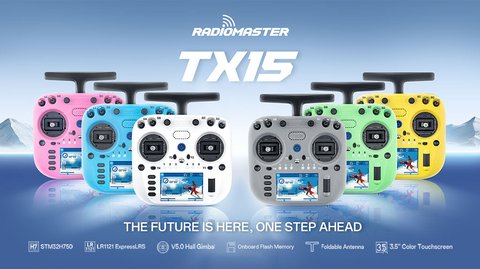
Key Specs
- Display: 3.5-inch IPS color touchscreen, 480×320 resolution, 262K colors
- Dimensions: about 178mm x 168mm x 81mm
- Weight: around 672g on the Max edition, without battery
- Processor: STM32H7 with 4GB onboard flash plus microSD slot up to 32GB
- Gimbals: AG02 CNC gimbals on the Max edition, Hall sensor V5.0 gimbals on the base model
- ExpressLRS dual-band support, both 2.4GHz and 900MHz, selectable 10mW to 1000mW output
- Battery: two 18650 Li-ion cells (3000-3500mAh) or an optional 21700 5000mAh pack, USB-C charging
- Foldable antenna with 2dB gain, built-in cooling fan, gyro sensor
First-Time Setup
Out of the box, the TX15 walks you through a setup wizard on first power-on, prompting for language, date and time, and gimbal calibration. Because it runs EdgeTX, most of the menu structure will feel familiar if you have used other EdgeTX-based radios before. Here is the general first-boot flow:
- Insert your battery and power on, following the on-screen setup prompts
- Calibrate the gimbals and switches through the Radio Setup menu
- Create a new model profile and select your RF module (internal 2.4GHz, internal 900MHz, or an external module bay if fitted)
- Set your channel order and switch mapping to match your receiver and flight controller
- Bind to your receiver, either by holding the bind button on the receiver or using a saved bind phrase
Navigating the Touchscreen Menus
The 3.5-inch touchscreen is genuinely useful for quickly jumping between model setup, mixes, and telemetry screens without the multi-button navigation older radios require. That said, a few things are easier with the physical buttons than with taps:
- Fine-grained mixer value adjustments are faster with the scroll wheel than dragging on screen
- Model select is quicker via the physical Model button shortcut
- Telemetry screens during flight are best left in landscape glance mode rather than tapping through menus mid-flight
Firmware updates are handled either over WiFi directly from the radio’s settings menu, or by connecting via USB-C to a computer and using EdgeTX Companion to flash a new build. I recommend the WiFi method for routine updates since it avoids installing drivers on your computer altogether.
Living With the TX15 Day to Day
I moved to a TX15 after years on a smaller stick radio, and the extra hand size took a session or two to adjust to, but the AG02 gimbals made every stick input feel noticeably more precise once I got used to the heft. The dual-band radio module has also been handy switching between short-range park flying on 2.4GHz and longer cross-country flights on 900MHz without swapping any hardware, just a menu setting per model.
Per Casey L., an RC Hobbyist and PeerSpot reviewer, “The TX15’s touchscreen took some getting used to, but once I had my most-used models saved as favorites, switching between planes and quads became almost instant. The dual-band flexibility is the real selling point for me.”
Accessories and Upgrades Worth Considering
Once you have the TX15 set up and bound to your first few models, a handful of accessories can noticeably improve day-to-day comfort and usability. A padded neck strap distributes the radio’s weight far better than the stock strap on longer sessions, and a snap-on gimbal protector is worth adding if you regularly toss the radio into a backpack between flights. If you eventually want to fly with an external RF module for a protocol the internal ExpressLRS radio does not cover, the module bay on the back accepts most standard external modules on the market.
Common upgrade paths owners take with the TX15:
- Swapping stock stick ends for aftermarket ones for a different grip feel
- Adding a larger microSD card for storing more sound packs and model data
- Installing a hard carrying case for travel, since the fixed gimbals do not fold down like on the GX12
- Updating to the latest EdgeTX release to pick up new mixer features and bug fixes as they are released
None of these are strictly necessary out of the box, but they are the changes I hear most often from other TX15 owners once they have logged a few dozen flights.
Frequently Asked Questions
Does the TX15 support both 2.4GHz and 900MHz without extra hardware?
Yes, the internal ExpressLRS module supports both bands, so you switch frequencies per model in the software rather than swapping modules.
What firmware does the TX15 run?
It ships with EdgeTX pre-installed, which is the same open-source firmware used across most modern RadioMaster radios.
Can I update the TX15’s firmware without connecting it to a computer?
Yes, the radio can download and install EdgeTX updates directly over WiFi from its settings menu.
Is the TX15 heavier than the TX16S?
No, the TX15 is generally lighter and more compact than the TX16S, since it uses a smaller 3.5-inch screen versus the TX16S’s larger 5-inch display.
Backing Up Model Data and Settings
Before you spend hours fine-tuning mixes and switch assignments across dozens of model profiles, it is worth setting up a backup routine early. The TX15 stores model data on its internal flash and optional microSD card, both of which can be copied to a computer over USB in Storage mode. I keep a dated folder on my desktop with a full copy of the SD card contents after any significant setup session, since recovering from a corrupted card or an accidental factory reset is far less painful with a recent backup on hand.
A simple backup habit that has saved me more than once:
- Back up model files immediately after finishing a new build’s setup, not weeks later
- Keep a copy of your exact EdgeTX firmware version alongside your model backups in case you need to restore to matching firmware
- Store backups somewhere other than the SD card itself, since a failing card is often the reason you need the backup in the first place
Conclusion
The RadioMaster TX15 lands nicely between smaller handheld radios and the flagship TX16S, offering a color touchscreen, dual-band flexibility, and precise gimbals in a slightly more compact package. Once you have gimbals calibrated and your first model bound, the touchscreen interface makes day-to-day flying and model management genuinely pleasant.
Ryan
CS degree · hands-on with RC transmitters and EdgeTX setups