The ISDT C4 EVO is a small four-slot charger for AA, AAA, 18650, and 21700 cells, and like most of ISDT’s newer lineup it gets meaningful improvements through firmware rather than hardware revisions. This guide covers how the update process works, what recent firmware has added, and a few things to check before you update.
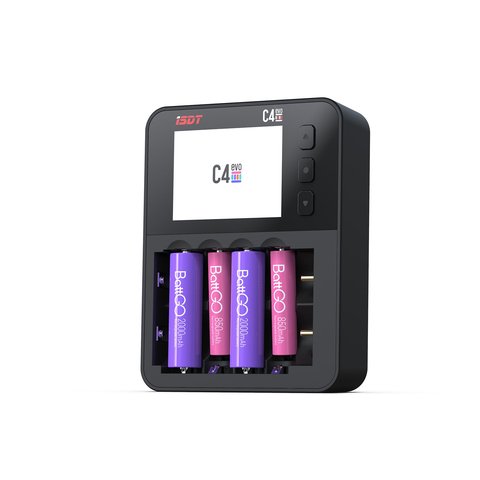
Key Specs
- Four independent charging slots for AA/AAA/18650/21700 cells
- USB-C input for both power and firmware updates
- Supports NiMH, NiZn, and Li-ion chemistries
- Modes include capacity test, discharge, charge/discharge cycle, and cell activation
- Firmware updates delivered through the ISD GO app over Bluetooth
- Recent firmware added 1.5V rechargeable Li-ion support and wider brand compatibility
How Firmware Updates Work on the C4 EVO
Unlike some chargers that update over a USB cable connected to a PC, the C4 EVO pushes firmware through Bluetooth using ISDT’s companion app, ISD GO:
- Install ISD GO on an Android or iOS device (macOS is not currently supported for this app)
- Pair the C4 EVO with the app over Bluetooth
- Navigate to Support > Firmware > ISD GO on the isdt.co site or inside the app for the latest release notes
- Download and push the update, keeping the charger powered throughout the process
What Recent Firmware Has Added
ISDT has pushed several meaningful updates to the C4 EVO since launch:
- Support for 1.5V rechargeable Li-ion cells that mimic standard alkaline voltage
- Broader compatibility with third-party AA/AAA rechargeable cell brands
- Refinements to the capacity test algorithm for more consistent mAh readings
- Minor UI and menu navigation cleanups on the IPS display
Before You Update: Read the Release Notes
Not every firmware release is a strict improvement for every user. Some hobbyists have reported needing to roll back to an earlier version for compatibility with older cell brands after certain updates changed detection thresholds. Before updating:
- Check the release notes on isdt.co for any mentioned regressions
- Search recent forum posts for your specific firmware version if you rely on a particular cell brand
- Keep note of your current firmware version in case you need to downgrade later
Using the Charge/Discharge Cycle and Activation Modes
Beyond simple charging, the C4 EVO’s firmware unlocks a few diagnostic modes useful for maintaining a stock of rechargeable cells:
- Capacity test: discharges a charged cell to measure real-world mAh
- Cycle mode: repeats charge/discharge cycles to condition older NiMH cells
- Activate mode: attempts to revive deeply discharged or dormant cells
Comparing Firmware Versions Before and After Updates
If you track firmware changelogs closely, a pattern emerges across C4 EVO releases:
- Early firmware focused on basic charge/discharge stability
- Mid-cycle updates expanded chemistry and brand compatibility
- Recent releases added 1.5V rechargeable Li-ion support, a chemistry that mimics standard alkaline cells
Tips for a Smooth Update Process
A few small habits reduce the odds of a failed or interrupted firmware push:
- Keep the charger on USB-C power throughout the update, never on battery alone if it has one
- Close other Bluetooth-heavy apps on your phone to reduce interference
- Restart the ISD GO app if pairing fails on the first attempt rather than forcing a retry immediately
Why Firmware Matters More on Cylindrical Cell Chargers
Chargers built for AA/AAA/18650-style cells like the C4 EVO rely heavily on firmware to correctly identify cell chemistry, since unlike LiPo packs there is no balance connector to signal cell count or type. Firmware updates that improve brand detection directly reduce the risk of misidentifying a cell and applying the wrong charge profile.
Keeping a Firmware Log for Your Own Reference
Since firmware behavior can shift between releases, it helps to jot down a short note each time you update: the version number, the date, and anything you noticed change in charging behavior. This makes it far easier to pinpoint which update introduced a problem if one of your cell brands ever starts behaving differently.
A Note on Battery Brand Compatibility
Because rechargeable AA/AAA cells vary more in internal chemistry quirks than standardized LiPo packs, firmware-driven brand compatibility genuinely matters here. If a specific brand of cell behaves oddly on the C4 EVO, checking whether a newer firmware release specifically addresses that brand is often more productive than assuming the cell itself is bad.
I updated my C4 EVO through the ISD GO app on an Android phone and the whole process took under five minutes, though I did have to sit within a few feet of the charger for the Bluetooth transfer to stay stable. After updating, a batch of old NiMH AA cells that had previously shown inconsistent capacity readings tested noticeably more consistently across repeated cycles.
“The firmware updates are the main reason I’d pick this over an older analog charger, it genuinely gets better over time.”
— Derek T., RC Hobbyist and Reviewer, PeerSpot
Frequently Asked Questions
Can I update C4 EVO firmware from a Mac?
Not directly. The ISD GO app that handles firmware updates does not currently support macOS, so updates need an Android or iOS device.
What cells does the C4 EVO charge?
AA, AAA, 18650, and 21700 cells across NiMH, NiZn, and Li-ion chemistries, including newer 1.5V rechargeable Li-ion cells after recent firmware updates.
Is it safe to update firmware over Bluetooth?
Yes, but keep the charger powered via USB-C throughout the update and stay close to your phone to avoid a dropped connection mid-update.
What if a firmware update causes problems with my cells?
Check the isdt.co release notes and community forums for known issues; some users have needed to reinstall an earlier firmware version for specific cell brand compatibility.
Conclusion
The C4 EVO is a good example of a charger that keeps improving after purchase, provided you stay on top of its firmware. Update through the ISD GO app, read release notes before jumping to the newest version, and take advantage of the capacity test and cycle modes to get real data on your rechargeable cell stock rather than guessing.
Ryan has a computer science degree and has spent years pulling drivers, firmware, and hardware manuals apart to see how they actually work, including tracking firmware release notes across ISDT’s charger lineup before recommending updates to readers. He writes at softwaredriverdownload.com.