Choosing between the RadioMaster Pocket and the DJI RC Controller 3 usually comes down to one question: are you committed to the DJI ecosystem, or do you want a radio that works with anything? These two controllers solve the same basic problem — flying a first-person-view drone — from completely different philosophies, and the right pick depends heavily on what you already own and what you plan to fly next. I have flown with both, and this comparison lays out exactly where each one wins.
Key Specs
- RadioMaster Pocket: EdgeTX firmware, X5 Hall-effect gimbals, 288g, roughly $60-72 depending on variant
- DJI RC Controller 3: closed DJI firmware, built for the DJI O4 ecosystem, roughly 240g, around $175
- Pocket protocol options: ExpressLRS or CC2500 multi-protocol
- DJI RC3 protocol: proprietary DJI O4 digital link only
- Pocket: works with any ELRS or CC2500-compatible receiver across quads, planes, and simulators
- DJI RC3: works only with DJI Avata 2, DJI Neo, and O4 Air Unit-equipped builds
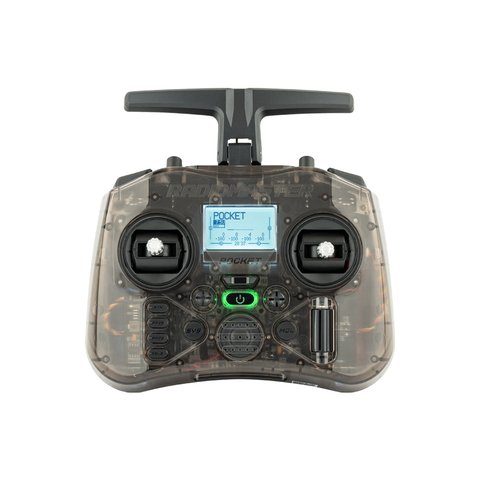
Full Comparison
| Spec | RadioMaster Pocket | DJI RC Controller 3 |
|---|---|---|
| Firmware | Open-source EdgeTX | Closed DJI firmware |
| Weight | 288g | 240g |
| Protocol | ExpressLRS or CC2500 | DJI O4 proprietary digital link |
| Vehicle compatibility | Any ELRS/CC2500 receiver: quads, planes, cars via cross-conversion | DJI Avata 2, DJI Neo, O4 Air Unit builds only |
| Gimbals | X5 Hall-effect, quad ball-bearing | DJI proprietary gimbal sticks |
| Modding/openness | Fully open, Lua scripts, custom firmware | Locked, no third-party firmware |
| Simulator use | Excellent, native EdgeTX joystick mode | Limited, DJI-specific simulator support only |
| Price | $60-72 | $175 |
Ecosystem Lock-In vs Open Flexibility
The DJI RC Controller 3 cannot be flashed to EdgeTX, cannot bind to non-DJI receivers, and cannot be repurposed for other RC vehicles like planes, cars, or boats. It is built specifically around the DJI O4 digital video link and works with DJI’s own goggles and aircraft. The RadioMaster Pocket, by contrast, runs open-source EdgeTX firmware and binds to any ELRS or CC2500 receiver depending on your variant, meaning the same radio can fly a tiny whoop, a long-range fixed wing, and a full-size freestyle quad without buying anything new.
- If you already own or plan to buy a DJI Avata 2, DJI Neo, or an O4 Air Unit build, the RC Controller 3 is the natural, integrated choice.
- If you fly a mixed fleet across brands and vehicle types, the Pocket’s open protocol support is far more useful long term.
- Neither radio can be converted into the other’s ecosystem after purchase, so this decision should be made based on your actual gear, not just specs on paper.
Feel and Gimbal Quality
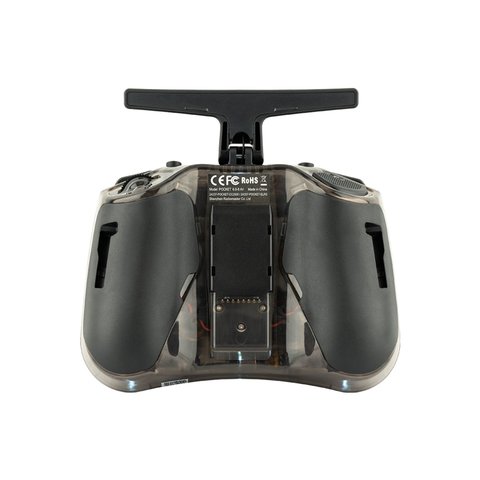
The Pocket uses X5 Hall-effect, quad ball-bearing nano gimbals that feel nearly identical between simulator and real flight, which makes the transition between practicing on a computer and flying outdoors smoother than on many budget radios. The DJI RC Controller 3’s gimbals are solid and precise for DJI’s own ecosystem, but its simulator support is limited to DJI-approved software, so pilots who like to practice extensively on third-party sims such as Liftoff or Velocidrone will find the Pocket considerably more flexible.
My Own Take After Flying Both
I bought the DJI RC Controller 3 specifically because I already owned a DJI Avata 2, and for that use case it is genuinely excellent — the video link, menu integration, and gimbal feel all work together seamlessly with zero configuration. But when a friend asked me to help set up a budget freestyle quad on ExpressLRS, the RC3 was useless for that job, and I reached for my Pocket instead. Having flown both regularly, I don’t think either radio is “better” in isolation; they are built for different situations, and owning both ended up making more sense for me than trying to pick just one.
Which One Fits Your Situation
- Pure DJI ecosystem use with an Avata 2, Neo, or O4-equipped build: get the RC Controller 3, the integration premium is worth it.
- Mixed-fleet flying across brands and vehicle types, or budget-conscious beginners: the RadioMaster Pocket saves money and offers far more flexibility.
- Heavy simulator practice on third-party platforms: the Pocket’s native EdgeTX joystick support is the easier path.
- Want both eventually: many pilots end up owning one of each for different flying styles, which is a reasonable long-term plan if budget allows.
Troubleshooting Setup and Binding Problems
Both radios are simple once bound correctly, but first-time setup is where most people get stuck. Here is what to check before assuming the hardware is faulty.
RadioMaster Pocket won’t bind to a receiver
- Confirm the internal module matches your receiver’s protocol — an ExpressLRS Pocket cannot bind to a CC2500 receiver and vice versa, since these are separate hardware variants, not a menu toggle.
- Update both the transmitter and receiver firmware to matching ELRS versions using the EdgeTX Companion or ExpressLRS Configurator tool before attempting a bind, since mismatched firmware versions are the most common cause of a failed bind.
- Hold the bind button on the receiver while powering it on, then trigger bind mode from the radio’s model menu within a few seconds — the timing window is short on most receivers.
DJI RC Controller 3 won’t pair with the aircraft
- Make sure the RC3’s firmware and the aircraft’s firmware are both fully updated through the DJI Fly app before pairing, since a version mismatch commonly blocks linking.
- Use the dedicated linking button sequence in the aircraft’s battery compartment or arm switch, and keep the controller within a short distance during the process.
- If pairing still fails, a factory reset of the controller from its system settings menu usually clears a stuck binding record and lets it re-pair from scratch.
Alternate path if binding keeps failing
If either radio still won’t link after firmware updates, try the manual bind phrase method instead of the automatic menu option: on ELRS-based Pocket setups, flashing a matching binding phrase to both transmitter and receiver over USB removes the timing-sensitive bind sequence entirely. On the DJI side, contacting DJI support with the controller and aircraft serial numbers can trigger a remote reset if a local factory reset does not resolve a stuck pairing record.
Frequently Asked Questions
Can the DJI RC Controller 3 bind to a non-DJI ELRS receiver?
No. It is built exclusively around DJI’s proprietary O4 digital link and cannot bind to standard ExpressLRS or CC2500 receivers.
Is the RadioMaster Pocket compatible with DJI digital FPV systems?
No, the Pocket runs ExpressLRS or CC2500 protocols and does not communicate with DJI’s proprietary O4 system, so it cannot control a DJI-native build.
Which controller is better for a total beginner?
If you already own or are buying into DJI’s ecosystem, the RC Controller 3 is simpler out of the box. If you want flexibility to try different drones and brands, the Pocket is the more future-proof starting point.
Does the Pocket support the same video quality as the DJI system?
The Pocket is a radio control transmitter only; video transmission depends entirely on whatever VTX and goggles you pair with your aircraft, separate from the radio choice itself.
Conclusion
The RadioMaster Pocket and DJI RC Controller 3 aren’t really competing products so much as tools built for different ecosystems. If your flying revolves around DJI’s own drones and digital system, the RC3’s tight integration and lighter weight justify its higher price. If you want one radio that can control almost anything on ExpressLRS or CC2500, from a tiny whoop to a long-range wing, the Pocket delivers far more flexibility for a fraction of the cost. Check current specs and pricing on the RadioMaster Pocket product page before deciding.
Ryan
CS degree · flies both open-source and proprietary FPV systems