The Moondrop Blessing 2 has stayed on recommendation lists for a long time in the mid-range in-ear monitor space, and after wearing it through several long work-from-home stretches and a couple of flights, I understand why. It was one of the earphones that convinced a lot of hobbyists that a five-driver hybrid could sound coherent rather than like five separate speakers arguing with each other.
- Applies To: Moondrop Blessing 2 hybrid in-ear monitor
- Drivers: 1 dynamic (10mm, paper diaphragm) plus 2 Softears D-MID-A and 2 Knowles SWFK balanced armatures
- Impedance / Sensitivity: 22Ω at 1kHz, about 117dB/Vrms
- Cable: Detachable 0.78mm 2-pin connector
- Compatibility: Easily driven by a phone jack or basic USB-C dongle DAC; no amplifier required
| Spec | Detail |
|---|---|
| Model | Moondrop Blessing 2 |
| Drivers | 1 dynamic (10mm) + 2 Softears D-MID-A + 2 Knowles SWFK BA |
| Impedance | 22Ω at 1kHz |
| Sensitivity | ~117dB/Vrms |
| Cable | Detachable 0.78mm 2-pin |
| Amp needed | No, easily driven by phone/dongle DAC |
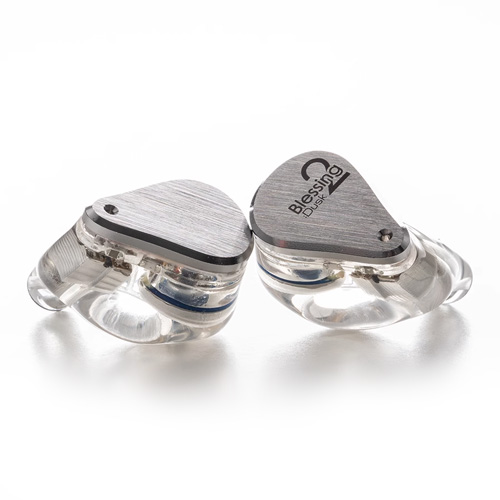
Driver configuration
The Blessing 2 uses a hybrid triple-crossover design: a 10mm paper-diaphragm dynamic driver handles bass, a pair of Softears D-MID-A balanced armatures cover the midrange, and dual Knowles SWFK armatures take care of treble extension. That is five total drivers per side, which was genuinely ambitious tuning work at this price point when it launched.
- 1 dynamic driver (10mm, paper diaphragm) for bass
- 2 balanced armature drivers (Softears D-MID-A) for midrange
- 2 balanced armature drivers (Knowles SWFK) for treble
- Impedance: 22Ω at 1kHz, sensitivity around 117dB/Vrms
Sound signature
What stands out most after extended listening is coherence. A lot of multi-driver IEMs suffer from an obvious seam where one driver hands off to the next, but Moondrop’s crossover work here is smooth enough that I genuinely forget there are five separate drivers doing the work. Bass has good texture without bloating the midrange, vocals sound natural rather than shouty, and the treble extends without turning harsh on brighter recordings.
Where it shows its age slightly compared to newer designs is in outright technical resolution — the sense of “hearing further into” a busy mix. Compared to Moondrop’s own newer flagship-tier Blessing 3, the Blessing 2 sounds a touch less separated during dense orchestral or metal tracks, which makes sense given how much driver technology has moved since.
Build and accessories
The shell mixes a clear resin body with a metal faceplate, and the fit sits relatively flush in the ear thanks to a shape based on Moondrop’s ear-scan database. The stock cable uses a detachable 0.78mm 2-pin connector, so upgrading later is simple if you decide you want a different cable material.
- Detachable 0.78mm 2-pin cable, easy to source replacements
- Multiple eartip sizes included in the box
- Semi-transparent resin shell shows the internal driver array, which is a nice touch for the curious
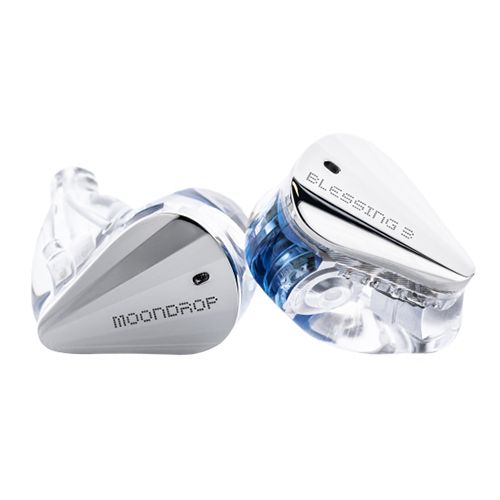
If you are weighing whether to buy the Blessing 2 used or new versus stretching for the newer Blessing 3, know that the newer model adds a second dynamic driver and generally tightens up the low end further, at a noticeably higher price. The Blessing 2 remains the better value if your budget is firmly mid-range.
Who should buy it
The Blessing 2 makes the most sense for listeners who already own a basic single dynamic-driver IEM and want to hear what a well-executed hybrid design brings to the table, without jumping straight to flagship pricing. It is also a solid choice if you listen to a wide variety of genres and want a tuning that doesn’t overly favor bass or treble.
Amping and source pairing
Because the Blessing 2 sits at a fairly low 22Ω impedance with reasonably high sensitivity, it doesn’t strictly need a dedicated amplifier, but it does respond noticeably to a cleaner source. I ran it off a plain phone jack, a basic USB-C dongle, and a slightly more capable desktop DAC/amp combo during testing, and the difference wasn’t subtle. On the phone jack alone, the bass stayed a bit looser and the treble occasionally edged toward thin on already-bright recordings. Moving to even a modest dongle DAC tightened up the low end and gave the midrange more body, which suggests the driver array benefits from a bit of current headroom even though it technically doesn’t require it to function.
If you’re pairing the Blessing 2 with a phone that lacks a headphone jack, almost any budget USB-C dongle DAC will do the driver array justice. You don’t need to spend heavily here — the returns diminish quickly once you’re past a competent entry-level dongle.
Long-term durability notes
After extended use, the main wear points to watch are the 2-pin connector housings and the nozzle mesh filters, which can accumulate earwax and debris over time and subtly change the tonal balance if left uncleaned. I make a habit of gently brushing the nozzle mesh every couple of weeks with a soft brush, which is a five-minute habit that noticeably preserves the treble clarity that a clogged mesh can otherwise dull.
The clear resin shell shows no signs of yellowing or cracking after months of regular pocket and bag carry in my case, which speaks well of the build quality Moondrop used even at this price tier several product generations back.
When Fit or Sound Problems Show Up
Most Blessing 2 complaints trace back to eartip fit or a dirty nozzle mesh rather than a defective unit. Work through these checks before assuming a driver has failed.
One Side Sounds Quiet or Distorted
- Reseat the 2-pin cable connector at the shell, since a connector that is not fully seated can cause an intermittent or weak channel.
- Check the nozzle mesh for wax buildup with a flashlight; a clogged mesh mutes treble and can make one side sound noticeably duller than the other.
- Swap the cable between left and right earpieces, or try a different cable entirely, to isolate whether the fault follows the cable or stays with the shell.
Bass Sounds Thin or the Seal Won’t Hold
- Try a different eartip size before assuming the tuning itself is the problem; a loose seal is the single most common cause of missing bass on any IEM.
- Insert the tips deeper and at a slight angle to match your ear canal, then twist gently for a fuller seal, rather than pushing straight in.
Alternate Manual Pathway: Cable and Tip Swap
Since the cable is detachable and eartips are interchangeable, most fit or channel-balance issues can be isolated and fixed without contacting support at all. Cleaning the nozzle mesh with a soft brush every couple of weeks, as covered in the durability notes above, prevents most of these problems from showing up in the first place.
Frequently asked questions
Is the Moondrop Blessing 2 still worth buying?
Yes, particularly on sale or secondhand. The tuning has aged well and the build quality holds up, even though newer models have since pushed technical performance further.
Does the Blessing 2 need an amplifier?
No. At 22Ω impedance and roughly 117dB/Vrms sensitivity, it is easily driven by a phone or basic USB-C dongle.
How does the Blessing 2 compare to the Blessing 3?
The Blessing 3 adds a second dynamic driver in a horizontally opposed configuration for tighter, more extended bass and slightly better separation, but costs noticeably more. The Blessing 2 is the better budget-conscious pick.
What ear tips work best with the Blessing 2?
Wide-bore silicone tips tend to preserve the treble extension best, while narrower-bore foam tips can add perceived warmth if the stock tuning feels too bright for your taste.
Conclusion
Years after its release, the Blessing 2 still earns its spot on recommendation lists, and using it again for this review reminded me why. It is not the newest or most technically advanced hybrid IEM you can buy anymore, but the tuning philosophy behind it holds up, and that matters more than a spec sheet in daily listening.
About the author: I review audio gear as a hobby alongside my day job in software, mostly because comparing driver specs scratches the same itch as debugging code.