| Applies To | Asus B85M-G LGA 1150 Motherboard |
|---|---|
| Author | Intel |
| Driver Date | 11/20/2013 |
| Driver Version | ver. 15.33.8.3345 |
| File Name | Win64_15338.exe |
| File Size | 138.0 MB |
| Requirements | Windows 7, Windows 8 |
| Description | This is the version 15.33.8.3345 (10.18.10.3345) driver for Asus B85M-G motherboard for Windows 7/8/8.1., which uses Intel build-in HD4400 display chipset.
Actually this is all in one driver for Intel HD display chipset for the following models:
Tested this new driver on my newly bought Intel I3-4130 processor, Asus LGA1150 B85M-G motherboard, 8GB Kingston (4GBx2) 1600 RAM and since I do not play games the build in Intel 4400 display is good enough for me. After clean install Windows and downloaded driver from Asus, the display driver version and date are as follow:
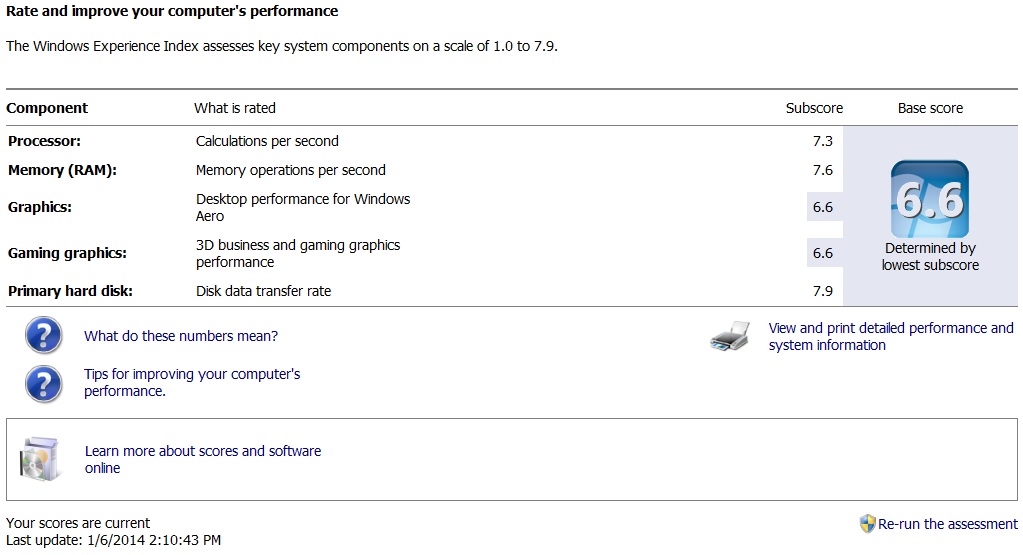
Tried the [Update Driver] button under [Intel HD Graphics 4400 Properties -> Driver] windows to update the old driver but it does nothing, just mentioned I already have the latest driver. The Windows Experience Index (under Control Panel\All Control Panel Items\Performance Information and Tools) also show some changes. It says "New hardware detected. Your Windows Experience Index needs to be refreshed"
Before update:
After update: a bit disappointing, no changes. Wil update here if notice any changes in terms of performance. |