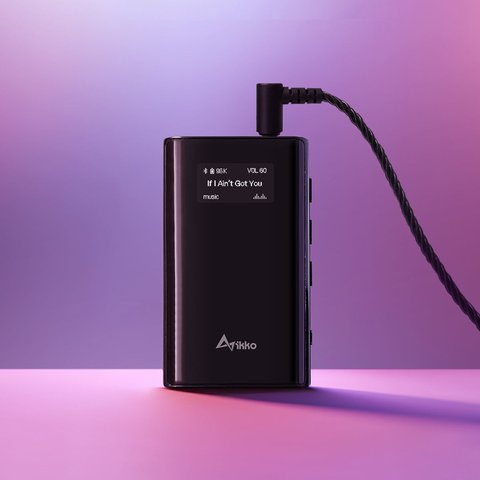
The Heimdallr ITB03 is IKKO’s portable Bluetooth DAC and headphone amplifier — a small brick you clip to a phone or laptop when the built-in headphone output isn’t good enough, or when there isn’t a headphone jack at all anymore. I’ve been running one alongside a pair of planar IEMs for a few weeks, mostly because my current phone has neither a 3.5mm jack nor a particularly strong internal DAC, and this is the kind of accessory that quietly fixes both problems at once.
| Quick Facts | IKKO Heimdallr ITB03 |
|---|---|
| Type | Portable Bluetooth DAC and headphone amp |
| DAC chips | Dual AKM AK4377, dual-mono configuration |
| Bluetooth chipset | Qualcomm QCC5125 with LDAC and aptX HD |
| Outputs | 3.5mm single-ended and 4.4mm balanced |
| Wired hi-res support | Up to 384kHz over USB-C |
| Typical price | Around $149 |
What’s actually inside
IKKO built the ITB03 around a pair of AKM AK4377 DAC chips run in a dual-mono configuration, which in plain terms means the left and right audio channels each get their own dedicated conversion path instead of sharing one chip. That tends to reduce channel crosstalk and generally produces a cleaner, more separated stereo image than a single shared-DAC design, at least on paper. The Bluetooth side runs on a Qualcomm QCC5125 chipset with support for LDAC and aptX HD, so wireless listening from a phone doesn’t have to mean settling for compressed SBC audio.
- Dual 3.5mm and 4.4mm balanced headphone outputs, so it works with both single-ended and balanced cables
- Small OLED screen showing sample rate, volume, battery, and connection mode at a glance
- Four switchable filter/EQ modes aimed at different genres or headphone types
- USB-C input with hi-res support up to 384kHz over a wired connection
- Three included cables: USB-C to USB-C, USB-C to Lightning, and USB-C to USB-A

Setting it up the first time
Out of the box the ITB03 pairs the same way any Bluetooth audio device does — hold the power button until the OLED shows a pairing prompt, then find it in your phone’s Bluetooth menu. The part that trips people up is codec selection: Android phones will often default to SBC unless you dig into developer options and force LDAC manually, since the phone doesn’t always know the ITB03 supports it. On iPhone this isn’t an issue because Apple devices use AAC by default and don’t expose LDAC at all, so iPhone owners get slightly less benefit from this DAC’s headline codec support than Android users do.
For wired use over USB-C, most phones and laptops recognize the ITB03 immediately as an external audio device with no drivers needed. Windows in particular sometimes needs you to manually select it as the default playback device in sound settings the first time, since it won’t always override whatever output was previously active.
How it actually sounds
Compared to a phone’s built-in DAC, the difference is immediately noticeable on anything with real detail in the recording — instrument separation is cleaner, the noise floor is lower, and there’s simply more headroom to drive harder-to-power headphones without hitting volume ceiling issues. Compared to a proper desktop DAC/amp costing two or three times as much, the ITB03 is obviously a step down in absolute resolution, but that’s a fair trade for something that fits in a jacket pocket and runs on battery.
Per one detailed teardown and measurement writeup on Head-Fi.org and Headfonics, the dual-DAC approach measures well for a device in this price bracket, particularly around channel separation and distortion figures at moderate volumes. That lines up with my own listening — it’s not going to embarrass a proper desktop stack, but for a battery-powered clip-on unit it punches well above its size.
Battery life and daily use notes
- Battery life varies heavily by output mode — expect noticeably shorter runtime driving power-hungry planar headphones over the 4.4mm balanced jack than easy-to-drive IEMs over 3.5mm
- The OLED screen can be set to auto-dim or turn off after a few seconds of inactivity, which meaningfully extends runtime if you’re not actively checking it
- It charges over USB-C, and can also act as a wired DAC while charging, so it doesn’t need to sit idle to top up
Who this actually makes sense for
This isn’t a device for someone who’s happy with wired earbuds and a phone dongle. It earns its keep for people running IEMs or headphones that genuinely need more current than a phone can supply, or for anyone who wants a real Bluetooth codec upgrade path without hauling around a full desktop stack. If you mostly listen through cheap earbuds on a commute, the ITB03 is overkill and the improvement won’t be obvious enough to justify the price. If you own anything in the planar or high-impedance category, or you’ve ever noticed your phone struggling to get loud enough, this class of device solves that specific problem directly.
It’s also worth comparing to IKKO’s own lineup rather than only outside competitors. The company’s earbuds and in-ear monitor products are what built its name in the audio space, and the ITB03 slots in as the source component meant to sit between those IEMs and whatever phone or laptop is playing the file. Buying IKKO IEMs and an IKKO amp together isn’t required — the ITB03 works with anything using a standard 3.5mm or 4.4mm plug — but the brand clearly designed the two product lines to complement each other tonally.
Common Setup Problems and Fixes
- Problem: Android phone won’t offer LDAC as a codec option. Fix: Enable Developer Options, then manually select LDAC under the Bluetooth audio codec menu; most Android phones default to a lower-bitrate codec unless you force it.
- Problem: The ITB03 isn’t recognized as an audio device over USB-C on Windows. Fix: Open sound settings and manually set it as the default playback device; Windows doesn’t always switch automatically the first time a new USB audio device is connected.
- Problem: Battery drains much faster than expected. Fix: Check which output and headphone combination you’re using; power-hungry planar headphones over the balanced 4.4mm jack draw noticeably more current than easy-to-drive IEMs over 3.5mm, and the OLED screen staying lit constantly also shortens runtime.
- Problem: Bluetooth keeps disconnecting intermittently. Fix: Forget the device on your phone and re-pair from scratch, and keep the phone within normal Bluetooth range without other 2.4GHz-heavy devices nearby causing interference.
- Problem: No sound over the balanced 4.4mm output specifically. Fix: Confirm your cable is genuinely wired for 4.4mm balanced operation rather than just physically fitting the jack; a mismatched cable can seat fine but carry a single-ended wiring internally.
Frequently asked questions
Does the ITB03 work with laptops as well as phones? Yes, it’s recognized as a standard external USB audio device on Windows, macOS, and Linux, with no proprietary drivers required for basic playback.
Is it worth it if I only use wired earbuds, no Bluetooth? Somewhat, mainly for the dual-DAC clarity and 4.4mm balanced output, but if you never use wireless you could get similar wired-only performance from cheaper dongle DACs; the LDAC/aptX HD support is the main reason to pay this price.
Does it support Apple’s Lossless Audio format? Over USB-C wired connection to an iPhone, yes it can pass hi-res audio; over Bluetooth, iPhone limits you to AAC regardless of what the ITB03 supports.
How long is the warranty? IKKO lists a standard one-year warranty from date of purchase on the ITB03.
Ryan
CS degree, long-time PC and portable audio hobbyist