- What the DH1000 actually is
- Full specifications
- Build and connector layout
- Sound impressions
- Who it makes sense for
- FAQ
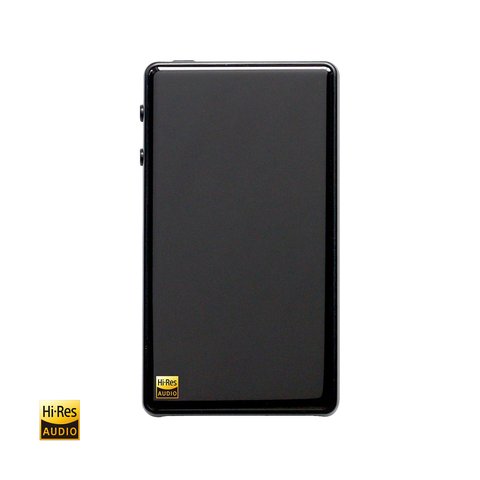
The Hidizs DH1000, also referred to as the Sonata DH1000 in some listings, is a fully balanced portable DAC and headphone amplifier rather than a dongle in the strictest sense. It sits a step above the compact dongle-style DACs most people are familiar with, trading pocketability for a genuinely more powerful analog output stage built around a pair of dedicated DAC chips.
| Spec | Hidizs DH1000 |
|---|---|
| DAC chips | Dual ESS ES9018K2M, one per channel |
| File support | PCM up to 24-bit/192kHz, DSD128 officially |
| Signal-to-noise ratio | Approximately 122dB |
| Outputs | 3.5mm unbalanced, 2.5mm balanced |
| Power delivery | Two independent micro USB ports (power + data) |
| Form factor | Compact external DAC/amp, black or silver |
What the DH1000 Actually Is
Unlike a simple USB-C dongle that plugs directly into a phone’s port, the DH1000 is closer to a compact external DAC/amp unit, using two independent micro USB inputs, one for power and one for data. That two-cable design is unusual for a device this size, and it is worth knowing upfront so you are not confused when a single cable does not power the unit on its own.
Full Specifications
- DAC chips: dual ESS ES9018K2M, one per channel
- File support: PCM up to 24-bit/192kHz and DSD128 officially, with some playback software reporting compatibility up to 384kHz
- Signal-to-noise ratio: approximately 122dB
- Outputs: unbalanced 3.5mm and balanced 2.5mm headphone jacks
- Power delivery: two independent micro USB ports, separating power input from data transfer
- Form factor: compact external unit rather than a pocket dongle, designed to sit alongside a source device rather than plug directly into it
Build and Connector Layout
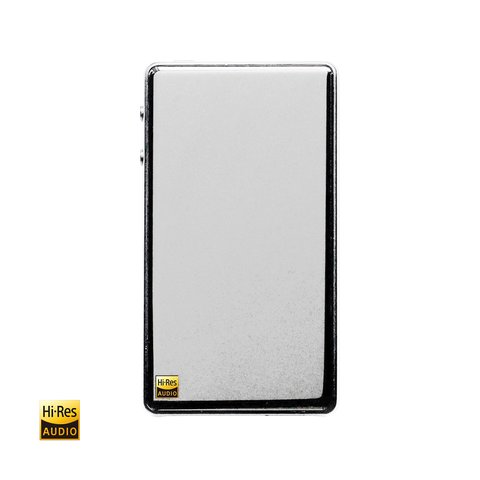
Available in black and silver finishes, the DH1000 uses a solid, no-frills metal housing without a display, relying instead on physical dials or switches for basic control. The dual micro USB layout is the detail that trips up first-time buyers most often; if your unit is not powering on, double-check that both ports are connected correctly rather than assuming a single cable should handle everything, since that is a genuinely common source of confusion with this exact design.
Sound Impressions
The dual ES9018K2M setup gives the DH1000 a clean, controlled output with more driving authority than a typical dongle-class DAC, which shows up most clearly when pairing it with harder-to-drive planar or high-impedance headphones that would otherwise sound thin or underpowered off a phone. Tonally it stays fairly neutral rather than adding obvious warmth or coloration, letting the source material and connected headphones do most of the tonal work.
Who the DH1000 Makes Sense For
This is not the right pick for someone who wants a minimal, single-cable dongle they can leave permanently attached to a phone. It makes far more sense as a semi-portable desktop or travel companion for someone who already accepts the two-cable setup in exchange for a genuinely more powerful balanced output than dongle-class devices typically offer. If you mostly listen at a desk or from a laptop and want more headroom than a basic dongle provides, without stepping up to a full desktop stack, the DH1000 fills that gap reasonably well.
Current availability and pricing can be checked on the official Hidizs DH1000 product page.
Setting It Up the First Time
The first time I connected a DH1000, I made the mistake most new owners make: plugging in only the data cable and assuming the unit would draw power through it automatically, the way most simpler dongles do. Nothing happened, and it took a minute of checking the product page again to realize both micro USB ports need to be connected for the unit to actually power on and pass audio. Once both cables are in place, from either a computer or a USB power source for the power line, playback starts normally and the unit behaves predictably from that point forward.
If you plan to use the DH1000 primarily at a desk, running both cables from the same computer is the simplest setup. For more mobile use, a small USB power bank handling the power line while the data line connects to your phone or laptop keeps the whole thing genuinely portable, if a bit more involved than a single-cable dongle.
Comparing It to Dongle-Class Alternatives
Against a typical single-cable USB-C dongle, the DH1000 trades convenience for output headroom and a more robust build. If your main headphones are easy-to-drive IEMs, a simpler dongle will likely serve you just as well with far less cable management to think about. If you regularly reach for planar or higher-impedance over-ear headphones and have found dongles leaving you wanting more power, the DH1000’s dual-DAC design and dedicated balanced output are a meaningful step up worth the extra cable.
Long-Term Reliability Notes
Because the DH1000 has no internal battery of its own to degrade over time, its main long-term wear points are the two micro USB ports and the headphone jacks, all standard, replaceable-feeling connectors rather than proprietary parts likely to become obsolete. That is a small but real advantage over battery-powered dongle DACs, which eventually lose runtime as their internal cells age. If you plan to keep a portable DAC for many years rather than upgrading yearly, that lack of a battery to wear out is worth factoring into the decision.
Frequently Asked Questions
Why does the DH1000 need two USB cables?
The design separates power delivery from data transfer across two independent micro USB ports, which is unusual but intentional rather than a defect.
Is the DH1000 a pocket dongle DAC?
Not really. It is better described as a compact external DAC and amplifier meant to sit alongside a source device rather than plug directly and permanently into a phone.
Does it support native DSD256 or higher?
Officially it is rated for DSD128, though some software reports higher PCM sample rate compatibility depending on the playback chain used.
Does the DH1000 have a balanced output?
Yes, it includes a 2.5mm balanced output alongside the standard 3.5mm unbalanced jack.
Common Problems and Fixes
A few issues come up repeatedly with the DH1000, most of them tied to its unusual dual-cable design:
- Unit won’t power on at all — almost always caused by only connecting the data cable. Both micro USB ports need power and data respectively; check both connections before assuming a hardware fault.
- No sound despite the unit powering on — confirm your source device has actually selected the DH1000 as its output device in system audio settings, since some operating systems default back to internal speakers after a reconnect.
- Audio cuts out intermittently — loose micro USB connections are the most common cause. Try a different cable for the data line first, since worn cables are a frequent culprit on devices with this connector type.
- Distorted or unusually quiet output — double-check that you’re using the correct output jack (balanced 2.5mm vs unbalanced 3.5mm) for your headphone’s cable termination, since mismatched connections can cause partial channel loss.
- Device not recognized by a laptop or phone — try a different USB port or cable for the data line, and confirm the source device supports USB audio class output, since some phones require a specific USB-C adapter to pass digital audio correctly.
Conclusion
The DH1000 is a niche but genuinely capable option for anyone who has outgrown a basic dongle DAC but is not ready to commit to a full desktop stack. Its dual-USB power design takes a moment to understand, but once set up, it delivers a noticeably more authoritative sound than pocket-sized alternatives at a similar price point.
A software and hardware enthusiast with a CS background, covering driver downloads, firmware updates, and portable audio gear at softwaredriverdownload.com.