The Hawkeye Firefly Micro Cam 2 is a pocket-sized FPV action camera built to shave weight off micro quadcopter builds while still saving usable HD footage separate from your live goggle feed. If you fly small builds and want onboard recording without wrecking your quad’s agility, here is what the camera actually delivers and where its limits are.
| Model | Hawkeye Firefly Micro Cam 2 |
| Type | Pocket-sized FPV action camera |
| Recording | Onboard HD footage, separate from live goggle feed |
| Best for | Micro quadcopter builds |
| Key benefit | Low weight for agility |
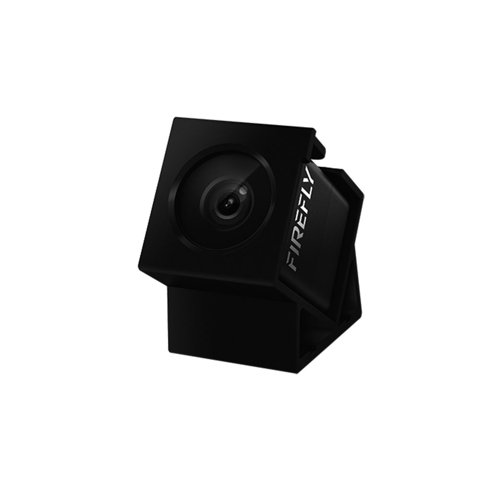
Firefly Micro Cam 2 at a Glance
- Applies to: Hawkeye Firefly Micro Cam 2 (current generation)
- Video: 2.5K/30fps, 1080p/60fps, and 720p/60fps recording modes
- Field of view: Around 160°, typical for this camera class
- Weight: About 31g bare, roughly 43g with the included silicone protective sleeve
- Battery: Built-in, roughly 600mAh, around 60 minutes of recording on a full charge
- Output: Low-lag FPV video feed alongside separately recorded HD footage
- Price tier: Budget, roughly $50–$60 depending on retailer and bundle
- Compatibility: Fits most standard micro-quad camera bays; double-check your specific frame before buying
Why Weight Matters More Than Anything Else Here
On a micro quadcopter, every gram affects flight time and how snappy the aircraft feels in the air. That is the entire reason this camera category exists. The Firefly Micro Cam 2 keeps the added weight low enough that most micro builds barely notice it is there, which matters more than squeezing out a slightly sharper frame from a heavier, bulkier action camera that would drag your build’s handling down.
- Preserves flight time better than a full-size action camera bolted onto a small frame
- Keeps the aircraft’s center of gravity closer to stock, so tuning stays predictable
- Small enough to tuck into most micro-quad camera bays without a custom mount
Dual Output: Flying on the Feed, Recording for Later
The camera sends out a low-lag feed for flying in real time while separately saving higher-resolution HD footage to its internal storage. This is standard for FPV cameras, but it trips up newcomers — the live feed you fly by is deliberately lower quality than what actually gets saved, so don’t judge the camera’s recording quality by what you see through goggles.
I put a Firefly Micro Cam 2 on a 3-inch toothpick build specifically to compare the saved footage against what I’d been watching live, and the gap was obvious the moment I pulled the file up on a monitor — the recorded clip looked noticeably cleaner and less compressed than the feed I’d flown by, which is exactly the tradeoff this dual-output design is meant to deliver.
Waterproofing: Read the Fine Print
Some listings for this camera advertise IPX4 splash resistance, which would cover light rain and incidental splashes but not submersion. That said, independent hands-on reviews have found the bare camera body isn’t reliably water-resistant without its included silicone sleeve in place, so treat any IPX4 claim as applying to the camera-plus-sleeve combination rather than the bare lens module. If you’re flying anywhere near water or in damp conditions, keep the sleeve on and avoid deliberately dunking the camera regardless of what the packaging claims — for a plain-language rundown of what IP ratings actually cover, the IP Code reference on Wikipedia is a useful primer.
Mounting on a Micro Frame
The Micro Cam 2 is designed to sit in a typical micro-quad camera bay using its included bracket or sleeve rather than a bulky separate housing. There isn’t one universal mount standard across every micro frame on the market, so it’s worth confirming your frame’s camera bay dimensions against the camera’s included hardware before you buy, rather than assuming it will fit. Builders active on forums like IntoFPV are a good place to check whether a specific frame is a known match before committing.
Troubleshooting Common Setup Problems
Most issues with the Micro Cam 2 come down to power, storage, or fit rather than a defective unit. Work through these before assuming you got a bad copy:
- Camera won’t power on: Confirm the built-in battery has a full charge before first use — a fully drained cell can take longer than expected to show a charging indicator, so give it 15–20 minutes on the charger before assuming it’s dead.
- No FPV feed but recording still works: Check the video-out cable connection to your flight controller or VTX first; a loose solder joint or connector is far more common than an actual sensor failure.
- Footage won’t transfer or files look corrupted: Avoid pulling the camera’s power mid-write. If a file is already damaged, a card reader connected directly to a computer is more reliable than transferring over the camera’s own USB port, since it bypasses the camera’s onboard controller entirely.
- Camera doesn’t physically fit the frame’s camera bay: Don’t force it. Loosen or remove the mount and test-fit the bracket alone first; forcing a slightly oversized camera into a tight bay is a common way to crack the lens housing.
If none of that resolves it, the manual fallback is a direct card-reader transfer combined with a full battery discharge-and-recharge cycle, which resets most of the minor firmware quirks that cause these small cameras to act up after storage.
Getting the Most Out of Battery Life
Around an hour of recording is typical, and for most pilots that comfortably outlasts a single flying session broken up by aircraft battery swaps rather than becoming the limiting factor. A quick habit worth building: transfer footage to a computer after every session instead of letting it pile up, since the onboard storage on a camera this small fills up faster than people expect.
Setting Realistic Image Quality Expectations
Given its tiny sensor and lens, footage from the Firefly Micro Cam 2 won’t match a full-size action camera, and going in with that expectation avoids disappointment. For documenting a flight rather than producing polished cinematic footage, the quality is genuinely appropriate. Comparing it directly against a much larger, heavier camera misses the point of why this category of camera exists in the first place — it trades some image quality for weight savings that a bigger camera simply cannot offer on a micro build.
Who the Firefly Micro Cam 2 Suits Best
This camera is built for micro-quad pilots who prioritize keeping their build light and agile over squeezing out maximum footage quality. If you want the best possible image quality regardless of added weight, a full-size action camera on a larger frame built to carry that bulk will serve you better. But for toothpick and micro builds, this is one of the few options that doesn’t meaningfully compromise how the aircraft flies.
- Confirm your frame’s camera bay fits the included bracket before ordering
- Keep the silicone sleeve on if you’re flying anywhere damp
- Charge fully before the first flight and transfer footage after every session
Frequently Asked Questions
Is the Firefly Micro Cam 2 fully waterproof?
No. Any splash-resistance claim applies best with the included silicone sleeve on, and even then it’s meant for light rain and incidental splashes, not submersion.
Does it record separately from the live FPV feed?
Yes. It outputs a low-lag feed for flying while separately saving higher-quality HD footage to internal storage, so the two are never identical quality.
How long does the battery last?
Around 60 minutes of recording on a full charge, which typically outlasts a single micro-quad flying session broken up by aircraft battery swaps.
Will it fit any micro quad frame?
Not automatically. Check your specific frame’s camera bay dimensions against the camera’s included mount before buying, since there’s no single universal standard across every micro build.
What should I do if footage won’t transfer off the camera?
Try a direct card-reader transfer instead of the camera’s USB port, and avoid pulling power while a file is being written to avoid corrupted clips.
Conclusion
The Hawkeye Firefly Micro Cam 2 fills its niche well: usable HD footage in a package light enough to preserve a micro quad’s flight characteristics. It won’t out-record a full-size action camera, and its splash resistance is better treated as a bonus than a guarantee, but for pilots specifically building lightweight FPV setups who want onboard recording without sacrificing agility, it remains a sensible pick.
Ryan
CS degree · builds and flies micro FPV quads as a hobby, tests the gear that goes on them