Most phones dropped the headphone jack years ago, and a dongle DAC is the cheapest, smallest way to get real sound quality back. The FiiO KA11, released under the Jade Audio sub-brand, is priced at just under $30 and manages to pack a surprisingly capable chip into a body barely bigger than a house key. I have been carrying one in a laptop bag for a while now, swapping it between a phone and a laptop, and it has quietly become one of those accessories I would miss immediately if it went missing.
| Model | FiiO KA11 (Jade Audio sub-brand) |
| Type | USB-C dongle DAC |
| Price | Under $30 |
| Connector | USB-C input, 3.5mm output (variant dependent) |
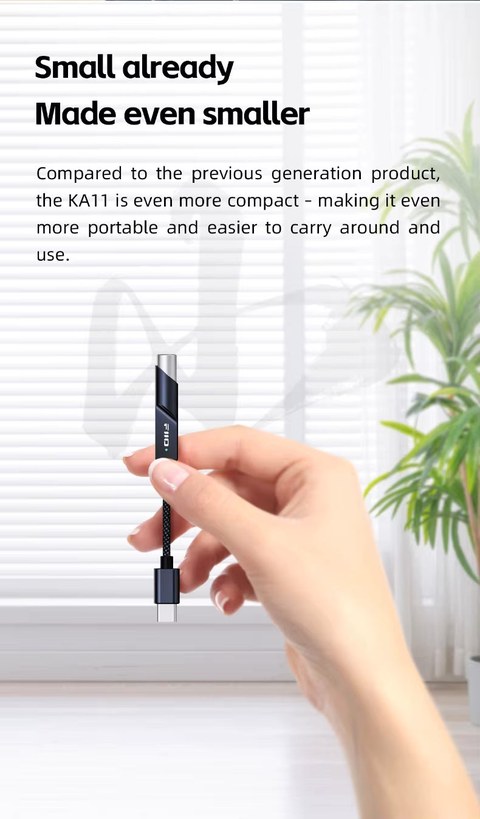
| Form factor | Keychain-sized |
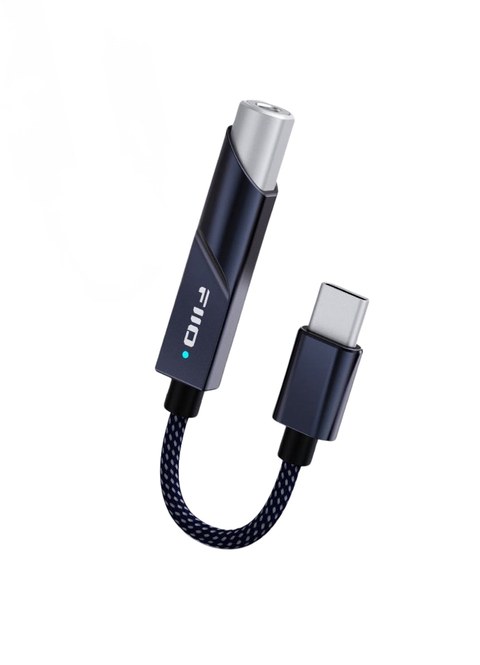
Key Specs
- Model: FiiO KA11 (Jade Audio sub-brand)
- DAC chip: CS43131 with SGM8262 low-noise op-amp
- Output power: 245mW into 16 ohms, 200mW into 32 ohms
- THD+N / SNR: as low as 0.0006% / 125dB
- Format support: PCM up to 384kHz/32-bit, DSD256
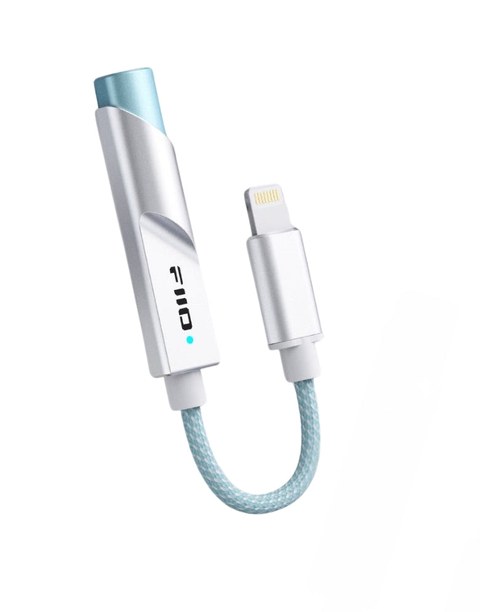
- Connector options: USB-C or Lightning, single 3.5mm headphone output
- Weight: about 8.5 grams
- Price tier: under $30, budget dongle DAC
- Compatibility: Android, iOS, Windows, and Mac depending on the connector version purchased; plug-and-play, no drivers required
What is inside such a small device
The KA11 is built around a CS43131 DAC chip, paired with a low-noise SGM8262 op-amp for the analog output stage. That combination is respectable for a dongle at any price, and genuinely impressive at under $30. FiiO rates the KA11 at 245mW into a 16 ohm load and 200mW into 32 ohms, with total harmonic distortion plus noise as low as 0.0006 percent and a signal-to-noise ratio of 125dB. Those numbers would have been considered excellent for a full-size desktop DAC not too long ago, and here they show up in something that weighs 8.5 grams.
On the format support side, the KA11 handles PCM up to 384kHz and 32-bit resolution, along with DSD256, so it is not going to bottleneck a hi-res music library. It has a single 3.5mm headphone output, and FiiO sells it with either a USB-C or Lightning connector, covering Android, iOS, Windows, and Mac devices depending on which version you pick up.
The LED indicator, and why it is genuinely useful
A small LED on the body of the KA11 changes color depending on what it is currently playing, which sounds like a minor gimmick until you actually use it day to day. Blue means a standard sample rate, yellow means a hi-res PCM stream, and green means DSD playback. That gives you an instant, at-a-glance confirmation that your streaming app or music player is actually sending high-resolution audio rather than silently falling back to a compressed stream, which is a real and common problem with some mobile apps.
Build and everyday use
The body is finished in an aluminum-magnesium alloy that feels considerably sturdier than the plastic shell found on some rival dongles at this price. The cable connecting the DAC body to the phone or laptop end uses oxygen-free copper wiring wrapped in a braided sleeve, which has held up fine to being coiled and uncoiled in a bag for weeks without any fraying. According to Headfonics, the build quality genuinely punches above the KA11’s price bracket, and my own experience carrying it around matches that assessment.
A few practical notes from regular use:
- The FiiO Control app allows adjustment of digital filters and RGB indicator behavior, though it is limited to Android devices only
- The short cable design keeps strain off the phone’s charging port compared with rigid, direct-plug dongles
- Output is strong enough for most easy-to-drive headphones and in-ear monitors without needing a separate amp
How it stacks up against pricier dongles
The obvious comparison point is FiiO’s own KA3, which costs roughly three times as much and offers a bit more output power and a slightly more refined tuning. But for casual listening, commuting, or working from a laptop, the gap between the two is smaller than the price difference suggests. Android Central called the KA11 one of the best ways to upgrade phone audio without spending real money, and Audiophile Heaven reached a similar conclusion, praising the CS43131 chip’s performance relative to the asking price. Whether the KA11 is enough for you really comes down to how demanding your headphones are and how much you value the extra headroom a pricier dongle provides.
Compatibility and setup in practice
Setup on both Android and Windows was genuinely plug-and-play in my testing: connect the KA11, and the device recognizes it as an external audio output within a couple of seconds, no driver install required on either platform. On Mac and iOS, the same holds true, though as noted above, the deeper filter and lighting controls in the FiiO Control app are currently limited to Android only. If you mostly listen through Spotify, Apple Music, or a local file player and do not care about tweaking filters, none of that matters much day to day, since the dongle works identically regardless of platform for basic playback.
One small but appreciated detail is how little heat the KA11 generates during extended use. Some dongle DACs get noticeably warm after twenty or thirty minutes of continuous playback, particularly when driving power-hungry headphones. The KA11 stayed cool to the touch through multi-hour listening sessions in my testing, which suggests reasonably efficient power management inside a very small enclosure.
Troubleshooting and practical tips
Dongle DACs are simple devices, but a few connection quirks trip up first-time buyers regularly:
- Phone or laptop doesn’t recognize the KA11: unplug and reconnect it, try a different USB-C or Lightning port, and confirm the cable end is fully seated, since a loose connection is the most common cause of no audio output being detected.
- No sound even though the device is detected: check your phone or computer’s sound output settings, since some devices default back to the internal speaker after a dongle is connected rather than automatically switching.
- LED stays blue even when playing a hi-res file: this usually means your music app or streaming service is downsampling the stream rather than the KA11 failing to detect it. Check the app’s audio quality setting to confirm it is set to its highest available option.
- FiiO Control app won’t connect: remember the app is Android-only currently, so iOS, Windows, and Mac users will not be able to pair it; this is expected, not a fault. On unsupported platforms, the KA11 still works fine for plain playback without the app.
- Alternate path if the app isn’t available on your platform: the KA11 ships with sensible default filter settings, so skipping the app entirely and using it purely plug-and-play still gets you the core sound quality improvement over a phone’s built-in output.
FAQ
Does the KA11 work with an iPhone?
Yes, FiiO sells a Lightning connector version specifically for iOS devices, alongside a USB-C version for Android, Windows, and Mac.
Is the FiiO Control app required to use the KA11?
No, it works as a plug-and-play DAC without any app. The app is only needed if you want to adjust digital filters or RGB behavior, and it is limited to Android currently.
Can the KA11 drive full-size headphones?
It can drive easier-to-power headphones and most in-ear monitors comfortably, but very demanding full-size headphones will benefit from a dedicated desktop amp instead.
What does the LED color actually tell me?
Blue indicates standard-resolution PCM, yellow indicates hi-res PCM above standard rates, and green indicates DSD playback, giving a quick visual check on what is actually being streamed.
Is the KA11 durable enough for daily commuting?
The aluminum-magnesium body and braided cable have held up well to regular use in a bag, and the short cable design reduces strain on the phone’s port compared with rigid dongles.
I have spent more years than I would like to admit chasing better sound out of cheap gear, and small dongle DACs like this one are exactly the kind of budget upgrade I look forward to testing. Ryan.