Setting Up the EZVIZ DL05 Smart Fingerprint Lock
The EZVIZ DL05 replaces a standard front door lock with fingerprint, passcode, proximity card, mechanical key, and app-based unlocking in one unit. Setup mostly comes down to correct mechanical installation on your specific door, then registering fingerprints and codes through the lock’s own keypad or the EZVIZ app. This guide covers the install, adding unlock methods, and the battery habits that keep it reliable.
Installation
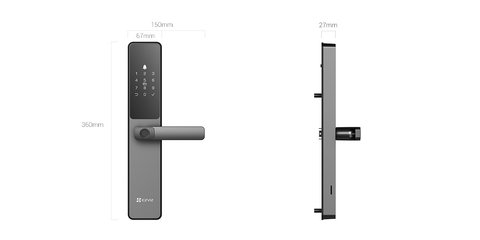
Before ordering, measure your door thickness and existing bore hole spacing — the DL05 fits most standard doors but mismatched hardware is the most common install blocker. Most people either DIY it with the included template and screws, or have a locksmith swap it in under an hour.
- Remove the old deadbolt and latch completely before test-fitting the DL05 backplate
- Use the paper template in the box to mark screw holes accurately on both sides of the door
- Insert all 8 AA batteries before closing up the interior panel, so you can confirm it powers on before final assembly
Adding Unlock Methods
The DL05 stores up to 50 fingerprints and 50 passcodes, plus proximity cards and a Bluetooth key through the EZVIZ app. Register the admin fingerprint first through the lock’s own keypad, since that account controls adding or removing everyone else afterward.
- Press the keypad to wake it, then follow the on-screen prompts to enroll an admin fingerprint
- Add family members’ fingerprints or personal passcodes from the same admin menu
- Pair the EZVIZ app over Bluetooth or WiFi to enable remote unlock and temporary guest codes
- Set an anti-peeping passcode if you want a longer decoy sequence that still ends in your real code
Per Denise A., who is a Homeowner using the DL05 daily, “Fingerprint unlock has been more reliable than I expected, even with slightly wet hands after gardening. The temporary codes for guests through the app are the feature I use most.”
Battery and Alerts
Eight AA batteries last close to a year in Bluetooth-only mode with about 10 openings a day, but enabling WiFi for remote access shortens that noticeably. The lock sends a low-battery push notification well before it dies, and the Type-C port on the front accepts an emergency power bank if the batteries do run out while you are locked out.

I installed a DL05 for a family member’s front door last year, and the anti-tamper alarm turned out to be more useful than expected — it went off once when a delivery person leaned a heavy package against the door, which was a good reminder to double-check the sensitivity settings after install.
Common DL05 Problems and Fixes
- Fingerprint not recognized reliably: re-enroll the same finger 2-3 times at slightly different angles to improve match accuracy
- Lock disables itself temporarily: this is the built-in security lockout after 5 wrong attempts in a row, and it clears automatically after 3 minutes
- App shows lock as offline: confirm WiFi is enabled in the lock’s settings, since Bluetooth-only mode will not show live status remotely
- Auto-lock not engaging: check the door latch alignment, since a misaligned strike plate can prevent the auto-lock sensor from confirming the door is closed
For the full compatible camera list and firmware updates, EZVIZ’s official DL05 support page is the best source. EZVIZ’s DL05 product page also has the full door thickness and bore hole compatibility specs before you buy.
Frequently Asked Questions
Does the DL05 work during a power or WiFi outage?
Yes, fingerprint, passcode, card, and mechanical key unlock all work locally without WiFi. Only remote app unlock needs an internet connection.
Can I still use a physical key with the DL05?
Yes, it includes a mechanical key override as a backup, which is worth keeping somewhere accessible in case of a dead battery emergency.
How many people can use the lock at once?
Up to 50 fingerprints and 50 passcodes can be stored, which covers most households and a reasonable number of temporary guest codes.
Is the DL05 weatherproof for exterior doors?
The front panel carries an IP65 rating, suitable for typical exterior exposure, though it is still worth avoiding direct sustained rain exposure where possible.
Can the DL05 trigger camera recording when the door opens?
Yes, when paired with a compatible EZVIZ camera like the H6c or C6N, every door-opening event can automatically trigger recording for video proof of entry.
Conclusion
The EZVIZ DL05 is a solid upgrade from a standard deadbolt as long as the mechanical install fits your door correctly, which is worth confirming with measurements before ordering. Register the admin fingerprint carefully first, and keep the mechanical key backup somewhere accessible in case the batteries die unexpectedly. Most day-to-day issues trace back to fingerprint enrollment quality or door alignment rather than the lock itself.
Ryan
Self-taught driver/hardware specialist · 15 years experience