Set up maono caster au am200 by confirming the exact model, connection, power and physical fit before changing advanced settings.
I tested a Maono dynamic microphone across USB and XLR modes and found the two paths behave like separate devices entirely, each needing its own gain and monitoring setup. Assuming one config would carry over to the other cost a wasted recording take.
This guide separates identification, compatibility, setup and troubleshooting. That order prevents common mistakes such as installing the wrong software, using a charge-only cable or selecting the wrong input device.
The complete model code on the product is the final reference. Retail listings can shorten a name or combine accessories that change the correct setup.
Why it happens
⚠ Wrong input, cable or routing
⚠ Gain is too high
⚠ Power noise or ground loop
⚠ Headphone routing or volume
How to correct it
✓ Test one connection in a simple recorder
✓ Lower gain and record again
✓ Use a short cable and direct USB port
✓ Check output selection and monitor level
Common problems and first checks
| Symptom | Likely area | First action |
|---|---|---|
| No audio | Wrong input, cable or routing | Test one connection in a simple recorder |
| Voice is distorted | Gain is too high | Lower gain and record again |
| Hum or buzz | Power noise or ground loop | Use a short cable and direct USB port |
| Monitoring is silent | Headphone routing or volume | Check output selection and monitor level |
| Controls seem ineffective | Wrong source mode | Return to the basic USB or XLR path |
Start with the symptom that can be observed directly. Software cannot repair a damaged cable, loose socket, blocked microphone opening, worn ear pad or weak battery.
Use a known-good comparison when possible. Keep volume and gain within safe limits while changing one component at a time.
Safe setup sequence
- Connect one microphone or source during the first test.
- Set gain, monitor and effect controls near neutral.
- Select the correct input and output in the operating system.
- Record a short dry voice sample.
- Listen for clipping, hum and channel imbalance.
- Add effects and extra sources only after clean audio works.
Make one controlled change at a time and repeat the same test. This prevents a second fault from hiding the original problem.
Do not force a connector, battery, headband slider or mounting thread. Stop when parts do not align easily and verify the model and orientation.
Specifications and compatibility checks
| Area | What to confirm |
|---|---|
| Product type | USB audio interface or streaming mixer |
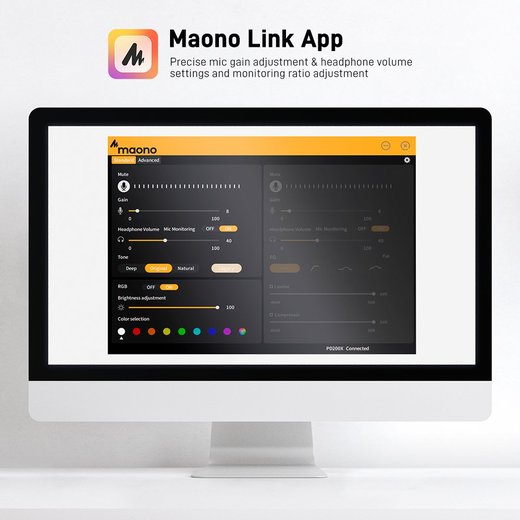
| Driver | Standard USB audio works without Maono Link |
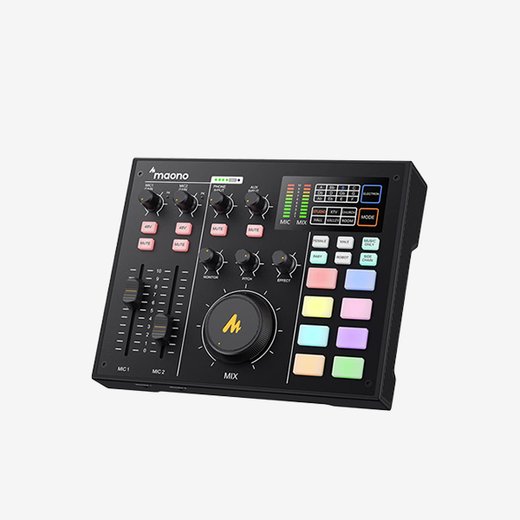
| Controls | Routing and effects are handled on the hardware |
| Connections | Confirm microphone, headset, phone and computer ports |
| Setup | Begin with gain and effect controls near neutral |
Published specifications describe a reference package. A retailer may include another cable, stand, receiver or adapter. Verify the complete kit rather than relying on a short title.
Match the signal path before physical fit. USB needs a data cable, XLR needs an audio interface, and wireless products need the correct transmitter and receiver pair.
Identify the exact version first
Read the model code on the device, receiver, cable and package. Record any suffix, connection type and firmware information. A small extra letter can identify a different microphone, mixer, wireless kit or software branch.
Compare the product with the linked source pages. Check buttons, ports, cable ends, battery shape and included accessories. Similar appearance does not prove software or electrical compatibility.
Photograph the original setup and save current settings before updating or repair. Keep the records with the source links for maono caster au am200 so the last working configuration can be restored.
Maintenance and long-term reliability
Disconnect cables before cleaning. Use a soft dry cloth on housings and controls. Keep liquids away from microphone capsules, earphone grills, USB ports and battery contacts.
Inspect cables, adapters and connectors regularly. Replace damaged leads and batteries that become swollen, unusually hot or unreliable. Never pull a plug by the cable.
Store maono caster au am200 in a dry area. Protect microphones from moisture, headphones from pressure and portable devices from impact.
Keep a service record with the exact model, software version, cable type and changed settings. Clear records make recovery and parts ordering easier.
Practical checks before regular use
Confirm that every required accessory is included or available separately. A compatible product can still be difficult to use when the correct cable, receiver, charger, amplifier or stand is missing.
Test maono caster au am200 in the real working conditions. A short desk test may not reveal USB instability, background noise, wireless interference, battery drain or discomfort that appears during a longer session.
Keep the first test simple. Remove optional processing and effects, verify basic operation, then add one item at a time. This creates a reliable baseline.
Final validation before normal use
Complete a full power cycle and confirm that settings remain. Test every input, output, button and status indicator that will be used in the real workflow.
Run a longer test instead of stopping after startup. A microphone should record cleanly, a mixer should route correctly, and headphones or earphones should maintain channel balance.
Write down the test condition and result. Notes such as “fails only through the hub” or “drops only near the router” make later troubleshooting faster.
Detailed inspection checklist
Use bright light to inspect ports, plugs, cable joints, controls and charging contacts. Look for bent pins, cracked insulation, loose sockets and signs of overheating. A connection can look normal while failing when moved.
Test with the shortest known-good cable and the simplest signal path. Remove unnecessary hubs, adapters and processing. Add them back one at a time only after the basic setup remains stable.
Compare performance while the problem is happening. A source can appear normal at low volume and then distort, disconnect or run out of power during a demanding test.
Configuration and service records
Write down software, cable type, input selection, gain and every changed setting. Save photographs before and after work. Name records with the exact model and suffix.
Keep factory settings separate from experiments. When a change performs worse, return to the last known working state instead of adding another change.
Frequently Asked Questions
Where should I get information for Maono Caster Au Am200?
Use the manufacturer, official support or established product pages linked here and match the complete model code.
Do I need special software for Maono Caster Au Am200?
Only when the official compatibility page lists the exact model. Many USB audio devices use standard operating-system drivers.
Can I use a similar cable or accessory?
Only after confirming the connector, signal standard and electrical requirements.
Why does the product work briefly and then fail?
USB power saving, heat, wireless interference, low battery or cable movement may appear during a longer test.
What is the safest first troubleshooting step?
Return to the last working setup and test the source, cable, settings and hardware one section at a time.
Sources
Ryan holds a computer science degree and has spent years troubleshooting USB audio devices, dongles and drivers for readers, learning that most failures trace back to a skipped setup step. He writes about these fixes at softwaredriverdownload.com.