The EZVIZ S2 is a 2-in-1 action camera and dash cam with 1080p 60fps recording, a 2-inch touchscreen, and a collision-triggered G-sensor for car use. It pairs with the EZVIZ SPORTS app rather than the main EZVIZ smart home app, which is the detail that trips up most first-time setups. This guide covers pairing, mounting for both use cases, and the storage and battery quirks worth knowing before you rely on it.
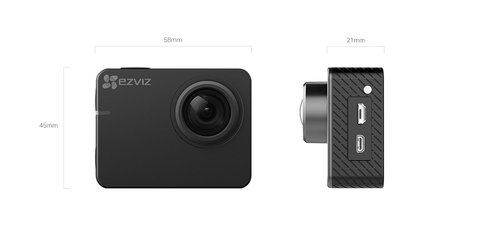
| Model | EZVIZ S2 2-in-1 Action and Dash Camera |
| Video | Up to 1080p at 60fps, 8MP stills, 150° wide viewing angle, WDR and low-light mode |
| Waterproofing | Rated for use down to roughly 131ft with the included waterproof housing attached |
| Battery | Roughly 2 hours of continuous 1080p 60fps recording per charge |
| Price Tier | Budget 2-in-1, generally under $100 at typical retail pricing |
| Compatibility | Pairs over WiFi and Bluetooth 4.0 with the EZVIZ SPORTS app on Android or iOS; car mounting accessories and helmet/handlebar/chest mounts sold separately |
Install the EZVIZ SPORTS App
Not the regular EZVIZ app — the S2 pairs specifically through EZVIZ SPORTS, a separate app for action and dash cams. Searching the wrong app store listing is the most common reason people cannot find their camera at all.
Insert and Format a MicroSD Card
The S2 supports up to 256GB cards. Format it through the camera’s own touchscreen menu before the first recording, since an unformatted or incompatible card causes silent recording failures.
Pair Over WiFi and Bluetooth
Turn on the camera, open EZVIZ SPORTS, and follow the in-app pairing flow. Bluetooth 4.0 handles quick control commands while WiFi handles video transfer and live preview to your phone.
Choose the Right Mount for Your Use Case
For dash cam mode, use the windshield suction mount and enable the G-sensor so collision footage locks and cannot be overwritten. For action use, EZVIZ’s accessory mounts attach to helmets, handlebars, and chest rigs.
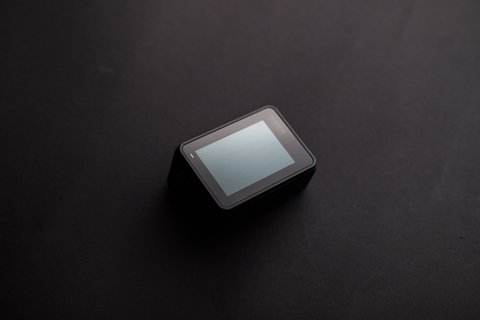
I used an S2 as a dash cam for about six months before switching it between the car and a bike mount on weekends. The battery is genuinely the limiting factor — around 2 hours at full 1080p 60fps — so for dash cam use, wiring it to a constant power source through the micro USB port is worth doing rather than relying on battery alone.
Per Priya M., who uses the S2 as a daily dash cam, “Switching it between the car mount and my bike on weekends has been genuinely useful — just remember to reformat the SD card occasionally or it fills up with loop recordings.”
Video Quality and What the EZVIZ SPORTS App Actually Does
The 150-degree field of view is wide enough to capture a full lane’s worth of road in dash cam mode, or a decent chunk of a helmet-mounted view without cropping in too tight on action footage. At 1080p 60fps, motion stays smooth enough for fast-moving footage like cycling or driving, though the 8MP still-photo mode is really a secondary feature rather than the camera’s main strength. WDR (wide dynamic range) helps in mixed-lighting scenes, like driving out of a tunnel into bright sunlight, by keeping both the shadows and highlights from blowing out at the same time, and the low-light mode noticeably reduces grain during dusk or nighttime driving compared to leaving it on a standard auto setting.
The EZVIZ SPORTS app is where most of the day-to-day value lives beyond just recording. It handles live preview over WiFi so you can frame a shot or double-check the dash cam feed from your phone, basic in-app clip trimming so you do not have to pull every file into a separate video editor, and direct sharing to social apps once you have trimmed a clip down. There is no built-in cloud backup subscription tied to the S2 the way there is with EZVIZ’s smart home cameras, so all footage stays local to the microSD card unless you manually export it, which is worth knowing if you were expecting automatic cloud sync.
- Live preview and remote shutter control work over WiFi once paired, useful for framing action shots without holding the camera
- In-app trimming exports a shortened clip directly to your phone’s camera roll for quick sharing
- No automatic cloud backup — footage lives on the microSD card until you manually transfer it
- Firmware updates are pushed through the app itself, so it is worth checking for one shortly after your first pairing
Setting the S2 Up as a Dedicated Dash Cam
Running the S2 purely as a dash cam changes a few defaults worth adjusting from day one. First, enable loop recording and confirm the G-sensor sensitivity is set to a level that catches genuine impacts without constantly locking files from normal braking, since an overly sensitive setting fills your card with locked, un-overwritable clips faster than you would expect. Second, since the battery only covers around two hours, wiring the camera to constant power through the micro USB port — either from a 12V adapter or a proper hardwire kit — is close to mandatory if you want continuous coverage rather than the camera dying partway through a drive. Third, mount it high and centered on the windshield using the suction mount, angled to capture the road ahead without picking up too much dashboard glare.
One thing that surprises new dash cam users generally, not just S2 owners specifically, is how loop recording actually behaves after an incident: the G-sensor only protects the specific segment it triggers during, not everything recorded that day, so if you need footage from just before or after a collision, retrieve the file quickly rather than assuming it is permanently safe from being looped over.
Using the S2 for Action Sports
Outside the car, the S2 covers a reasonable range of action use cases once you factor in the right mount and, if needed, the waterproof housing. On its own the S2 is splash-resistant, but it needs the included waterproof housing attached for anything involving real submersion, like kayaking or snorkeling, where EZVIZ rates it down to roughly 131 feet with the housing on. For cycling, the handlebar mount keeps the camera stable enough at typical road speeds, and I found chest or helmet mounts gave noticeably steadier footage than a handlebar mount on rougher trails, since the camera moves with your body rather than amplifying every bump the bike itself absorbs.
Battery life is the main planning constraint for longer outdoor sessions — roughly two hours of continuous 1080p 60fps recording means a full day of hiking or a long ride will likely need either a spare battery swap, if your unit supports it, or intermittent recording rather than leaving it rolling the entire time. Bringing a portable power bank and a compatible cable is a reasonable workaround for extending a session without carrying spare batteries.
Common S2 Problems and Fixes
- Camera not found during pairing: confirm you are in the EZVIZ SPORTS app, not the main EZVIZ smart home app
- Recordings missing or corrupted: reformat the microSD card through the camera menu and use a card rated Class 10 or higher
- Collision footage got overwritten: check the G-sensor is enabled in dash cam mode — it is what locks the file from being looped over
- Battery drains fast even when idle: fully power off the camera between uses rather than leaving it in standby, since standby still drains the battery over a few days
For firmware downloads and the full accessory list, check EZVIZ’s official S2 support page. If you are deciding between the S2 and the S2 Lite, EZVIZ’s S2 product page lists the full spec sheet for comparison.
Frequently Asked Questions
Does the S2 work with the regular EZVIZ app?
No, it requires the separate EZVIZ SPORTS app built specifically for action and dash cams, not the smart home EZVIZ app used for cameras and doorbells.
Is the EZVIZ S2 waterproof on its own?
Check your specific model’s rating, as some EZVIZ action cameras need a waterproof housing accessory for underwater use rather than being waterproof out of the box.
How long does dash cam footage stay before being overwritten?
This depends on your microSD card size, since the S2 uses loop recording and overwrites the oldest footage once the card fills, except for files locked by the G-sensor collision trigger.
Can I livestream from the S2 to my phone?
Yes, the EZVIZ SPORTS app supports live preview over WiFi so you can frame shots or check the dash cam feed from your phone.
What microSD card should I use?
A Class 10 or higher card up to 256GB works best, since slower cards can cause dropped frames at 1080p 60fps.
Conclusion
The EZVIZ S2 works well as a budget 2-in-1 once you know it needs the separate SPORTS app and a decent microSD card from day one. For dash cam use, wiring it to constant power and confirming the G-sensor is on will save you from the two most common regrets people have after an incident. As an action camera, the battery life is the main limiting factor, so plan around roughly two hours of continuous 1080p 60fps recording per charge.
Ryan
Computer Science grad · long-time hands-on troubleshooter