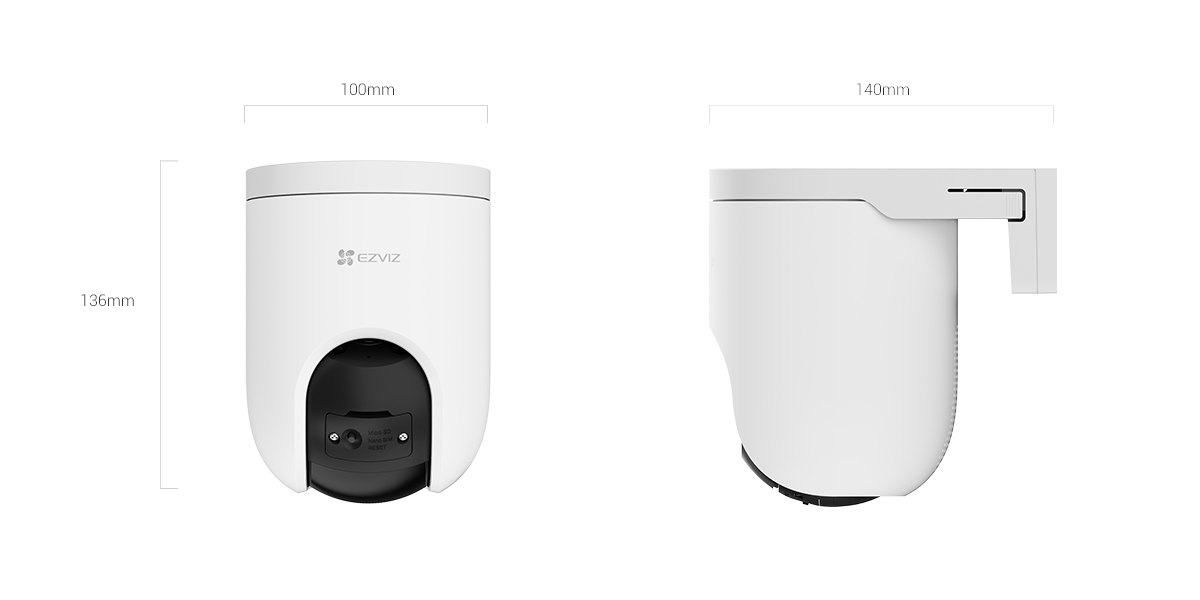
The H8c Pro 4K is EZVIZ’s current top-tier pan-tilt camera, built around a 4K sensor and a dual-lens setup for wide or narrow coverage. Most of what makes it worth the price shows up in the EZVIZ App rather than the hardware alone — tracking, presets, and alert zones are all configured and controlled there, so how well the app works matters as much as the camera itself.
It replaces the older H8c line as the flagship pan-tilt model, sitting above the 2K and 3K variants primarily on sensor resolution and the app-side detection accuracy that comes with a sharper source image. For anyone comparing it against a fixed 4K camera instead, the pan-tilt motor and preset system are the real differentiator — one H8c Pro 4K can effectively replace two or three fixed cameras aimed at different parts of a yard, provided the detection zones are configured carefully in the app rather than left on default settings.
Full Specifications
| Spec | Detail |
|---|---|
| Resolution | 4K, 3840 × 2160 |
| Sensor | 1/2.7″ Progressive Scan CMOS |
| Lens options | 4mm F1.6 (91° horizontal) or 6mm F1.6 (56° horizontal) |
| Pan / tilt range | 350° pan, 80° tilt |
| Night vision | Up to 30m, color/black-and-white/smart modes |
| Storage | MicroSD up to 512GB, or EZVIZ CloudPlay |
| Connectivity | 2.4GHz Wi-Fi (802.11b/g/n) or wired RJ45 |
| Power | DC 12V/1A, max 12W |
| Dimensions / weight | 100 × 136 × 140mm, 540g |
| Rating | Weatherproof, -30°C to 50°C |
4K vs 4mm/6mm Lens: Choosing the Right Fit
The dual-lens option is a bigger practical decision than the resolution bump itself. The 4mm variant covers a full driveway or backyard in one frame but makes faces and license plates small at longer distances once you crop into the 4K footage. The 6mm variant trades that wide coverage for a tighter, more zoomed-in view — better for watching a single gate, side path, or shared alley where you need to read detail at 15–20 meters rather than see the whole yard. If you’re only buying one camera for a whole property, the 4mm is the safer default; the 6mm makes more sense as a second camera aimed at a specific choke point.
Why 4K Matters (and When It Doesn’t)
4K’s real advantage over 1080p or even 2K isn’t a sharper live view on a phone screen — it’s digital zoom headroom after the fact. Being able to crop into a recorded clip and still read a license plate or a face without the image falling apart is the main reason this resolution tier exists for outdoor cameras. The tradeoff is file size: 4K footage eats through a microSD card and CloudPlay storage allowance noticeably faster than 1080p, so H.265 compression (on by default) matters more here than on lower-resolution models. If your priority is just knowing something happened rather than reading fine detail later, the resolution bump matters less and a cheaper 2K sibling may be enough.
Setting Up the Camera in the App
Pairing starts by scanning the QR code printed on the base with the EZVIZ App, then joining the camera to a 2.4GHz Wi-Fi network — it doesn’t support 5GHz, which is the most common reason setup stalls on newer mesh routers that broadcast a single combined SSID. Once connected, the app walks through a firmware check and a short live-view test before it lets you register a mounting location. It’s worth doing this bench-test step indoors first, since repositioning a pan-tilt camera after it’s screwed to a wall is more work than repositioning a fixed one.
What the App Actually Controls
Detection zones, human/vehicle AI filtering, the 12 preset viewing spots, and the siren/spotlight active-defense trigger are all set from the app, not on the camera itself. Getting detection zones right is the single biggest factor in whether the camera is useful day to day — without a defined zone it will alert on cars driving past on the street or trees moving in wind, which trains most people to ignore notifications entirely within a week.
Notifications and Two-Way Talk
Push notifications include a thumbnail and a short clip preview before you open the full recording, which saves time when checking alerts from a phone rather than a desktop. Two-way talk works through the app’s live view screen with a push-to-talk button; latency is usually under a second on a stable connection but climbs noticeably over cellular data if the local Wi-Fi upload speed is weak.
Common Problems and Fixes
- App shows camera offline: restart the router before the camera — a dropped DHCP lease is more common than an actual camera fault.
- Too many false alerts: narrow the detection zone and enable human/vehicle-only filtering instead of general motion detection.
- Live view lags in the app: lower the stream quality setting from HD to SD for remote viewing over cellular data.
- Presets drift over time: re-save the preset points after any firmware update, since a calibration reset can shift the saved pan/tilt coordinates slightly.
- Can’t add a second phone: share access from the primary account’s device management menu rather than logging into the same account on two phones at once.
Common questions
Do I need a subscription to use the app?
No. Live view, local microSD recording, and notifications work without CloudPlay; the subscription only adds cloud backup and longer clip history.
Can multiple people use the app for one camera?
Yes, through the share-access feature in account settings, without handing out the primary login.
Does the 6mm lens change anything in the app?
The app shows the narrower field of view automatically once the lens variant is registered; preset points still need to be re-set for the tighter frame.
Is the app compatible with Alexa and Google Assistant?
Yes, live view can be pulled up on a compatible smart display once linked through the app’s third-party integrations menu.
How much microSD storage does 4K recording actually use?
With H.265 and typical event-triggered recording rather than continuous, a 128GB card usually holds several weeks of footage; continuous 24/7 recording fills the same card in days.
Can I switch between the 4mm and 6mm lens later?
No, the lens is fixed at purchase as a specific SKU variant — it isn’t a swappable part, so the choice needs to be made before buying.
Why does the app ask to re-verify after a power outage?
A hard power loss can reset the camera’s session token; logging in again re-establishes the connection without losing saved presets or recordings.
Ryan T.
PC hardware enthusiast · writes about drivers and smart home gear