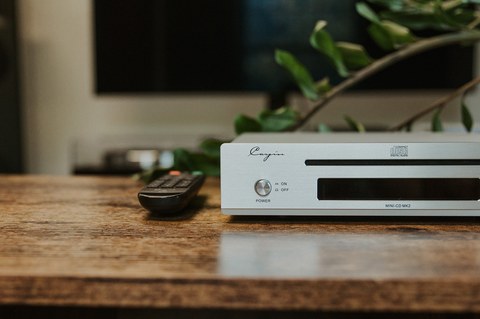
A dedicated CD player feels almost like a rebellious purchase these days, but plenty of listeners still own a shelf of discs and want a clean, simple way to spin them. The Cayin Mini-CD MK2 is built for exactly that crowd — a compact desktop transport and player that skips the flashy touchscreen nonsense and just plays music.
I want to be upfront about something before going further: this is not a portable, battery-powered player. It is a small desktop unit meant to sit on a shelf or rack next to an amplifier, the same way a traditional CD player would, just shrunk down to a footprint of 240 x 213 x 58mm. If you were expecting something you could toss in a bag, this isn’t it — but if you want a compact transport for a desktop or bookshelf system, the size is part of the appeal.
Quick Facts
| Category | Detail |
|---|---|
| Brand | Cayin |
| Model | Mini-CD MK2 |
| DAC chip | ESS ES9018K2M |
| Upsampling | Up to 352.8kHz (8x) |
| Transport mechanism | Sanyo high-precision CD mechanism |
| Outputs | RCA analog, coaxial S/PDIF, I2S (HDMI-type) |
| Dimensions | 240 x 213 x 58mm |
| Price | Roughly €398 |
What’s Inside the Mini-CD MK2
At the heart of the unit is an ESS ES9018K2M DAC chip, a well-regarded conversion chip that shows up in plenty of respected desktop and portable gear. Cayin pairs it with a built-in sample rate converter that upsamples the CD’s native 44.1kHz signal all the way up to 352.8kHz, using as much as 8x conversion. Whether that upsampling audibly improves the sound is debated among audiophiles, but it’s a nice option to have and doesn’t hurt anything if you’d rather leave it engaged.
The actual disc-reading is handled by a high-precision Sanyo CD mechanism, a detail that matters more than it sounds. Cheap transports are usually the first thing to fail or introduce jitter and read errors, so sourcing a proven mechanism instead of a bargain-bin part is a sensible move on Cayin’s part.
Around back, the Mini-CD MK2 offers a reasonably complete set of outputs for a device this size:
- A pair of RCA analog outputs for connecting directly to an amplifier or receiver
- A coaxial S/PDIF digital output
- An I2S output delivered over an HDMI-type connector, intended for feeding a compatible external DAC
That I2S output is arguably the most interesting feature here. It lets the Mini-CD MK2 function purely as a transport, handing off the raw digital signal to a separate, more capable DAC rather than relying on the onboard conversion. For anyone who already owns a nice outboard DAC, that’s a genuinely useful option rather than a marketing checkbox.
How It Sounds, and an Honest Caveat
Fed through its own analog outputs, the Mini-CD MK2 has a pleasant, slightly warm and relaxed character that suits a wide range of music without calling attention to itself. It isn’t a clinical, ruler-flat sounding machine, and for casual listening on a bookshelf system that’s usually a good thing.
That said, I’d be doing you a disservice if I didn’t mention a caveat that came up in more rigorous testing. One technical review site that specializes in objective distortion measurements found that the Mini-CD MK2’s built-in DAC section measured with more distortion than you’d expect from a modern ESS-based design, and the reviewer’s recommendation was to bypass the internal DAC entirely and route the digital output (coaxial or I2S) into an external DAC instead.
I don’t think this is a dealbreaker, especially at this player’s roughly €398 price point, and plenty of listeners will be perfectly happy running it through its own analog outputs. But if you’re the type who cares about bench numbers as much as subjective impressions, it’s worth knowing that the built-in DAC isn’t the star of the show here — the transport and digital outputs are.
Build Quality and Everyday Use
The chassis feels appropriately solid for a component in this price range, with a brushed aluminum faceplate and enough heft that it doesn’t feel like a toy sitting next to a proper amplifier. Reviewers at outlets including HiFi.blog and Audio Science Review have both put the unit through its paces, and the general consensus is that build quality punches above the price.
Day to day, operation is refreshingly simple. There’s no app to install, no firmware update dance, and no menu diving. You load a disc, press play, and the transport does its job. For anyone tired of Bluetooth pairing screens and streaming apps that seem to update themselves into new bugs every other week, that simplicity is a feature, not a limitation.
Who Should Consider This CD Player
The Mini-CD MK2 makes the most sense for a few specific types of buyers:
- Someone with an existing CD collection who wants a compact, no-fuss way to play it through a home system
- Someone who already owns a good external DAC and wants a clean transport to feed it via coaxial or I2S
- Someone building a small, minimalist desktop or bookshelf system where a full-size CD player wouldn’t fit
If none of those describe your situation, a streaming-focused source or a general-purpose DAC/transport combo might serve you better. But for the CD-owning crowd, this is a tidy little unit that does one job well, with the flexibility to hand off to better outboard gear when you want to squeeze out a bit more fidelity. You can find additional owner impressions from retailers like Bloom Audio and Hi-Fi Ratings, along with the community thread on Starspicker Audio.
Troubleshooting Common Playback Issues
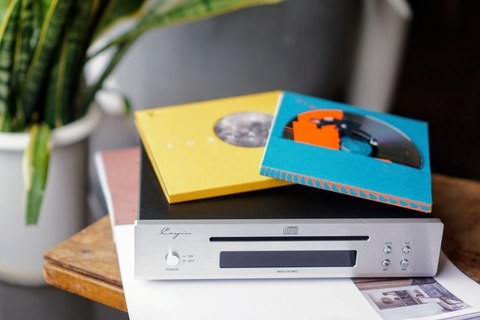
- Problem: The tray won’t open or close properly. Check for a firm, level surface under the unit first, since even a slight tilt can cause a slot or tray mechanism to bind, and gently clean any visible dust from the opening before assuming a mechanical fault.
- Problem: The player skips or stutters on certain discs. Clean the disc surface with a proper CD cleaning cloth, working outward from the center rather than in circles, since burned CD-Rs and scuffed discs are far more likely to cause read errors than the mechanism itself.
- Problem: No sound comes through the RCA outputs. Confirm the cables are seated fully in both the player and the amplifier, and check that your amp is actually set to the correct input, which is an easy step to overlook when a system has several sources connected.
- Problem: The external DAC connected via I2S produces no signal or distorted audio. Double check that your DAC actually supports the same I2S pinout Cayin uses over its HDMI-type connector, since I2S implementations aren’t fully standardized across brands and a mismatch can cause silence or garbled sound.
- Problem: The display or front panel becomes unresponsive. Unplug the unit from mains power for about a minute rather than just turning it off at the front panel, which resets the internal control board on most compact CD players of this type.
- Problem: Burned CD-Rs play inconsistently while pressed discs work fine. This is normal behavior for optical mechanisms in general, not a defect specific to this unit; try burning at a slower write speed and using a well-regarded disc brand to improve compatibility.
Frequently Asked Questions
Is the Cayin Mini-CD MK2 portable?
No. Despite the compact size, it’s a desktop component meant to be plugged into mains power and connected to an amplifier or DAC — there’s no battery inside.
Do I need an external DAC to use it?
Not necessarily. The built-in ESS ES9018K2M DAC works fine through the RCA outputs for casual listening. An external DAC is only recommended if you want to chase the last bit of measured accuracy.
What’s the benefit of the I2S output?
I2S carries the digital audio signal in a format that avoids some of the conversion steps required by S/PDIF, which can result in a cleaner handoff to a compatible external DAC, provided that DAC supports I2S input over the same connector type.
Can it read CD-Rs or damaged discs well?
The Sanyo mechanism used here is a proven, higher-precision part compared to budget transports, so it generally handles burned discs and mildly scuffed CDs better than cheaper players, though results always depend on individual disc quality.
Ryan has spent over a decade tinkering with desktop audio gear, from vintage CD transports to modern DACs, and writes hands-on impressions for readers who want plain-English takes rather than lab jargon.