It’s worth stating this plainly before anything else: the Cayin iDAP-6 will not make sound by itself. There’s no digital-to-analog converter inside it. What it does instead is gather digital audio from almost any source you can think of — Bluetooth, WiFi, Ethernet, an SD card, or a USB drive — and hand that signal off, as cleanly as possible, to a separate DAC. Understanding that distinction up front is the whole key to understanding what this device is actually for.
Quick Specs
- Model / Applies To: Cayin iDAP-6 digital transport
- Inputs: Bluetooth, WiFi, Ethernet, SD card, 3x USB (7 total)
- Outputs: USB, I2S, AES/EBU, coaxial, optical
- Format support: PCM up to 32-bit/384kHz; DSD up to DSD256 over I2S, DoP128 over USB, DoP64 on coax/optical
- Price Tier: Around $799, mid-tier standalone transport
- Compatibility: Requires a separate external DAC (no built-in DAC or headphone jack); pairs with the Cayin iDAC-6/iHA-6 stack or any competent third-party DAC
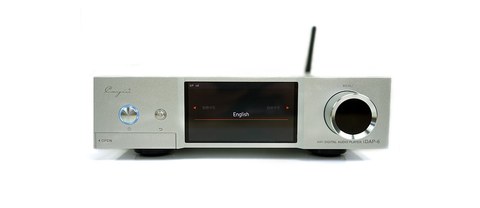
| Spec | Value |
|---|---|
| Model | Cayin iDAP-6 digital transport |
| Inputs | Bluetooth, WiFi, Ethernet, SD card, 3x USB (7 total) |
| Outputs | USB, I2S, AES/EBU, coaxial, optical |
| PCM support | Up to 32-bit/384kHz |
| DSD support | Up to DSD256 (I2S), DoP128 (USB), DoP64 (coax/optical) |
| DAC included | No, requires a separate external DAC |
| Price tier | Around $799 |
A transport, not a player
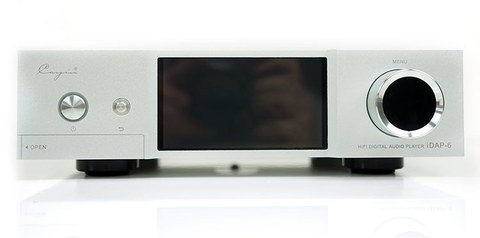
In hi-fi terminology, a device like this is usually called a “transport” or a “streamer-server,” and Cayin built the iDAP-6 specifically to pair with its own iDAC-6 and iHA-6 stack, though it works equally well feeding any competent external DAC. At $799, it competes less on flashy specs and more on being an unusually versatile front-end: seven separate ways to get audio in, and four ways to send it out digitally, all inside one relatively compact box.
What goes in
The input list is genuinely broad for a device this size:
- Bluetooth, for quick streaming from a phone or laptop
- WiFi, for network streaming from services and local network shares
- Ethernet, for a more stable wired network connection
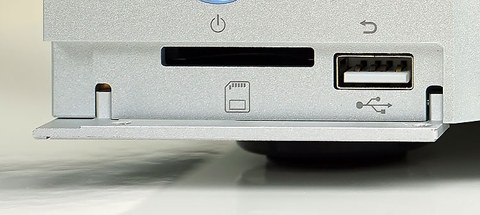
- A full-size SD card slot, for locally stored files without needing a computer nearby
- Three USB ports, usable as OTG sources for external drives or DACs
That range of inputs means the iDAP-6 can realistically replace several separate boxes — a network streamer, a card reader, and a USB source switcher — with one unit sitting at the front of a system.
What comes out, and at what quality
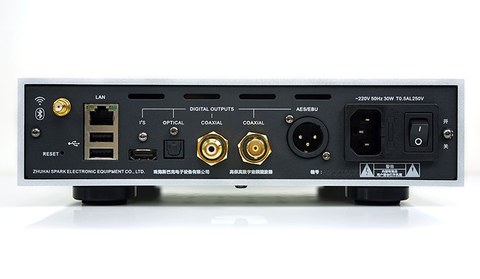
On the output side, the iDAP-6 offers USB, I2S, AES/EBU, coaxial, and optical digital outputs, giving you a choice of connection depending on what your downstream DAC supports and which interface tends to perform best with it. Format support is comprehensive: DFF, DSF, SACD-ISO, FLAC, ALAC, WAV, and APE files, with PCM decoding up to 32-bit/384kHz. DSD is handled a little differently depending on the output used — up to DSD256 over I2S, DoP128 over USB, and DoP64 on the other digital interfaces. That tiering is normal for devices in this category and reflects real bandwidth differences between the interfaces themselves, not an inconsistency in the iDAP-6’s design.
What reviewers actually noticed
Headfonics praised the iDAP-6 as a genuinely versatile, low-noise transport, singling out local playback from attached drives and SD cards as a particular strength, with a straightforward interface that doesn’t require fighting through menus to find a file. Coverage from The Absolute Sound, Hi-Fi+, and audioFi.net echoed that assessment, focusing on how competitive the iDAP-6 sounds against transports costing considerably more, provided it’s paired with a DAC that can actually take advantage of the clean signal it’s sending out. That last point matters: the iDAP-6 is only as good as what you connect it to. Pair it with a mediocre DAC and you’ll hear a mediocre DAC; pair it with something like the iDAC-6, and reviewers describe results that punch well above the iDAP-6’s own price.
Who should actually buy this
The iDAP-6 makes sense for one specific kind of buyer: someone who already owns, or is planning to buy, a separate DAC and wants a single flexible source component to feed it from network streams, local files, and Bluetooth alike. It does not make sense as a first purchase for someone who just wants to plug in headphones and hear music, since on its own it’s silent — there’s no DAC and no headphone jack anywhere on the chassis. If that describes what you’re after, look at the iDAC-6 or a DAC/amp combo instead, and consider the iDAP-6 later once you’re ready to build out a source that can do more than any single all-in-one player.
Choosing the right output for your DAC
Because the iDAP-6 offers four different digital outputs, it’s worth thinking through which one actually suits your downstream DAC rather than defaulting to whichever cable happens to be handy:
- I2S generally offers the most direct, least-processed path to a compatible DAC and supports the highest DSD rate the iDAP-6 can output, but only works if your DAC has a matching I2S input, and connector standards vary between brands
- USB is the most universally compatible option and a safe default if your DAC doesn’t support I2S or AES/EBU
- AES/EBU is a professional-grade balanced digital interface, often favored in higher-end DACs for its resistance to interference over longer cable runs
- Coaxial and optical are the most common consumer digital interfaces and a safe fallback, though they cap out at a lower DSD rate than I2S or USB
If your DAC supports more than one of these, it’s genuinely worth trying each before settling, since the practical difference in noise floor and perceived detail can be noticeable even though all four are nominally carrying the same digital bits.
Troubleshooting Common Setup Problems
- No sound at all: remember the iDAP-6 has no DAC of its own, so confirm a separate DAC is actually connected and powered on before assuming the transport itself is faulty.
- WiFi network streaming keeps dropping: switch to the Ethernet port for a wired connection, which is more stable than WiFi for gapless network playback.
- SD card or USB drive not showing up: reformat the drive to a standard file system (FAT32 or exFAT) and confirm files sit in a normal folder structure rather than deeply nested subfolders.
- Chosen digital output not recognized by your DAC: fall back to the USB output first, since it is the most universally compatible interface, then try I2S or AES/EBU once basic playback is confirmed working.
- Bluetooth pairing fails: forget the device on both ends and re-pair from scratch, keeping the source phone or laptop within a few meters during the initial pairing handshake.
Frequently asked questions
Can the Cayin iDAP-6 play music on its own, without any other equipment?
No. It has no digital-to-analog converter and no headphone or speaker output. It needs to be connected to a separate DAC to produce any sound at all.
What’s the benefit of using the iDAP-6 instead of just plugging a hard drive into my DAC directly?
The iDAP-6 handles file browsing, network streaming, Bluetooth, and multiple storage types through one dedicated interface, and its output stage is engineered specifically to deliver a clean digital signal, which can matter more than people expect for ultimate sound quality.
Does it support streaming services directly?
It connects via WiFi and Ethernet for network streaming and works with locally stored files from SD cards and USB drives; check current firmware and app support for specific streaming service compatibility before assuming full support.
Is the iDAP-6 only meant to be used with Cayin’s own DAC and amp?
No. It’s designed to look and pair well with the Cayin iDAC-6 and iHA-6, but its digital outputs are standard interfaces that work with DACs from other manufacturers too.