The CaddxFPV Protos 1.6 is a compact digital FPV drone that can be bought as an aircraft or as a ready-to-fly kit. The complete kit is easier for a first-time pilot because the goggles, controller, batteries and charger are designed to work together.
I set up a CaddxFPV Protos 1.6 for a first-time FPV pilot and Position Hold mode drifted noticeably on a dark, low-detail carpet until we moved to a brighter room with more visible floor texture. That single change made the hover rock-solid without touching any settings.
This guide explains what is included, how to complete the first setup, how the three flight modes behave and what to check when the drone will not arm or the digital video link is unstable. The Protos uses the Caddx Ascent ecosystem, so it should not be treated like a standard analog Tinywhoop or a DJI-air-unit build.
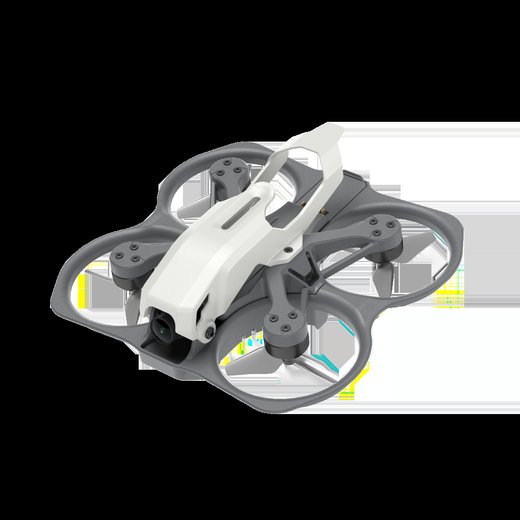
Key specifications
Item Details Propeller class 1.6-inch Approximate aircraft weight About 100g Video system Caddx Ascent HD Camera output Up to 1080p at 60fps Flight modes Position hold,…
What the Protos 1.6 is designed for
The Protos is aimed at indoor practice, garden flying and the first steps into manual FPV control. Its guarded propeller layout and position-hold mode reduce the workload for a…
First setup before the first flight
Charge the aircraft batteries and the goggle battery before binding. Inspect the battery contacts and make sure each modular pack clicks fully into the aircraft. A pack that is…
Battery charging and flight-time expectations
The complete kit normally includes three modular batteries and a multi-battery charging unit. Caddx advertises up to about ten minutes per pack under controlled conditions, but…
Key specifications
| Item | Details |
|---|---|
| Propeller class | 1.6-inch |
| Approximate aircraft weight | About 100g |
| Video system | Caddx Ascent HD |
| Camera output | Up to 1080p at 60fps |
| Flight modes | Position hold, self-stabilising and manual |
| Battery | Modular 840mAh pack |
| Typical kit | Drone, goggles, controller, three batteries and charging hub |
What the Protos 1.6 is designed for
The Protos is aimed at indoor practice, garden flying and the first steps into manual FPV control. Its guarded propeller layout and position-hold mode reduce the workload for a beginner, but it can still switch to a manual mode for flips, rolls and faster lines.
The aircraft is part of the Ascent HD system. That means the camera, video transmitter and goggles form one digital link. Analog goggles cannot receive the picture, and DJI or Walksnail goggles should not be assumed compatible unless Caddx explicitly lists support for that exact hardware.
- Use Position Hold when learning throttle and direction.
- Use the self-stabilising mode after basic control feels natural.
- Use manual mode only in a large, clear area.
- Keep propeller guards fitted until you can recover from mistakes.
First setup before the first flight
Charge the aircraft batteries and the goggle battery before binding. Inspect the battery contacts and make sure each modular pack clicks fully into the aircraft. A pack that is only partly seated can power the drone on the bench and then disconnect during a hard movement.
- Install the correct propellers in their marked positions.
- Power the goggles and controller first.
- Place the drone on a level surface and connect the flight battery.
- Wait for the video link and control link to finish connecting.
- Select the beginner-friendly flight mode.
- Check the live view, battery level and control response before arming.
Do not move the aircraft while its sensors are initialising. Position-hold performance depends on a clean downward view and a stable surface. Very dark floors, shiny tiles, strong reflections and moving carpet patterns can reduce optical-flow accuracy.
Battery charging and flight-time expectations
The complete kit normally includes three modular batteries and a multi-battery charging unit. Caddx advertises up to about ten minutes per pack under controlled conditions, but real time depends on flight mode, speed, temperature, propeller condition and battery age.
Land before the pack is deeply discharged. Repeatedly flying until the aircraft cuts power will shorten battery life. If one pack delivers much less time than the others, label it and compare its behaviour after a normal charge.
- Let warm batteries cool before charging.
- Do not store packs fully charged for long periods.
- Stop using a pack that is swollen, damaged or unusually hot.
- Keep the charging contacts clean and dry.
How the three flight modes differ
Position Hold is the easiest mode because the aircraft tries to maintain location and altitude when the sticks are centred. It is useful for orientation practice, but it still needs a suitable surface and a reasonably calm environment.
Self-stabilising mode levels the aircraft when the sticks return to centre, but it gives the pilot more direct control than Position Hold. Manual mode removes automatic levelling and should be treated as a separate skill. Practise manual control in a simulator before using it near people or furniture.
| Mode | Best use | Main limitation |
|---|---|---|
| Position Hold | First flights and slow indoor practice | Can drift over reflective or low-detail floors |
| Self-stabilising | Learning turns and controlled forward flight | Does not hold an exact position |
| Manual | Freestyle and full control | Will not level itself when sticks are released |
Video link and goggles setup
The Ascent goggles receive the digital video stream and can record to a microSD card. Insert and format the card through the goggle menu when possible. A card that is too slow or formatted incorrectly can stop recording even while the live image remains normal.
Keep the goggle antenna area clear and avoid covering the front of the goggles with metallic accessories. The radio-control link and video link are separate systems, so a clear image does not always mean the controller link is healthy, and a working controller does not confirm that the goggles are on the correct video channel.
Common Protos problems and fixes
| Symptom | Likely cause | First check |
|---|---|---|
| Drone will not arm | Calibration, GPS, battery or safety lock | Read the app or controller warning before cycling power |
| Video freezes | Weak link, interference or overloaded phone | Move closer, reduce obstructions and close background apps |
| Aircraft drifts | Poor calibration, weak optical flow or wind | Recalibrate on a level surface and test in calm air |
| Short flight time | Aged battery, cold pack or aggressive flying | Check cell condition and compare hover time with another pack |
| Return-to-home looks wrong | Weak home-point lock or compass interference | Wait for a stable GPS lock away from metal objects |
When the aircraft will not arm, read the exact warning rather than repeatedly reconnecting the battery. Typical causes include an incomplete sensor start-up, a safety lock, low battery voltage, an incorrect flight-mode state or a controller that has not finished binding.
If the picture breaks up only when the drone turns away, check whether the battery, frame or your body is blocking the antenna path. Test in an open area at low altitude before changing firmware or replacing parts.
Safe storage and maintenance
Remove the battery after flying and inspect the ducts, propellers and motor shafts. Hair and fibres can wind around the small shafts and raise motor temperature. Replace a cracked propeller even if the drone still hovers.
Keep firmware changes controlled. Record the installed versions before updating, use files intended for the exact Protos and Ascent hardware, and avoid interrupting power during an update. A complete kit that already binds and flies should not be updated only because a different Caddx product has a newer file.
Sources and further reading
Conclusion
Use a controlled first-flight process, keep a battery reserve and read the exact controller or app warning before changing settings. Older drones can still work well, but battery health, software availability and replacement parts matter as much as the original specifications.
Frequently Asked Questions
Can the Protos 1.6 use analog goggles?
No. It uses the Caddx Ascent digital video system, so standard 5.8GHz analog goggles cannot decode its image.
Is the Protos suitable for a first FPV drone?
Yes, especially as the complete ready-to-fly kit. Position hold and self-stabilising modes reduce the learning load before manual mode is attempted.
How long does one battery last?
Caddx advertises up to about ten minutes in controlled conditions. Faster flight, cold weather and an aged battery reduce that time.
Can the controller be used with a simulator?
The supplied A-Link controller is promoted for simulator use. Follow the controller instructions and confirm the simulator sees every channel before practising.
Why does the drone drift indoors?
Optical flow needs visible floor detail and steady lighting. Reflections, darkness, moving patterns or air from a fan can cause drift.
Ryan has set up ready-to-fly digital FPV kits for beginners, learning that optical-flow position hold depends heavily on floor lighting and texture rather than the drone’s settings. He documents these lessons at softwaredriverdownload.com.