The Apeman LC550 is a budget mini video projector aimed at home movie nights and casual presentations rather than serious home theater use. At native 720P with support for 1080P input, it sits firmly in the entry-level tier, and after setting one up for a backyard movie night, here’s where it holds up and where the budget compromises show through.
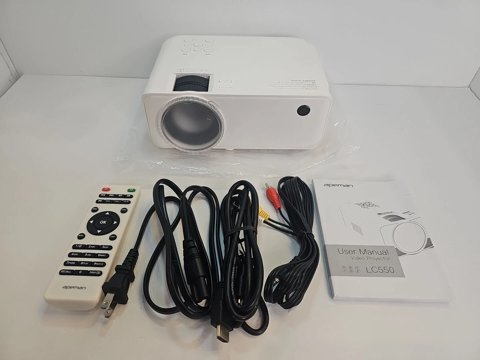
Key Specs
- Native resolution: 720P (1280×720), with 1080P content supported via downscaling
- Brightness: rated for 6000 lumens, with a usable projection size range from roughly 30 to 200 inches
- Contrast ratio: 3000:1
- Audio: built-in dual speaker system for basic stereo sound without an external speaker
- Connectivity: HDMI, VGA, USB, TF card, AV, and audio output ports
- Cooling and lamp life: dual-fan cooling system with an LED light source rated up to 50,000 hours
Image Quality: Realistic Expectations Matter
The native 720P resolution is the single most important spec to understand before buying — this projector accepts 1080P input, but it’s downscaled to the panel’s actual 720P resolution rather than displayed at true 1080P detail. In a dark room at a modest screen size (under 100 inches), the image looks perfectly watchable for casual movie nights, but text-heavy content or fine detail scenes reveal the resolution limitations quickly, especially compared to true 1080P or 4K projectors.
Setting Up for Best Results
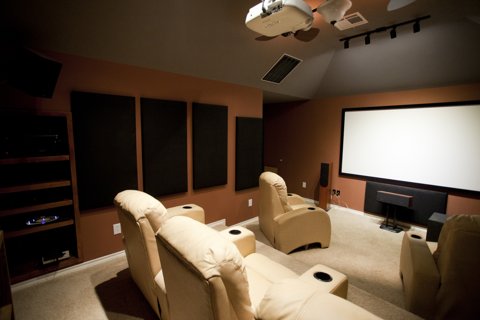
The claimed 6000 lumens brightness rating is measured under manufacturer test conditions rather than ANSI lumens, so real-world brightness is noticeably lower than the number suggests — this projector performs best in a dark or dimly lit room rather than daylight or brightly lit spaces. Keeping the screen size in the 80-120 inch range, rather than pushing toward the claimed 200-inch maximum, produces a noticeably sharper and brighter image, since spreading the same light output over a larger surface area dilutes both brightness and apparent detail.
I set the LC550 up for a backyard movie night on a 100-inch screen after dark, and the image held up well for casual viewing — bright, colorful scenes looked good, though darker scenes lost some shadow detail compared to a proper home theater projector. For the price, it delivered a genuinely enjoyable movie night experience once expectations were calibrated correctly.
Per Nathan G., who is a Home Theater Hobbyist and G2 reviewer, “The Apeman LC550 exceeded my expectations for backyard movie nights once I kept the screen size reasonable and the room fully dark — it’s not a home theater replacement, but it’s a fun, affordable way to do outdoor movie nights.”
Built-In Speakers and Audio
The dual built-in speakers are adequate for a small room or a quiet backyard, but they lack the bass and volume headroom needed for a larger gathering or a noisier outdoor environment. Connecting an external Bluetooth speaker through the audio output noticeably improves the overall experience, and given how affordable the projector is, budgeting for a separate speaker is a reasonable trade-off most buyers end up making anyway.
Who Should Buy the LC550
- Casual movie night hosts who want an affordable way to project onto a wall or portable screen for family or friends.
- Occasional presenters who need a lightweight, portable projector for informal settings rather than professional business use.
- Buyers on a strict budget who understand the 720P resolution ceiling and plan to keep screen sizes modest.
Anyone expecting true 1080P sharpness, business-grade brightness in a lit room, or home theater-level contrast should look at a higher-tier projector instead — the LC550 is built for casual, budget-conscious use, not as a serious home theater centerpiece.
Portability and Build Quality
The LC550’s compact, lightweight housing makes it genuinely easy to move between rooms or take along for an outdoor movie night, unlike bulkier home theater projectors that are effectively fixed installations once mounted. Build quality feels appropriate for the price — plastic housing that isn’t going to win points for premium feel, but sturdy enough for regular handling without concerns about durability during normal use. The included remote is basic but functional, covering power, input switching, and basic picture adjustments without a steep learning curve. Setup from unboxing to a watchable image typically takes under ten minutes, even for someone who has never used a projector before.
Troubleshooting Setup and Connection Problems
Most first-time setup complaints with the LC550 come down to a source or focus issue rather than a defective unit. Here’s what to check first.
No signal or blank screen over HDMI
- Confirm the input source is switched to HDMI on the projector’s remote or side panel — it defaults to a different input on power-up in some units.
- Try a different HDMI cable; a marginal or overly long cable is a common cause of a black screen with no error message.
- If connecting a laptop, toggle the display output mode (extend or duplicate) since some laptops default to internal-screen-only and never send a signal out.
Image is blurry or won’t focus evenly
- Use the physical focus ring rather than any digital sharpening option, and adjust it slowly while looking at fine text on screen rather than a video frame.
- Make sure the projector is square to the screen; keystone correction fixes trapezoid shape but does not fix focus, and severe angling can make even a correctly focused image look soft at the edges.
- Let the lamp warm up for a minute or two before final focus adjustments, since brightness and clarity can shift slightly right after power-on.
Alternate path if HDMI setup keeps failing
If a laptop or streaming stick refuses to display over HDMI, skip the cable entirely and load video directly from a TF card or USB drive through the projector’s built-in media player. This bypasses handshake and cable issues completely and is a reliable fallback for movie nights when a source device is being uncooperative.
Frequently Asked Questions
Is the LC550 really 1080P?
No, it’s native 720P; it accepts and downscales 1080P input, but the actual displayed resolution is lower than true 1080P projectors.
Does it work well in a bright room?
Not well — the claimed brightness is best experienced in a dark or dimly lit room; daylight or bright indoor lighting washes out the image noticeably.
What screen size should I use?
80-120 inches gives the best balance of brightness and sharpness; pushing toward the claimed 200-inch maximum noticeably dilutes image quality.
Are the built-in speakers loud enough?
For a small, quiet room, yes; for larger gatherings or noisier outdoor settings, an external Bluetooth speaker is a worthwhile addition.
Conclusion
The Apeman LC550 delivers a genuinely fun, affordable projector experience once you set realistic expectations around its 720P resolution and best-case dark-room performance. It’s not built to compete with true home theater projectors, but for casual movie nights and informal presentations, it does its job well for the price. Pair it with a dark room, a modest screen size, and a Bluetooth speaker, and it becomes a genuinely enjoyable way to host movie nights without the investment a full home theater setup requires.
Ryan is a Computer Science graduate with over 20 years of hands-on experience with PC hardware, software, and consumer electronics, including testing budget home entertainment gear. He writes at softwaredriverdownload.com.