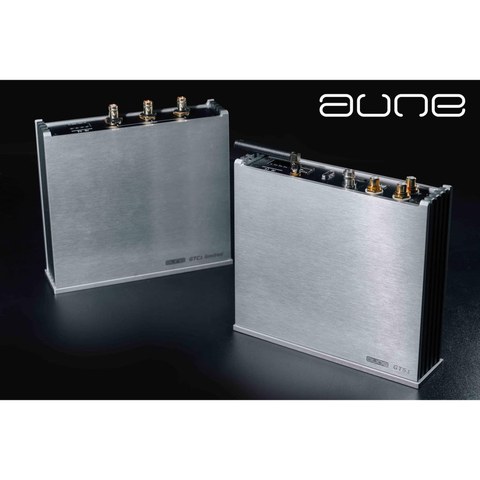
Car audio does not get anywhere near the attention that desktop and portable gear gets in the audiophile hobby, which is a shame because a good car system deserves a source component worthy of it. The Aune GTS1 is exactly that: a dedicated hi-res car audio player built to sit in the trunk or under a seat and feed a proper car DSP or amplifier with a clean digital signal, rather than relying on a head unit’s built-in DAC.
| Storage Support | USB flash drive or SSD, up to 2TB, exFAT |
| Formats Decoded | WAV, FLAC, DSD64-DSD512, SACD-ISO, APE, ALAC, AAC, MP3 |
| Output Level | 2.0 Vrms, THD+N around -102dB |
| Wireless Streaming | Bluetooth with LDAC and aptX HD |
| Digital Outputs | IIS, coaxial, optical |
| Power | 12V, with accessory-circuit power detection pin |
| External Clock Support | 10MHz input, compatible with Aune GTC1 |
What the GTS1 actually does
Think of the GTS1 as a purpose-built transport rather than a head unit replacement. It reads music directly off a USB drive or hard disk, up to 2TB in capacity, and decodes it with pure hardware rather than running on a general-purpose operating system. That matters in a car environment because it means there is no bootloader lag, no app crashes, and no background processes competing for resources. The unit is built to boot in about a second and get straight to playback.
- Direct hardware decode of WAV, FLAC, DSD64 through DSD512, SACD-ISO, APE, ALAC, AAC, and MP3
- FPGA-based asynchronous clocking to keep jitter down
- Support for an external 10MHz master clock input
- Bluetooth with LDAC and aptX HD for wireless high-res streaming from a phone
- Supports USB drives and hard disks up to 2TB, formatted to exFAT
Aune quotes an output level of 2.0 Vrms with THD+N around -102dB, which are genuinely serious numbers for a source designed to survive vibration, heat, and the electrically noisy environment inside a vehicle.
Pairing with the GTC1 clock
The GTS1 is designed to work alongside a companion product, the GTC1, which is a dedicated car OCXO audio clock. The GTC1 provides a stable 10MHz reference signal that the GTS1 and other digital components in the chain can lock to, which reduces jitter across the whole system rather than just at one link. If you already have a car DSP that accepts an external clock input, adding the GTC1 is the single biggest upgrade you can make to a GTS1-based system. Full specifications for both units are listed on Aune’s own car audio product page.
Installation notes
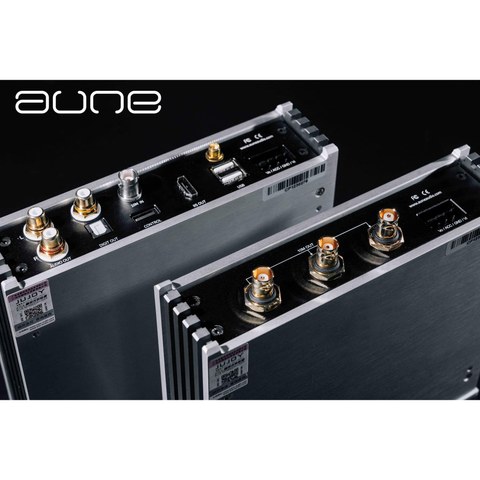
Because the GTS1 is meant to be installed rather than carried around, a few practical points matter more here than they would with a portable product. It runs off 12V, with a dedicated power interface that includes a 12V input detection pin so it can be wired into an accessory circuit and power on with the ignition rather than needing a separate switch. It also has an HDMI-style IIS output for connecting to compatible DSP units, alongside more conventional coaxial and optical digital outputs and an analog RCA output.
If you are running a hard disk drive rather than a flash drive, Aune explicitly recommends against it, since the vibration and heat inside a moving vehicle are not kind to spinning platters. Stick with a good quality USB flash drive or solid-state drive formatted to exFAT, and remove any volume label before you format it, since the GTS1’s file system reader can behave oddly with a labeled drive. A demonstration of the unit running in an actual vehicle installation is up on Xcite Audio’s product listing, which is worth a look before you plan your own install.
Who this is actually for
This is a niche product aimed squarely at car audio enthusiasts who already have a proper amplifier and speaker setup and want a source component that will not be the weak link in the chain. If your car audio system is still running off a stock head unit’s built-in DAC, the GTS1 is a significant step up, but it only makes sense once you have already invested in decent amplification and speakers downstream. It is not a Bluetooth speaker replacement or a casual upgrade for someone who just wants louder music in the car.
Comparing it to a head unit’s built-in DAC
Most factory and even many aftermarket head units use a fairly basic DAC chip shared across dozens of unrelated products, tuned for cost rather than fidelity, and running on a general-purpose processor that also has to manage navigation, phone calls, and touchscreen graphics at the same time. That shared workload introduces electrical noise and processing overhead that a dedicated transport like the GTS1 simply does not have to deal with, since its only job is reading files and converting them to a clean digital or analog signal.
The practical upshot in a real vehicle is a noticeably quieter background and better separation between instruments, especially at moderate to loud listening levels where a head unit’s internal DAC often starts to show its limitations. If you have ever noticed your car system sounding congested or harsh once you push the volume up, a cleaner source component like the GTS1 addresses that problem more directly than swapping speakers or amplifiers alone would.
Troubleshooting Common GTS1 Setup Issues
Most problems installers run into with the GTS1 trace back to drive formatting, wiring, or clock pairing rather than the unit itself.
- Unit doesn’t power on with the ignition: Double-check the 12V input detection pin is wired to a genuine accessory circuit rather than a constant-hot line; a miswired power interface is the most common cause of no-power complaints.
- Drive isn’t recognized at all: Reformat to exFAT and remove any volume label, since a labeled drive can cause the file system reader to behave oddly. Also confirm you’re using a flash drive or SSD rather than a spinning hard disk.
- Playback stutters or files skip: This is usually a drive speed issue with very large DSD512 or SACD-ISO files on a slower flash drive; switching to a faster USB drive or SSD typically resolves it.
- No sound through the DSP after wiring the IIS output: Verify your downstream DSP actually supports IIS input and is configured to expect it, since mismatched digital output settings between the GTS1 and DSP are a common install-day mistake.
- GTC1 clock doesn’t seem to improve anything audible: Confirm your DSP or downstream component is actually configured to lock to the external 10MHz reference; simply connecting the cable without enabling external clock sync in the DSP’s settings won’t have any effect.
FAQ
What storage does the Aune GTS1 support?
USB flash drives and solid-state drives up to 2TB, formatted to exFAT. Hard disk drives are not recommended due to vibration in a vehicle.
Do I need the GTC1 clock to use the GTS1?
No, the GTS1 works as a standalone unit with its own internal clocking, but adding the GTC1 external clock reduces jitter further if your downstream DSP supports an external clock input.
Can the GTS1 stream from a phone over Bluetooth?
Yes, it supports Bluetooth with LDAC and aptX HD codecs for high-resolution wireless streaming.
What formats does it support?
WAV, FLAC, DSD64 through DSD512, SACD-ISO, APE, ALAC, AAC, and MP3, all decoded directly in hardware.
Does it need a separate power switch?
No, it has a 12V input detection pin so it can be wired to power on automatically with the vehicle’s accessory circuit.
Car audio is a corner of this hobby I did not expect to get pulled into, but after wiring a GTS1 into my own car for a few weeks of testing, I came away with a lot more respect for how much a clean source component changes things even in a moving vehicle.