Picking between two $199 digital audio players that share the same core DAC chip is trickier than it sounds. I spent a few weeks going back and forth between the HiBy R3 Pro II and the FiiO JM21, running the same playlists through both, and the two ended up feeling like different tools for different jobs rather than one being an outright upgrade over the other.
Both players lean on a dual CS43198 DAC configuration from Cirrus Logic, so on paper the conversion stage is nearly a wash. What actually separates them is everything built around that chip: the operating system, the battery philosophy, and how each brand expects you to use the device day to day.
- Price
- $199 for both players
- Shared DAC
- Dual Cirrus Logic CS43198
- Operating system
- HiBy R3 Pro II: HiByOS-based; FiiO JM21: full Android 13
- Balanced output
- 480mW (R3 Pro II) vs up to 700mW cited (JM21)
- Battery life
- 21+ hours (R3 Pro II) vs roughly 9.5-16 hours (JM21)
- Best for
- R3 Pro II: battery-focused simplicity; JM21: app flexibility
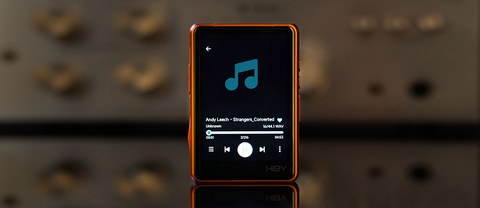
HiBy R3 Pro II: a focused music player
The R3 Pro II keeps HiBy’s streamlined HiByOS-based interface, which is essentially a custom shell built for playing music and not much else. There is no app drawer full of distractions, no background sync eating into battery, just a fast, responsive UI running on the upgraded X1600E chip. HiBy also gave this generation a genuinely nicer body: 86.9 x 60.6 x 21.6mm, 160g, wrapped in an aluminum alloy frame with a choice of Ultrasuede or matte glass on the back panel.
- Dual CS43198 DAC chips paired with four OPA1622 headphone amp chips
- PCM up to 32-bit/384kHz, native DSD256, MQA 8X unfolding
- 480mW at 32ohm through the 4.4mm balanced jack, plus a 3.5mm single-ended output
- 4000mAh battery rated for roughly 21+ hours of playback and around 900 hours standby
- USB-C, WiFi for Tidal and Qobuz streaming, Bluetooth 5.1
Because the software footprint is so light, that battery figure holds up well in daily use. It is the kind of player you charge once and mostly forget about for a few days of commuting.
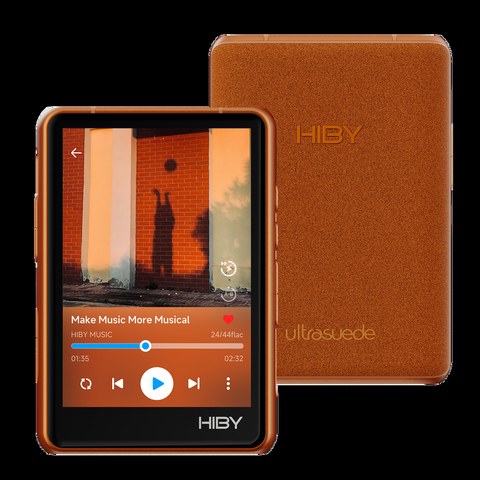
FiiO JM21: full Android in a thinner shell
The JM21 takes the opposite approach. It runs full Android 13 on a Snapdragon 680 chipset with 3GB of RAM and 32GB of storage (there is also a 4GB/64GB variant sold at a different price point, which is worth checking if you plan to install a lot of streaming apps or games alongside your music library). That means the Google Play Store, a real notification shade, and the ability to sideload whatever player app you already trust.
- Dual Cirrus Logic CS43198 DACs matched with dual SGM8262 amp chips in a fully balanced path
- 4.4mm balanced output plus 3.5mm single-ended, coaxial out, and USB DAC mode
- Bluetooth 5.0 with LDAC, aptX HD, and LHDC support
- About 13mm thin and roughly 156g
- Battery life around 12.5 hours (single-ended) or 9.5 hours (balanced) on the base model, up to 16h/12.5h on the 4GB/64GB version
One review clocked the balanced output at 700mW, noticeably punchier on paper than the R3 Pro II’s 480mW spec, though real-world headroom depends heavily on what headphones or IEMs you are driving.
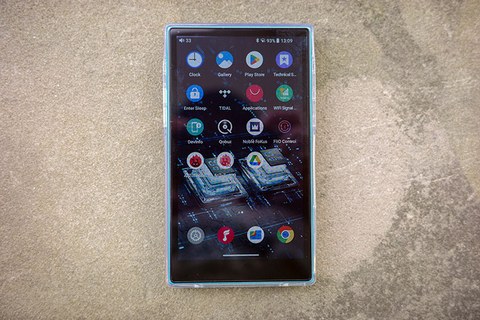
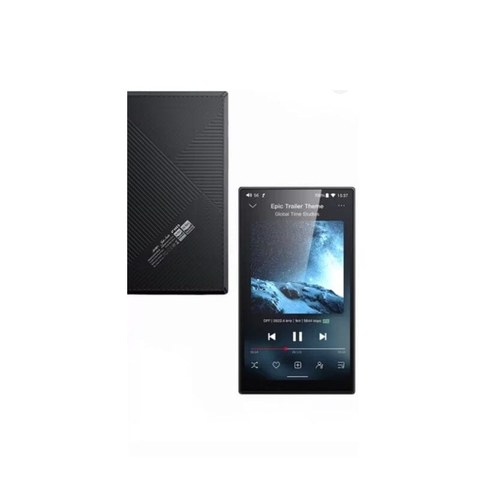
Handling, screen, and everyday usability
Picking either one up for the first time, the build quality difference is smaller than the price tag might suggest. The R3 Pro II’s suede-textured back is genuinely nice to hold and grips well in a jacket pocket without feeling slippery, while the matte glass option leans a bit more premium if you prefer a cleaner look. FiiO went the other direction with the JM21, keeping it under 13mm thin with a textured rear panel that resists fingerprints better than glass but still feels dense and well put together for a $199 player.
Screen size is where the two diverge the most in daily use. The JM21’s 4.7″ display makes browsing a large local library, adjusting EQ curves, or reading lyrics noticeably easier, and it carries over the familiar Android navigation gestures if you are coming from a phone. The R3 Pro II’s smaller touchscreen is snappier for basic playback controls thanks to the lighter software running underneath, but you will notice the difference if you spend a lot of time scrolling through folders or adjusting settings menus.
Output routing is similar on both: 4.4mm balanced plus 3.5mm single-ended, so most existing IEM and headphone cables carry over regardless of which one you buy. The JM21 adds a coaxial output and native USB DAC mode, which matters if you also want to use it tethered to a laptop or desktop as an external sound card, something the R3 Pro II is not really built around.
Bluetooth codec support tells a similar story. The JM21’s Bluetooth 5.0 radio covers LDAC, aptX HD, and LHDC, which is a broader spread than the R3 Pro II’s Bluetooth 5.1 connection, though the newer Bluetooth version on the HiBy side tends to translate into a slightly steadier wireless link in crowded environments according to several hands-on reviews from owners and reviewers alike.
Troubleshooting common problems
A few issues come up often enough with either player that they are worth covering before you run into them yourself.
- No sound through the balanced 4.4mm jack: double-check the cable itself is wired for balanced output and not a single-ended cable with a 4.4mm adapter tip, since plugging a single-ended cable into the balanced port on either device typically produces silence or one dead channel rather than an error message.
- JM21 streaming apps crash or fail to log in: because it runs Android 13, apps occasionally need a manual update through the Play Store rather than relying on auto-update, especially after the device has sat unused for a few weeks.
- R3 Pro II WiFi drops during Tidal or Qobuz playback: this is almost always a router band issue; forcing the player onto the 5GHz network instead of 2.4GHz in WiFi settings usually clears it up.
- Battery draining faster than the rated spec on either device: leaving WiFi or Bluetooth scanning enabled in the background eats into runtime noticeably on both players, so turning off radios you are not actively using helps close the gap to the advertised numbers.
- Firmware update fails partway through: keep the device above 50 percent battery and avoid touching the screen mid-update; both HiBy and FiiO recommend a fresh download of the firmware file if a previous attempt was interrupted rather than reusing a partially downloaded package.
Side-by-side spec comparison
| Spec | HiBy R3 Pro II | FiiO JM21 |
|---|---|---|
| Price | $199 | $199.99 (4GB/64GB variant at a different price) |
| Operating system | HiByOS-based, music-focused UI | Android 13, full app support |
| Processor | X1600E SoC | Snapdragon 680 |
| DAC | Dual CS43198 | Dual CS43198 |
| Amp stage | 4x OPA1622 | Dual SGM8262 |
| Balanced output | 480mW @32ohm | Up to 700mW cited |
| Wireless | WiFi, Bluetooth 5.1 | WiFi (Android), Bluetooth 5.0, LDAC/aptX HD/LHDC |
| Battery | 4000mAh, 21+ hours | ~9.5 to 16 hours depending on output/variant |
| Dimensions/weight | 86.9×60.6×21.6mm, 160g | ~13mm thin, ~156g |
Which one actually fits you
If you want a phone-like experience with access to whatever streaming or podcast app you already use, the JM21’s full Android build and bigger 4.7″ display make it the more flexible pick. You lose some battery life to that flexibility, and Android running in the background always carries a bit more overhead than a purpose-built music OS.
If you would rather charge less often and skip the fiddling that comes with a general-purpose OS on a dedicated audio player, the R3 Pro II’s focused software and longer battery rating make it the calmer choice. Reviewers at Headfonics and Headfonia both praised its build quality and the Ultrasuede back panel specifically, while Headfonics’ JM21 review and TechRadar’s writeup leaned on the Android flexibility as the JM21’s biggest selling point.
Neither is a clear-cut winner here. It genuinely comes down to whether you value app flexibility or battery-life simplicity more in a pocket audio player.
Frequently asked questions
Do the R3 Pro II and JM21 sound different if they share the same DAC chip?
The core conversion chip is the same dual CS43198 setup, but the amplifier stage, power delivery, and firmware/software tuning around it still shape the final sound, so expect a similar tonal baseline with some differences in dynamics and output headroom.
Can I stream Tidal or Qobuz on both?
Yes. The R3 Pro II supports Tidal and Qobuz through its WiFi connection and HiByOS integration, while the JM21 can install those apps directly from the Google Play Store since it runs full Android.
Which one has better battery life?
The R3 Pro II’s rated 21+ hours generally beats the JM21’s roughly 9.5 to 16 hour range, largely because HiByOS carries less background overhead than full Android.
Is the 4GB/64GB JM21 worth the extra cost?
If you plan to keep a large local library alongside multiple streaming apps, the extra RAM and storage help with multitasking and app switching; if you mostly stream or keep a smaller local collection, the base configuration is plenty.
I have put a good number of hours into portable DAPs over the years, mostly chasing the smallest rig that still sounds honest, and comparisons like this one are where that habit actually pays off.