Entry-level and “tube DAP” aren’t two phrases you’d expect to see together, but the Cayin N3 Ultra pulls it off at $530, making a genuine vacuum-tube listening experience available in a portable player for the first time to a lot of newcomers.
I’ve spent time with a few portable DAPs over the years, and the N3 Ultra stands out simply because it doesn’t try to be everything at once. There’s no attempt to cram in a flagship-grade DAC chip or absurd processing power. Instead, Cayin focused the budget on the one feature that actually differentiates it: a real tube circuit, shrunk down to fit in your pocket.
- Applies To: Cayin N3 Ultra portable tube DAP
- Key Specs: Qualcomm 425 processor, 2GB RAM, 4.1-inch 720×1280 touchscreen, 4500mAh battery, up to 12 hours playtime
- Price Tier: entry-level tube DAP, around $530
- Storage: no internal storage; runs entirely from a TF (microSD) card
- Compatibility: USB-C for charging, file transfer, and bidirectional USB DAC mode with a laptop or phone
| Spec | Detail |
| Processor | Qualcomm 425, 2GB RAM |
| Display | 4.1-inch 720×1280 TFT-LCD touchscreen |
| Tube Circuit | Third-generation, dual Raytheon JAN6418 Pentode NOS tubes |
| Battery | 4500mAh, up to 12 hours playtime |
| Storage | No internal storage; TF (microSD) card only |
| Connectivity | USB-C charging/data, bidirectional USB DAC mode, coaxial S/PDIF via USB-C |
| Dimensions / Weight | 125 x 65.5 x 19.5mm, approximately 240g |
| Price | Around $530 |
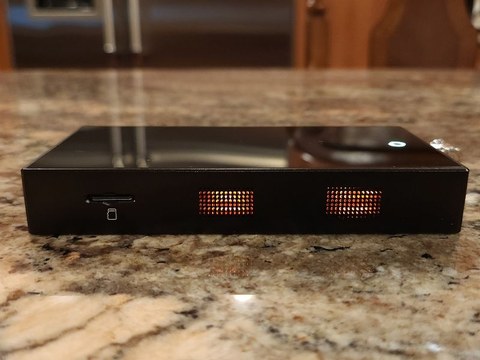
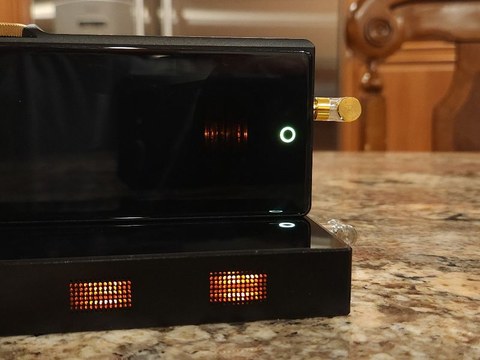
Inside sits Cayin’s third-generation tube circuit, running on genuine Raytheon JAN6418 Pentode NOS (new old stock) tubes — real vacuum tubes, not a simulated “tube-style” filter applied in software. That’s a meaningful distinction, because a lot of gear markets itself as “tube-inspired” without any actual valve inside. The N3 Ultra has the real thing, visible through small windows on the chassis that glow faintly during playback.
The player runs on a Qualcomm 425 processor with 2GB of RAM, paired with a 4.1-inch 720×1280 TFT-LCD touchscreen. Underneath the audio-focused interface, it’s actually running Android 8.1, though Cayin has locked down the experience into a closed, purpose-built UI rather than exposing the full Android app ecosystem. That’s a reasonable trade-off for a dedicated audio player — you get a stable, predictable interface instead of a general-purpose tablet that happens to play music.
Battery life comes in at up to 12 hours from the 4500mAh cell, which is solid for a player running a genuine tube circuit — tube gear tends to be less power-efficient than pure solid-state designs, so Cayin clearly put effort into balancing that trade-off. There’s no internal storage at all; everything runs off a TF (microSD) card, so budget for that separately if you’re coming from a phone-based listening setup.
The Triple Timbre Switch
The signature feature here is what Cayin calls the Triple Timbre switch, a physical toggle that changes how the signal is processed:
- Classic — routes the signal fully through the tube circuit for the warmest, most traditionally “tube” sound
- Modern — a hybrid mode that still engages the tube circuit but blends it with a more neutral character
- Solid-State — bypasses the tube circuit entirely for a cleaner, more linear presentation
Having all three options on a physical switch, rather than buried in a settings menu, means you can genuinely A/B the tube coloration against a neutral baseline in seconds. It’s a great way to actually hear what a tube stage adds to the sound rather than taking it on faith, and reviewers at outlets including Headfonia and Headfonics have both highlighted this switch as the standout feature of the player.
Connectivity That Punches Above the Price
For an entry-level player, the N3 Ultra’s connectivity is unusually complete. It supports bidirectional USB DAC mode, meaning it can act as an external DAC for a laptop or phone in addition to functioning as a standalone player. There’s also a coaxial S/PDIF output embedded directly in the USB-C port, letting you feed a digital signal to an external DAC or amp without needing a separate coaxial jack taking up space on the small chassis.
That’s a clever piece of engineering for a device this size and price, and it gives the N3 Ultra some flexibility that budget DAPs usually skip entirely.
A Real Step Up From the N3 Pro
If you’ve used or researched Cayin’s earlier N3 Pro, the N3 Ultra represents a meaningful upgrade rather than a minor refresh. The screen is larger, the tube implementation is more refined, and the Triple Timbre switch gives far more control than the older model offered. Reviewers at Head-Fi and Ear Fidelity have echoed similar impressions: this is Cayin’s most polished attempt yet at bringing tube sound to a pocketable price point.
Who This Player Is Actually For
The N3 Ultra makes the most sense for a specific kind of buyer: someone who has heard tube gear at a friend’s house or a headphone meet, been intrigued by that warmer, more organic character, and wants an affordable way to bring it into a portable setup without committing thousands of dollars to a flagship tube DAP. It’s also a sensible pickup for anyone already invested in a pair of decent in-ear monitors or headphones who wants more tonal flexibility from their source than a typical smartphone dongle can offer.
It’s less suited to someone chasing sheer measured performance or the largest possible screen and app ecosystem — for that, a mainstream Android-based DAP without the tube circuitry, or a flagship player, will serve better. But for the specific niche of “portable tube sound on a budget,” there isn’t much else that competes directly with the N3 Ultra at its price.
Physically, the player measures a pocketable 125 x 65.5 x 19.5mm and weighs around 240g, noticeably larger than a phone but still comfortable for daily carry in a jacket pocket or bag. The glass back and squared-off aluminum edges give it a more substantial feel than the price might suggest, and the black-and-gold color treatment on the retail unit looks appropriately premium sitting next to pricier gear.
Troubleshooting Setup and Playback Problems
Most complaints about the N3 Ultra trace back to a handful of setup issues rather than an actual hardware fault.
- TF card is not detected: reformat the card to FAT32 or exFAT depending on its size, power the player off before inserting or removing the card, and try a different card if the player still does not see it, since some high-capacity cards are pickier about controller compatibility than others
- No sound when connected as a USB DAC: confirm the player is switched into DAC mode from its own menu rather than assuming the USB connection alone activates it, and check that your laptop or phone has selected the N3 Ultra as its output device
- Tube glow looks dim or uneven: this is often just ambient lighting, since the glow is subtle by design. If a tube stops glowing entirely while Classic or Modern mode is selected, that points to an actual tube fault rather than a cosmetic issue
- Player feels sluggish navigating menus: this is normal for the modest Qualcomm 425 processor under a large music library; keeping your library organized into fewer, well-tagged folders on the TF card noticeably speeds up browsing
If the touchscreen becomes unresponsive or the player freezes outright, the manual fallback most owners reach for first is a forced restart by holding the power button down for roughly ten seconds, followed by a normal power-on. That resolves the vast majority of freezes without needing a factory reset.
Frequently Asked Questions
Does the N3 Ultra have internal storage?
No, all music files live on a TF (microSD) card, since there’s no built-in storage on the device.
What does the Solid-State mode actually do?
It bypasses the tube circuit entirely, routing audio through a conventional linear path for a cleaner, more neutral sound, useful for comparison or for genres where tube coloration feels like too much.
Can I use it as a USB DAC for my laptop?
Yes, the N3 Ultra supports bidirectional USB DAC mode, so it can serve as an external DAC and amp for a computer or phone in addition to working standalone.
Is Android app support available, like Spotify?
The underlying OS is Android 8.1, but Cayin ships it with a closed, audio-focused interface rather than open access to the Google Play ecosystem, so third-party streaming app support is more limited than on a general Android phone.
Penned by an audio enthusiast who has carried a rotating cast of portable players through daily commutes for years, judging each one by how it survives real-world use.