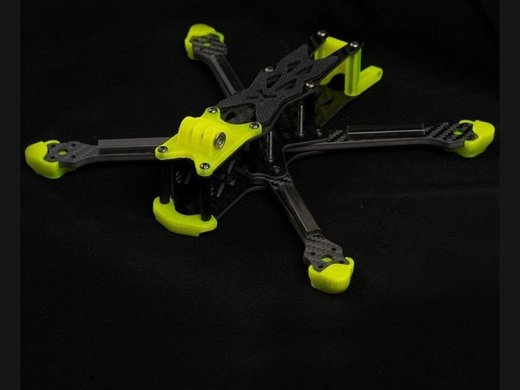
The Foxeer Aura 5 is a lightweight 5-inch carbon frame designed for freestyle and long-range builds. Check whether you have the standard freestyle or lighter long-range version before ordering arms, TPU parts or camera plates.
I assembled an Aura 5 frame for a freestyle build and one of the standoffs was a few millimeters short for the stack I was using, so double checking stack height compatibility before final assembly saved a return trip to the parts bin.
The Aura family has several closely related versions, and this is the main source of build confusion. This guide explains the standard 5-inch frame, component fit, camera and VTX choices, assembly order and the problems that appear when parts from the Aura Pro or long-range version are mixed.
Key specifications
| Item | Details |
|---|---|
| Frame class | 5-inch freestyle or long-range, depending on version |
| Material | Toray T700 carbon with smooth coating |
| Standard freestyle wheelbase | About 220mm |
| Standard freestyle weight | About 115g without TPU |
| Stack support | 20 × 20mm and 30.5 × 30.5mm on standard version |
| Camera support | Micro-size analog or digital camera plates |
| Video support | Analog or compact digital VTX systems |
Identify the exact Aura frame version
The name Aura 5 can refer to more than one frame layout. The standard freestyle model is heavier and supports larger stacks, while the long-range version uses a lighter structure and different mounting dimensions. Aura Pro parts and community TPU files may not fit the original frame.
Before buying spares, measure the wheelbase, arm thickness, stack-hole pattern and camera-plate spacing. Compare the bottom plate shape instead of relying only on a product photo.
- Standard freestyle frame: around 220mm wheelbase and larger stack support.
- Long-range version: lighter build with smaller mounting patterns.
- Aura Pro: may use different rear and camera geometry.
- Third-party TPU: confirm exact version and antenna-tube diameter.
Plan the build before tightening the frame
Lay out the flight controller, ESC, VTX, receiver, capacitor and battery lead before installing electronics. A 5-inch frame has more room than a micro build, but poor cable planning still creates crushed wires and blocked airflow.
Decide whether the battery will sit on top and where the VTX antenna, receiver antennas and GPS will be placed. Check that the propeller arc cannot reach any wire or antenna during a crash.
Recommended assembly order
- Deburr and clean the carbon edges.
- Dry-assemble the bottom plates and arms.
- Install the motor wires and ESC before the top plate limits access.
- Fit the flight controller with correct soft mounting.
- Route receiver and GPS wires away from high-current leads.
- Install the camera and set a usable angle.
- Fit the VTX and antenna with cooling space.
- Complete a continuity test before connecting a battery.
Tighten the frame gradually in a cross pattern. If one arm or plate is forced into alignment by a single screw, loosen the whole joint and correct the stack rather than bending the carbon.
Camera and digital-system fit
The standard frame is commonly described as supporting 19mm micro cameras and compact digital systems such as Vista-class hardware. Newer air units may need custom camera plates, TPU mounts or more airflow.
Check lens clearance at the intended angle. A camera that sits too far back can show the front standoffs or propellers. A camera pushed too far forward is more exposed in a crash.
Motor, propeller and battery choices
The frame is built around 5-inch propellers. Motor choice depends on battery voltage and desired style. A heavy long-range setup needs different motors and tune from a light freestyle setup even when both use the same frame.
Do not copy a motor KV value without also matching the battery voltage and propeller load. After the first hover, check motor temperature and listen for oscillation before increasing filter or PID values.
Control vibration before changing software
Jello in an HD camera often starts with loose hardware, a bent propeller, damaged motor bearing or soft camera mount. Fix the mechanical problem before using aggressive software filtering.
Use thread-lock only where metal threads into metal. Thread-lock can damage some plastics and makes field repair harder when applied to every screw.
Common Aura 5 build problems
| Build problem | Likely cause | Practical fix |
|---|---|---|
| Arms do not sit flat | Hardware fitted in the wrong order | Loosen the stack, align every plate, then tighten gradually |
| Camera view shows props | Camera too far back or angle too low | Move the camera forward or change the side-plate position |
| Jello in HD video | Loose camera mount, bent prop or soft stack | Balance the mechanical build before changing filter settings |
| VTX overheats | No airflow or antenna problem | Fit the antenna first and leave an air path around the VTX |
| Frame resonates | Loose arm bolts or damaged carbon | Inspect each arm and use thread-lock only on metal-to-metal joints |
If an online TPU file almost fits but pulls the frame out of shape, it is for a different Aura version. Modify the file or print the correct part rather than forcing screws through misaligned holes.
A frame that twists after a crash may have a cracked centre plate even when the arms look straight. Remove the battery and inspect the carbon around every press nut and standoff.
Is the Aura 5 still a practical frame?
It remains useful when you already own compatible parts or want a traditional 5-inch layout with quality carbon. The main disadvantage is the number of versions and reduced availability of exact replacement plates.
For a new build, check spare-arm availability before choosing it over a current frame. A strong frame is less useful when one damaged arm cannot be replaced without buying a complete kit.
Sources and further reading
Conclusion
Measure the exact frame revision, dry-fit every component and solve mechanical vibration before tuning software. A careful build with accessible wiring and available spare arms is more reliable than a crowded build based only on headline compatibility.
Quick Fixes for Common Setup Mistakes
- Problem: Motors spin up but the quad won’t arm. Check the arming switch assignment in the flight controller software, and confirm the receiver is bound and showing valid signal before assuming the frame or ESCs are at fault.
- Problem: One arm flexes noticeably more than the others under load. Remove that arm and check for a hairline crack near a standoff or press nut, since a stressed but visually straight arm can still be structurally compromised after a hard landing.
- Problem: The VTX loses signal intermittently mid-flight. Check that the antenna has a clear air path away from carbon and metal components, since carbon fiber blocks RF signal and a poorly routed antenna is a common cause of dropouts on 5-inch builds.
- Problem: Props strike the frame arms during hard maneuvers. Confirm prop size matches what the frame is actually rated for, and check that motors are mounted with the correct bolt pattern rather than an adapter that shifts motor position slightly.
- Problem: The build feels front-heavy or tail-heavy in flight. Recheck battery strap position and camera angle, and confirm the flight controller’s accelerometer was calibrated with the quad sitting level and fully assembled, not on a bare frame.
Frequently Asked Questions
Is the Foxeer Aura 5 a complete drone?
No. It is a carbon frame kit that needs motors, electronics, camera, VTX, receiver and battery.
Do Aura Pro TPU parts fit the original Aura 5?
Not always. The rear geometry, camera plates and mounting dimensions can differ, so verify the exact frame version.
Can the frame use a digital video system?
Yes, versions were designed for analog and compact digital systems, but newer air units may need custom mounts and cooling space.
What stack size fits?
The standard freestyle version supports common 20 × 20mm and 30.5 × 30.5mm patterns. The lighter long-range version can differ.
Why does HD footage show jello?
Check propellers, motor bearings, arm bolts, camera mounting and frame cracks before changing flight-controller filters.
Ryan reviews computer peripherals and gadgets as part of his ongoing coverage at softwaredriverdownload.com, with a soft spot for anything involving cables, firmware, and stubborn driver installs.