The FrSky Taranis Q X7 has been one of the default recommendations for anyone getting into FPV or fixed-wing flying for good reason: it’s an open-source-friendly stick radio that runs EdgeTX (the successor to OpenTX) and doesn’t cost anywhere near what a competition-grade transmitter does. If you’re deciding whether the Q X7 is worth buying, or you already have one and want to understand what’s under the hood, here’s the full rundown.
Key Specs
- Protocol: ACCESS (24 channels) or legacy ACCST D16 (16 channels), depending on firmware
- Firmware: EdgeTX / OpenTX compatible
- Display: monochrome LCD, 128 x 64 resolution
- Gimbals: FrSky G7 quad ball-bearing hall sensor gimbals
- Power: two 18650 Li-Ion cells, balance-chargeable via Mini USB
- Ports: Smart Port, micro SD card slot, Mini USB, DSC port
- Weight: approximately 613g without batteries or module
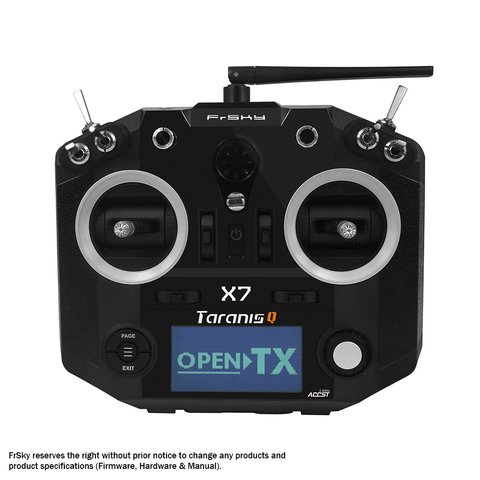
My first “real” radio after outgrowing a toy-grade transmitter was a Q X7, and honestly it spoiled me before I even understood what I was looking at. Being able to load EdgeTX and set up custom mixes, curves, and telemetry alarms without touching a soldering iron felt like a different hobby entirely compared to the closed-firmware radio I’d started with.
What Makes the Q X7 Stand Out
A handful of design choices explain why the Q X7 still shows up in “best beginner radio” lists years after release:
- Running EdgeTX/OpenTX means the radio’s entire menu system, mixing logic, and telemetry display can be customized far beyond what stock firmware on most competing radios allows.
- The hall sensor gimbals resist the wear and drift that potentiometer-based gimbals suffer from over years of use.
- ACCESS protocol support (on newer units) brings 24-channel capability and firmware-updatable receivers, so the radio doesn’t get stuck on an aging protocol as new receivers ship.
- The removable module bay accepts external RF modules, letting you add long-range systems later instead of buying a whole new transmitter.
ACCESS vs ACCST D16
This trips up a lot of first-time buyers, so it’s worth breaking down clearly:
- ACCST D16 is FrSky’s older protocol, limited to 16 channels, and was the standard on early Q X7 units.
- ACCESS is the newer protocol, supporting up to 24 channels along with firmware-updatable receivers and improved range/telemetry handling.
- Which one your Q X7 runs depends on when it was manufactured and whether it’s been flashed with updated firmware — check the internal RF module and receiver compatibility list before assuming either way.
For most sport flying and simple multirotor builds, either protocol is more than adequate. Where it matters more is if you’re planning to expand into a large channel count setup down the road, in which case ACCESS gives more headroom.
“The Q X7 was my first EdgeTX radio and it’s still the one I recommend to every new pilot who asks — cheap enough to not panic over a crash, capable enough to grow into.” — Tom Reyes, FPV racing league organizer
Who Should Buy the Q X7
- New FPV or fixed-wing pilots who want an upgrade path without committing to a premium transmitter right away.
- Anyone who wants to learn EdgeTX/OpenTX mixing and telemetry setup on hardware that’s cheap enough to not stress over.
- Pilots planning to add a long-range RF module later, thanks to the removable module bay.
- Hobbyists who prioritize gimbal durability over premium ergonomic extras like haptic feedback.
If you want haptic feedback, a color screen, or more premium ergonomics out of the box, FrSky’s X9D Plus sits a tier above and is worth the price difference for pilots who fly often enough to justify it.
Setting Up a New Q X7
A few steps make the first setup smoother, whether you’re on stock firmware or flashing EdgeTX:
- Update to the latest stable EdgeTX release before doing anything else — early firmware quirks have mostly been ironed out in later versions.
- Create a new model profile for each aircraft rather than editing a shared one, so mixes and trims don’t cross-contaminate between builds.
- Calibrate the gimbals and switches through the hardware calibration menu, even on a brand-new unit, since factory calibration can drift slightly in shipping.
- If you’re running ACCESS, register your receivers through the transmitter’s registration menu before binding — this step is easy to miss coming from older ACCST radios.
Once that’s done, most pilots spend some time setting up telemetry alarms for battery voltage and RSSI, which is arguably the single most useful thing EdgeTX adds over a stock closed-firmware radio.
Frequently Asked Questions
Does the Q X7 run EdgeTX out of the box?
Some units ship with OpenTX pre-installed, but flashing to EdgeTX (the actively maintained successor) is straightforward using the EdgeTX Companion software and a USB cable.
Is the Q X7 good for drone racing?
Yes, especially paired with a low-latency ACCESS receiver. Serious racers sometimes prefer the X9D Plus for its ergonomics, but the Q X7’s gimbals and response are more than capable for competitive flying.
Can I use a Q X7 with older ACCST receivers?
Yes, as long as your specific Q X7 unit or firmware supports ACCST D16 mode, which most do either natively or through a firmware toggle.
How long does the battery last?
With the stock 18650 cells, most pilots get several hours of flying per charge, though actual runtime depends on screen brightness, module usage, and how often you’re actively transmitting versus idle.
What’s the difference between the Q X7 and the Q X7S?
The Q X7S variant adds a built-in FrSky S-module bay allowing certain long-range modules to be integrated without an external bulge, along with minor ergonomic tweaks. The base functionality and gimbal quality are otherwise the same across both versions.
Conclusion
The FrSky Taranis Q X7 earns its reputation as an entry point into serious FPV and fixed-wing flying by pairing durable hall sensor gimbals with full EdgeTX/OpenTX customization at a price that doesn’t punish you for crashing. Whether you go with ACCST or ACCESS firmware, it’s a radio that grows with your skill level instead of getting outgrown in a season.
Ryan has flashed more radios with custom firmware than he’d like to admit, and the Q X7 remains one of his go-to recommendations for anyone starting out in FPV. He writes at softwaredriverdownload.com.